Download UAT Pro V200.01 (Latest Version) Setup File – Uni-Android Tool
If you’re looking for a reliable and efficient solution to unlock, repair, or reset your Android device, UAT Pro V200.01 is the ultimate tool you need. This powerful Windows-based program is designed to help users remove FRP (Factory Reset Protection), unlock pattern passwords, and fix a wide range of Android-related issues in just a few seconds. Whether you’re a mobile repair specialist or a tech enthusiast, UAT Pro Tool offers unmatched compatibility and features to make your job easier.
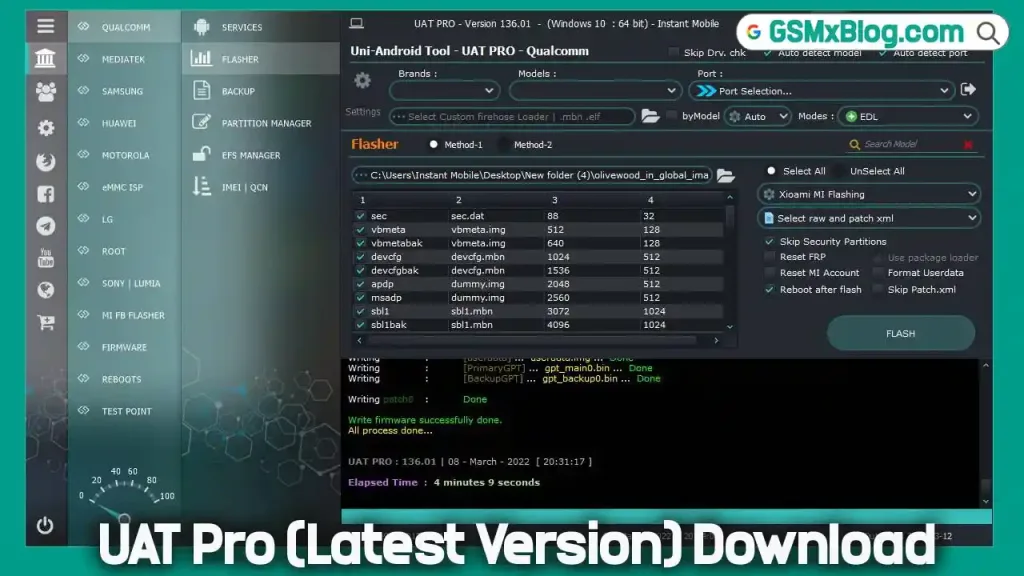
In this article, we’ll dive into everything you need to know about UAT Pro Uni Android Tool, including its latest features, how to download and use it, and why it’s the go-to solution for Android device repairs.
What is UAT Pro Uni Android Tool?
UAT Pro Uni Android Tool is a versatile and powerful software designed to address a wide range of Android-related issues. It supports devices running on MTK, Qualcomm, and SPD chipsets, making it a one-stop solution for Android repairs.
Key Features of UAT Pro V200.01
- FRP Removal: Unlock FRP-protected devices from brands like Vivo, Xiaomi, Oppo, and Samsung.
- Pattern Lock Reset: Easily remove pattern, PIN, or password locks.
- Bootloader Unlocking: Unlock bootloaders for Xiaomi, Vivo, and other devices.
- IMEI Repair: Repair or reset IMEI numbers for Xiaomi and other MTK devices.
- Factory Reset: Perform safe and secure factory resets.
- Partition Management: Backup, wipe, or write partitions effortlessly.
Download UAT Pro V200.01 (Latest Version)
- File Name: Setup_UAT_PRO_200.01.7z
- Version: V200.01
- Release Date: 13-05-2026
- File Size: 58 MB
- Platform: Windows (32-bit and 64-bit).
How to Install UAT Pro V200.01 Step-by-Step Guide
Download the Tool:
- Visit the official download link to get the latest version of UAT Pro V189.01.
Install the Tool:
- Extract the downloaded .rar file and run the .exe installer.
- Follow the on-screen instructions to complete the installation.
Activate the Tool:
- Launch UAT Pro and click on Register or Login.
- Purchase an activation plan (1 Year, 2 Year, 3 Months, or 6 Months).
- Enter your registered email ID and password to log in.
Start Using UAT Pro:
- Once activated, you can use the tool to unlock, repair, or reset your Android device.
How to Use UAT Pro Uni Android Tool
Step-by-Step Instructions
- Connect Your Device: Use a USB cable to connect your Android device to your computer.
- Select the Desired Service: Choose from a wide range of services, including FRP removal, pattern lock reset, bootloader unlocking, and more.
- Follow On-Screen Instructions: The tool will guide you through the process step-by-step.
- Complete the Process: Once the process is complete, your device will be unlocked or repaired.
Services Offered by UAT Pro
UAT Pro offers a comprehensive range of services to address all your Android repair needs:
- FRP Removal: Remove FRP locks from Vivo, Xiaomi, Oppo, Samsung, and more.
- Pattern Lock Reset: Unlock pattern, PIN, or password locks.
- Bootloader Unlocking: Unlock bootloaders for Xiaomi, Vivo, and other devices.
- IMEI Repair: Repair or reset IMEI numbers for Xiaomi and other MTK devices.
- Factory Reset: Perform safe and secure factory resets.
- Partition Management: Backup, wipe, or write partitions with ease.
✅ UAT PRO V200.01 What’s New – Changelog
UAT PRO V200.01 – Samsung Qualcomm / Xiaomi Bootloader Unlock
Release Date: 13-05-2026
Version: UAT PRO v200.01
➡️ XIAOMI
✅ Added New Xiaomi Models
Supported Functions
- Reset FRP
- Factory Reset
- Flashing
- Partition Manager
Supported Devices
- Xiaomi 15 (dada)
- Xiaomi 15 Pro (haotian)
- Xiaomi 15 Ultra (xuanyuan)
- Redmi K80 Pro (miro)
- POCO F7 Ultra (miro)
- Redmi K90 (annibale)
- POCO F8 Pro (annibale)
- Xiaomi Pad 8 Pro (piano)
- MIX Flip (ruyi)
- POCO F8 Ultra (myron)
- Redmi K90 Pro Max (myron)
- Xiaomi Mix Flip 2 (bixi)
🔓 Added Xiaomi Bootloader Unlock (ADB Method)
⚠️ Bootloader Unlock does NOT work on devices running February 2026 security patch or later.
Supported Devices
- Mix Flip (ruyi)
- Mix Fold 2 (zizhan)
- Mix Fold 3 (babylon)
- Mix Fold 4 (goku)
- POCO F6 Pro (vermeer)
- POCO F7 Pro (zorn)
- POCO F7 Ultra (miro)
- POCO F8 Pro (annibale)
- Poco F8 Ultra (myron)
- POCO M6 Plus 5G (breeze)
- POCO M6 Pro 5G (sky)
- POCO M7 4G (creek)
- POCO M7 5G (flame)
- Redmi 14C 5G (flame)
- Redmi 14R 5G (flame)
- Redmi K60 Pro (socrates)
- Redmi K70 (vermeer)
- Redmi K80 (zorn)
- Redmi K80 Pro (miro)
- Redmi K90 (annibale)
- Redmi K90 Pro Max (myron)
- Redmi Note 12 5G (sky)
- Redmi Note 12R 5G (sky)
- Redmi Note 13 5G (breeze)
- Redmi Note 13 NFC (sapphiren)
- Redmi Note 13R 5G (breeze)
- Redmi Note 14 Pro Plus (amethyst)
- Xiaomi 13 (fuxi)
- Xiaomi 13 Pro (nuwa)
- Xiaomi 13 Ultra (ishtar)
- Xiaomi 14 (houji)
- Xiaomi 14 Pro (shennong)
- Xiaomi 14 Ultra (aurora)
- Xiaomi 15 (dada)
- Xiaomi 15 Pro (haotian)
- Xiaomi 15 Ultra (xuanyuan)
- Xiaomi 17 (pudding)
- Xiaomi 17 Pro (pandora)
- Xiaomi 17 Pro Max (popsicle)
- Xiaomi 17 Ultra (nezha)
- Xiaomi CIVI 4 (chenfeng)
- Xiaomi Pad 6S Pro (sheng)
- Xiaomi Redmi 15 4G (creek)
⚙️ Added HyperOS Support
- Enable Diag for:
- Xiaomi HyperOS 2
- Xiaomi HyperOS 3
➡️ SAMSUNG
✅ Added New BIT Support
Supported Functions
- Reset FRP
- Factory Reset
Supported Models
- SM-A057F BIT C (Galaxy A05s)
- SM-A235F BIT E (Galaxy A23)
- SM-A235M BIT E (Galaxy A23)
- SM-A235N BIT B (Galaxy A23)
- SM-G996U BIT J (Galaxy S21 Plus 5G)
- SM-G998U BIT J (Galaxy S21 Ultra 5G)
- SM-S921U BIT 5 (Galaxy S24)
- SM-S926U BIT 5 (Galaxy S24 Plus)
- SM-X216B BIT B (Galaxy Tab A9 Plus)
Conclusion
UAT Pro V200.01 is the ultimate solution for unlocking, repairing, and resetting Android devices. With its wide range of features, frequent updates, and user-friendly interface, it’s the go-to tool for mobile repair specialists and tech enthusiasts alike.
Don’t let a locked or malfunctioning Android device slow you down. Download UAT Pro V200.01 today and experience the power of the Uni-Android Tool for yourself!