Download Android Utility Tool v200 (Latest Version) – Free
Are you looking for a reliable tool to flash firmware, bypass FRP locks, or repair your Android device? The Android Utility Tool v200.01.0001 is here to help! This powerful application is a must-have for anyone working with Android devices, supporting chipsets like MediaTek, Qualcomm, UniSoC/SPD, and Kirin. Whether you’re a tech enthusiast or a professional, this tool simplifies complex tasks such as factory resets, boot repairs, and MI account resets. In this guide, we’ll show you how to download and use the latest version of the Android Utility Tool for free.
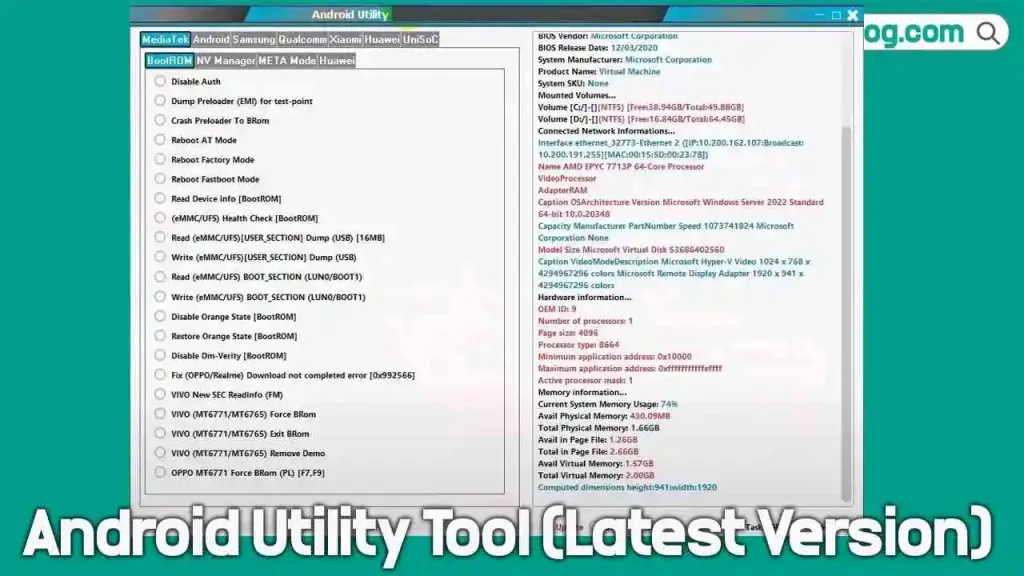
What is the Android Utility Tool?
The Android Utility Tool is a versatile application designed for GSM professionals and Android users. It supports a wide range of devices and chipsets, making it ideal for tasks like:
- Flashing stock firmware
- Removing FRP (Factory Reset Protection) locks
- Performing factory resets
- Repairing boot issues
- Resetting MI accounts on Xiaomi devices
Key Features of Android Utility Tool v200.01.0001
Here are some of the standout features of the latest version:
- Multi-Mode Support: Works in ADB, fastboot, recovery, and EDL modes.
- FRP Bypass: Easily remove Google FRP locks.
- Firmware Flashing: Flash stock firmware on supported devices.
- Device Information: Read device details in ADB and fastboot modes.
- Xiaomi Diag Mode: Enable diagnostic mode for Xiaomi devices.
- NVRAM/NVDATA Wipe: Clear NVRAM and NVDATA in fastboot mode.
- Payjoy App Disable: Disable the Payjoy app on supported devices.
- Partition Flashing: Flash specific partitions on your device.
- Active Slot Selection: Choose the active slot for dual-partition devices.
How to Download Android Utility Tool v200.01.0001
Downloading the Android Utility Tool is quick and easy. Click on one of the download links below:
- File Name: AndroidUtility_v200.01.0001 Offline.zip
- Version: v200.01.0001 (Latest) 01:01:2026
- File Size: 322 MB
- Platform: Windows (32-bit or 64-bit)
- Password: mfdl
How to Use the Android Utility Tool
Follow these step-by-step instructions to use the tool effectively:
- Install the Tool: Extract the ZIP file and install the Android Utility Tool on your Windows PC.
- Install USB Drivers: Download and install the required USB drivers for your device.
- Flashing Firmware (Samsung): Open the tool, go to the Samsung Flasher tab, select the firmware file, connect your device in Download Mode, and click Flash.
- Resetting FRP Lock (Samsung): Open the tool, go to the Samsung Main tab, connect your device in MTP Mode, and click Samsung Enable ADB New Sec (MTP).
- Factory Reset (UniSoC Devices): Open the tool, go to the UniSoC tab, connect your device in Flash Mode, and click Wipe Data (Diag).
📢 Full Changelog: Android Utility Tool V200.01.0001 (01-01-2026)
- 🚀 Android Utility PRO – Offline Release
- New fully offline build released
- No internet connection or online verification required
- Mandatory lifetime updates are no longer required
- No additional features introduced in this version
- 🔓 Protection Notice
- This version does not include a protection system
- Simple date check can be removed by disassembly
- Original update mechanism was intended for user protection, not restriction
- 🛠️ Previously Resolved Issues
- Samsung Force Brom issue permanently closed
- Tablet format abuse and SPD Brom Force misuse corrected
- Multiple risky and outdated functions removed or fixed since 2021
- 📅 Developer Message
- This is not a final release
- Users are advised to follow monthly updates via the official website
- Always use the latest available version for better safety and stability
- 📌 Important Notice
- Developed strictly for educational and legal servicing purposes
- Software is provided “as-is”, without express or implied warranties
- Usage is entirely at the user’s own risk
- Developers are not responsible for any damage caused by misuse
- Illegal or unauthorized use is strictly prohibited
Important Tips
- Backup Your Data: Always back up your data before performing any operations, as they may result in data loss.
- Battery Level: Ensure your device has at least 50% battery to avoid interruptions.
- Use at Your Own Risk: Improper usage may lead to device bricking. Follow instructions carefully.
Conclusion
The Android Utility Tool v200.01.0001 is an indispensable tool for anyone working with Android devices. From flashing firmware to bypassing FRP locks, it simplifies complex tasks with ease. Download the latest version today and unlock the full potential of your Android device.