Global Unlocker Pro v5.1.8.84 Download – Samsung, LG, Nokia & Motorola Unlock Tool
If you need a GSM tool that handles unlocking, FRP bypass, and IMEI repair across several major Android brands without buying a box or dongle, Global Unlocker Pro runs entirely through credits on independent servers. It supports Samsung, LG, Alcatel, Nokia, Motorola, Coolpad, and Google phones, with no license required to get started.
This guide covers the full feature breakdown, supported brands, and how the credit system works for Global Unlocker Pro.
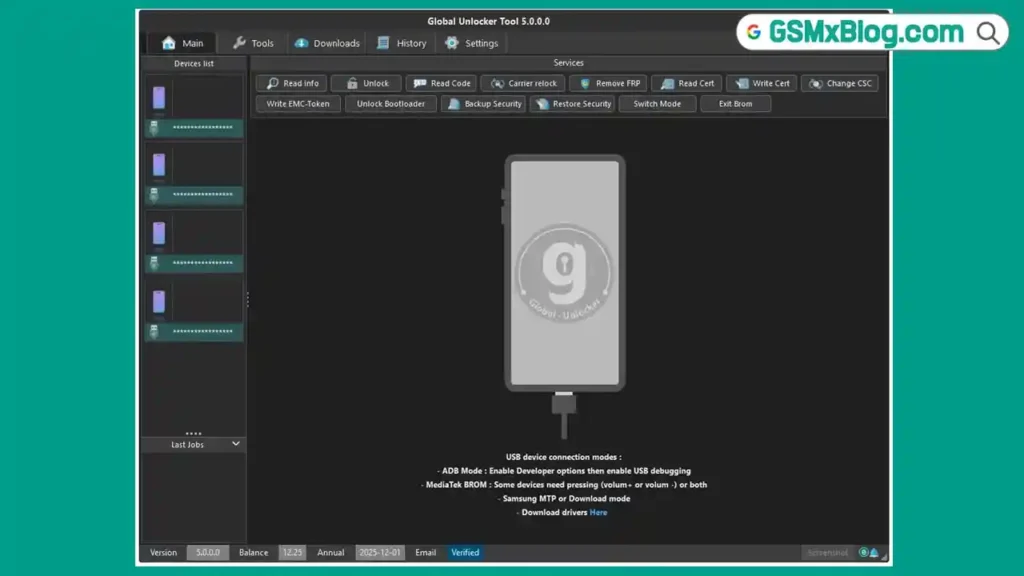
What Is Global Unlocker Pro?
Global Unlocker Pro is a server-based unlock and repair tool built for technicians who service Samsung, LG, Alcatel, Nokia, Motorola, Coolpad, and Google devices. Instead of requiring a hardware box or dongle, the tool runs through credits purchased from an authorized reseller, with a minimum charge of just 5 credits to start. The platform reports independent servers running 24/7, with over 20,000 customers using the service worldwide.
Key Features of Global Unlocker Pro
🔓 Core Unlock Functions
- Network unlock for Samsung, LG, Alcatel, Motorola, Nokia, Coolpad, and Google devices
- FRP Bypass
- E-Token Bypass
- Carrier Change
- IMEI Repair
📦 Bulk Mode
An exclusive feature for handling multiple unlocks at once, designed to make wholesale and high-volume unlock work faster and easier for resellers and shops.
💳 Minimum Charge & No License
Just 5 credits is enough to charge your account and start using the service. There’s no need to purchase or activate any separate license.
🔄 Free Updates
A dedicated development team works continuously to add new solutions and exclusive model support to the platform.
🌐 Without Box or Dongle
The tool works without a physical box or dongle. You simply download the software and start using it directly once your account has credits.
🛟 24/7 Dedicated Support
Support is available around the clock through live chat on the website and through the official Telegram group, in addition to a dedicated support forum.
Supported Brands
Global Unlocker Pro supports unlocking, FRP bypass, and repair functions across:
- Samsung
- LG
- Alcatel
- Motorola
- Nokia
- Coolpad
A full, searchable model list is available on the official Supported Models page, along with a quick model checker tool to confirm support for a specific device.
How to Get Started with Global Unlocker Pro
- Go to the official Register page and fill out the registration form. An activation email will be sent to your inbox.
- Visit the Reseller page and find a reseller near you, or one that suits your needs, to charge your account with credits.
- A minimum of 5 credits is required to begin using the service — no license purchase needed.
- Download the tool from the official Download page once your account is set up.
- Log in through the User Panel and start unlocking, bypassing FRP, or repairing IMEI on supported devices.
I don’t have file size, version number, or a direct download link for Global Unlocker Pro — the homepage only links to a Download page (https://global-unlocker-pro.com/Download) without listing those details on the page I fetched. Let me check that page directly.Found it. Here’s the updated download section to add to the article:
Download Global Unlocker Pro
- File Name: Global_Unlocker_5.1.8.84.zip
- Version: 5.1.8.82
- File Size: 14 MB
- Compatibility: Windows 7 / 8 / 10 / 11 (32-bit and 64-bit)
🔌 Recommended USB Drivers
How to Use Global Unlocker Pro
▶️ Unlocking a Device
- Connect the supported phone to your PC.
- Use the Fast Checker on the site, or the in-tool model list, to confirm your exact device model is supported.
- Select the unlock, FRP bypass, or IMEI repair function needed.
- Start the operation — credits are deducted from your account balance automatically.
▶️ Using Bulk Mode
- Open the Bulk Mode section for handling multiple devices at once.
- Load the batch of devices or model details as required.
- Run the bulk operation and monitor the results as each unit completes.
Important Notes
💳 Credit System: No license is required — just a minimum of 5 credits to start using the tool. 🌍 Resellers: Credits are purchased through authorized resellers found on the official Reseller page, not directly on the main site. 🔌 No Box Needed: The tool works without any physical box or dongle — just download and use it once your account has credits. 📌 Credit: Global Unlocker Pro is developed and maintained by the Global Unlocker Team.
Frequently Asked Questions (FAQs)
❓ Is Global Unlocker Pro free to use? Registration is free, but using the unlock and repair functions requires credits, with a minimum of 5 credits to get started.
❓ Do I need a license or dongle? No, Global Unlocker Pro doesn’t require a license, box, or dongle — it runs entirely through your credit balance.
❓ Which brands does Global Unlocker Pro support? It supports Samsung, LG, Alcatel, Motorola, Nokia, Coolpad, and Google devices.
❓ How do I add credits to my account? Credits are purchased through an authorized reseller, which can be found on the official Reseller page.
❓ What is Bulk Mode used for? Bulk Mode lets you process multiple device unlocks at once, which is useful for wholesalers and high-volume repair shops.
Related Posts
- QuickADB Tool – Free ADB and Fastboot Tool
- DTPro Qualcomm Module – Xiaomi EDL Repair Tool
- Download Sigma Plus (Latest Version)
Conclusion
Global Unlocker Pro gives mobile technicians a straightforward way to unlock, bypass FRP, and repair IMEI on Samsung, LG, Nokia, Motorola, and other supported brands, all without needing a license, box, or dongle. With a low 5-credit minimum and round-the-clock support, it’s built to be accessible for both individual technicians and high-volume resellers using Bulk Mode. If you regularly handle unlocks across multiple brands, register with Global Unlocker Pro and check your device against the supported models list.