UT Tool Pro V2.0 (Latest Version) Free – Multi-Brand FRP & Repair Tool
Looking for an Android repair tool that covers FRP removal, screen lock bypass, factory reset, and firmware flashing across a huge range of phone brands? UT Tool Pro V2.0 is a Windows-based GSM tool that organizes its functions by brand and model, so you only see the options that actually apply to the device you’re working on.
This guide covers the full feature list, supported brands, installation steps, and download links for UT Tool Pro V2.0.
What Is UT Tool Pro V2.0?
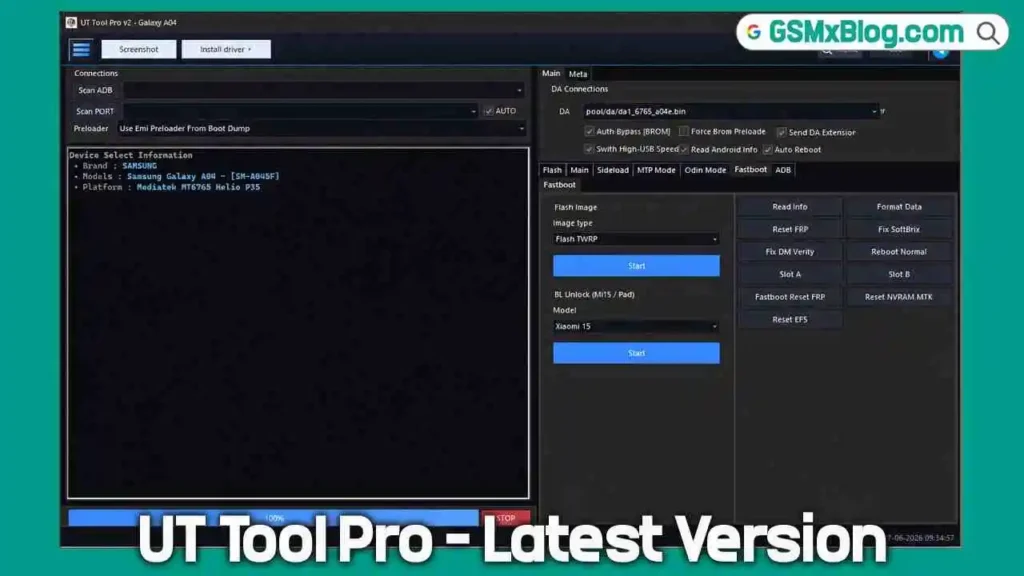
UT Tool Pro V2.0 is a multi-brand mobile repair tool built for technicians who service a wide variety of Android devices. Instead of showing every function at once, the tool asks you to pick a brand first, then the exact phone model, and only then loads the functions available for that device. This keeps the interface clean and reduces the chance of running the wrong operation on the wrong model.
The tool comes with a 10-day free login, giving users enough time to test the FRP bypass, screen lock removal, and flashing functions before deciding whether to continue. It also includes several theme options beyond the usual dark mode, which is a nice touch for technicians who spend long hours looking at the screen.
Key Features of UT Tool Pro V2.0
📱 ADB Functions
- Read Device Information
- Device Detection
- Reboot Device / Recovery / Fastboot
- Screenshot Capture
- Install / Uninstall APK
- Open Browser / Dialer
- Enable / Disable ADB Mode
⚡ Fastboot Functions
- Read Device Information
- Reboot Device / Recovery / Fastboot
- Bootloader Operations
- Fastboot Detection
- Unlock / Lock Support
🔓 FRP Functions
- Remove FRP Lock / Reset FRP
- FRP Bypass Support
- Google Account Lock Removal
- Samsung, Huawei, Qualcomm, and MediaTek FRP Support
🔄 Factory Reset Functions
- Factory Reset / Master Reset
- Safe Format Data
- Wipe Cache
- Erase User Data
- Reset Device Settings
🔒 Screen Lock Functions
- Remove Pattern, PIN, and Password Lock
- Remove Screen Lock
- Remove Privacy Password
- Lock Reset Support
🛠️ MediaTek & Qualcomm Functions
- Read / Write Firmware and Partitions
- Backup / Restore Firmware
- Format Device + Factory Reset
- Preloader Mode & Meta Mode Support (MediaTek)
- EDL Mode Support & Flash Operations (Qualcomm)
- Security Operations
📲 Samsung & Huawei Functions
- FRP Reset and Factory Reset
- Download Mode Support (Samsung)
- Fastboot Support (Huawei)
- ADB Operations and Device Information
- Security Operations
💾 Firmware & Utility Functions
- Flash, Read, Backup, and Restore Firmware
- Partition Backup and Restore
- Scatter File and XML Firmware Support
- Driver Installation
- USB Port Detection and Auto Device Recognition
- Log Viewer and Operation History
Supported Brands and Models
UT Tool Pro V2.0 covers an extensive device list across major Android brands, including:
- Asus – Zenfone, ROG Phone, and Max series
- Cubot – KingKong, Note, and X series
- Hisense – Infinity, F, H, and U series
- Huawei – P, Mate, Nova, Enjoy, Y series, and Honor sub-brand models (6A to X50i)
- Infinix – Hot, Note, Smart, Zero, and GT series
- OnePlus – Numbered series, Nord, and Ace models
- Oppo / Realme – Multiple CPH and RMX model codes
- Samsung – Galaxy A, J, M, S, Note, Z Fold/Flip, and Tab series, covering dozens of region-specific model codes
- Tecno – Camon, Spark, Pova, Pouvoir, and Phantom series
- Xiaomi / Redmi / Poco / Black Shark – Mi, Redmi, Poco, Civi, and Black Shark series across multiple generations
- ZTE – Blade and Axon series
This wide brand coverage is one of the main reasons mobile technicians choose this flash tool, since it reduces the need to switch between separate software for different brands during daily repair work.
Download UT Tool Pro V2.0
- File Name: UT_Tool_Pro_v2_Setup.7z
- Version: V2.0
- File Size: 115 MB
- Platform: Windows PC
- License: Free (Credits Required)
How to Install UT Tool Pro V2.0
- Download the UT_Tool_Pro_v2_Setup.7z file from any link above.
- Extract the archive and run the setup file as administrator.
- Accept the license agreement and continue through the installation screens.
- Select the installation folder, or keep the default location if unsure.
- Allow the installer to add the required drivers and create a desktop shortcut.
- If the setup asks to close ADB or other running processes, let it close them automatically.
- Once installation finishes, open the tool and sign in using your login details.
How to Use UT Tool Pro V2.0
▶️ Selecting Your Device
- After logging in, choose the brand from the list.
- Select the exact model for your device.
- The supported functions for that specific model load automatically on the right side of the screen.
▶️ FRP Remove / Screen Lock Bypass
- With the correct model selected, open the FRP or Screen Lock category.
- Choose the function you need, such as Remove FRP Lock or Remove Pattern Lock.
- Connect the device using the correct mode (ADB, Fastboot, EDL, or Preloader, depending on the chipset).
- Start the operation and wait for it to complete.
▶️ Firmware Flashing
- Open the Firmware or chipset-specific tab (MediaTek or Qualcomm).
- Load the firmware, scatter file, or XML as required by the platform.
- Select the correct partitions for your operation.
- Start the flash and monitor progress through the Log Viewer.
System Requirements
| Component | Requirement |
|---|---|
| OS | Windows PC |
| USB Port | USB 2.0 or 3.0 |
| Drivers | Platform-specific drivers (added automatically during setup) |
| Internet | Required for login and activation |
⚠️ Warning
Always confirm the exact brand and model before running any FRP remove, screen lock, or flashing function, since the tool only loads functions matched to your selection. Use a dedicated testing PC rather than your main machine when working with service tools and various drivers. Test on a non-critical device first.
Important Notes
📌 Credit: Full credit goes to the UT Tool Pro Team for developing this software. 💳 License: Account login is required, and most operations work on a credit-based system after the 10-day free trial period. 🔌 USB Driver: Make sure the correct platform driver is installed before connecting any device for servicing.
Frequently Asked Questions (FAQs)
❓ Is UT Tool Pro V2.0 free to use? It offers a 10-day free login, after which most device operations run on a credit-based system.
❓ Which brands does UT Tool Pro V2.0 support? It supports a wide range of brands including Asus, Cubot, Hisense, Huawei, Infinix, OnePlus, Oppo, Realme, Samsung, Tecno, Xiaomi, and ZTE.
❓ How does the tool organize its functions? You first pick the brand, then the exact model, and the tool automatically loads only the functions available for that device.
❓ Does the setup install drivers automatically? Yes, the installer adds the required drivers during the installation process.
❓ Is the loader safe to install? During testing, no security warnings appeared during installation on Windows 11, though it’s still recommended to use a dedicated repair PC for service tools.
Conclusion
UT Tool Pro V2.0 stands out as a practical Android repair and flash tool thanks to its brand-and-model selection system, which keeps FRP bypass, screen lock removal, and firmware flashing functions organized and easy to find. With support for a long list of brands and a 10-day free trial, it gives mobile technicians a real chance to test the tool before committing to the credit system. If you handle repairs across multiple device brands, download UT Tool Pro V2.0 and see how it fits into your workflow.