360OS MDT ASE Tool V1.1.0 Download Free – CPB Firmware Flash Tool
If you work on a production line that handles 360OS devices, 360OS MDT ASE Tool is a Windows-based flash tool built by the MDT Team specifically for flashing .cpb firmware packages. It supports Spreadtrum, MTK, and Qualcomm platforms, which makes it a practical GSM tool for technicians and engineers who need one application instead of separate software for each chipset.
This guide covers the full feature list, file details, and download links for the 360OS MDT ASE Tool.
What Is 360OS MDT ASE Tool?
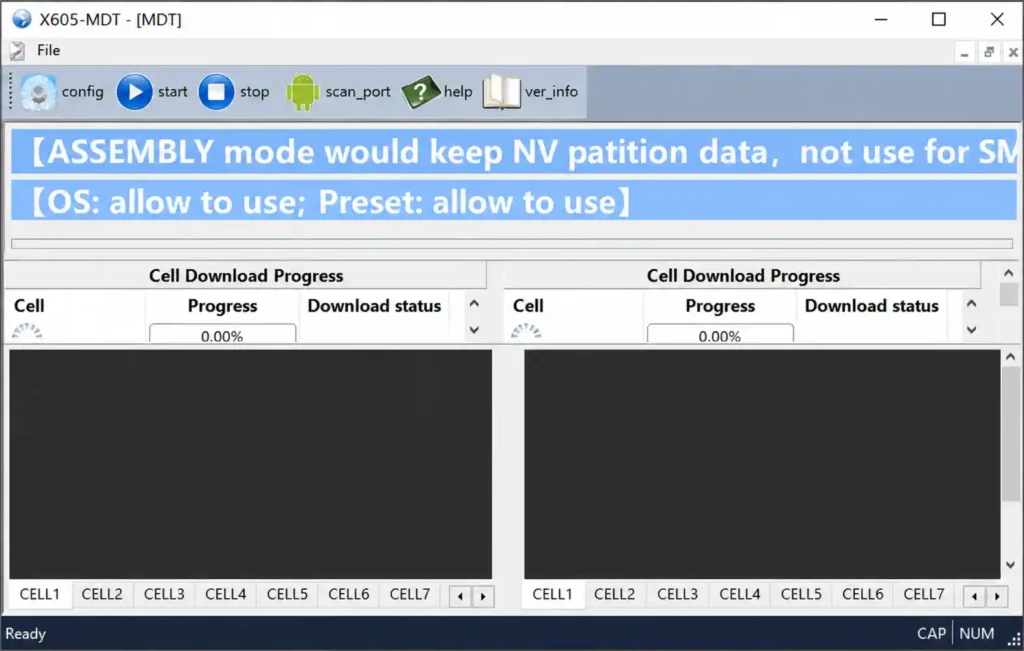
360OS MDT ASE Tool is a firmware flashing utility designed for SMT and Assembly production lines working with 360OS devices. It handles .cpb firmware packages across three major mobile platforms and offers two dedicated operating modes depending on the production stage, making it suitable for both blank board flashing and firmware upgrades on the assembly line.
Key Features of 360OS MDT ASE Tool
🔧 Multi-Platform Support
MDT Tool currently supports Spreadtrum, MTK, and Qualcomm platforms for firmware flashing. Technicians can flash .cpb packages across these chipsets without switching between separate flash tools for each platform.
⚙️ Dual Mode Operation
The tool provides dedicated SMT and Assembly versions. SMT mode handles blank board flashing with full data erase, while Assembly mode supports firmware upgrades while preserving calibration and NV data for production efficiency.
🔄 Multi-Threaded Flashing
MDT supports up to 16 simultaneous download threads, with each thread showing real-time progress in the message area. This allows high-volume production stations to flash multiple devices at once and track status easily.
📦 CPB Package Handling
The tool automatically unpacks .cpb firmware files on login. It validates each package, handles preset files, and confirms all required components are ready before starting the download process.
📋 Comprehensive Logging System
It generates detailed logs covering unpack, share, download, Spreadtrum platform, and dump activity. Users can turn logging on or off and set custom save paths for troubleshooting and record-keeping.
🔌 Port Scanning and Configuration
A built-in scan port function detects download ports after the correct device-specific trigger action. Advanced configuration options are available for custom setups, while default settings keep flashing safe and stable.
Download 360OS MDT ASE Tool
- File Name: 360OS_MDT_ASE_v1.1.0.zip
- Version: 1.1.0
- File Size: 63 MB
- File Type: ZIP Archive
- Platform: Windows PC (32-bit / 64-bit)
How to Install 360OS MDT ASE Tool
- Download the 360OS_MDT_ASE_v1.1.0.zip file from any link above.
- Extract the ZIP file to a folder on your PC.
- Install the correct platform-specific USB driver (Qualcomm, Spreadtrum, or MTK) before connecting any device.
- Restart your PC after installing the driver.
- Open Device Manager and verify the download ports are showing correctly.
- Run the MDT Tool application from the extracted folder.
How to Use 360OS MDT ASE Tool
▶️ Loading CPB Firmware
- Launch the tool and let it automatically unpack the .cpb firmware package on login.
- Wait while the tool validates the package and prepares preset files.
- Confirm the firmware loaded correctly before starting any download.
▶️ Flashing Devices (SMT / Assembly Mode)
- Choose the correct mode — SMT for blank board flashing with data erase, or Assembly for firmware upgrades that keep calibration and NV data.
- Use the scan port function to detect download ports after triggering the device into download mode using the correct volume key or power button combination for your platform.
- Start the flashing process and monitor each thread’s progress in the message area.
- Repeat across multiple devices using the multi-threaded flashing support for faster throughput.
EFuse Handling on SMT Stations
SMT stations perform EFuse operations based on the CPB header. Only signed 360OS packages are allowed on EFuse-enabled devices, since this prevents boot issues during production flashing.
System Requirements
| Component | Requirement |
|---|---|
| OS | Windows PC (32-bit or 64-bit) |
| USB Drivers | Qualcomm, Spreadtrum, or MTK driver (platform-specific) |
| USB Port | USB 2.0 or 3.0 |
| Restart | Required after driver installation |
⚠️ Warning
Always confirm the correct platform driver is installed and the download port is verified in Device Manager before starting any flash. Only use signed 360OS packages on EFuse-enabled devices, since an unsigned or mismatched package can cause boot problems. Trigger actions differ slightly between SMT, Assembly, and platforms, so confirm the correct sequence for your setup before flashing.
Important Notes
📌 Credit: 360OS MDT ASE Tool is developed and maintained by the MDT Team at Qiku Internet Network Scientific (Shenzhen) Co., Ltd for 360OS production use. 🔌 USB Driver: Install the platform-specific driver (Qualcomm, Spreadtrum, or MTK) that matches your target device before flashing. 📖 Flashing Guide: For step-by-step CPB flashing instructions, refer to a detailed how-to-flash guide for this tool.
Frequently Asked Questions (FAQs)
❓ Is 360OS MDT ASE Tool free to download? Yes, the tool is available as a free download for Windows PC.
❓ Which platforms does this tool support? It supports Spreadtrum, MTK, and Qualcomm platforms for flashing .cpb firmware packages.
❓ What is the difference between SMT and Assembly mode? SMT mode is used for blank board flashing with a full data erase, while Assembly mode is used for firmware upgrades that preserve calibration and NV data.
❓ How many devices can this tool flash at once? It supports up to 16 simultaneous download threads, so multiple devices can be flashed at the same time with real-time progress shown for each.
❓ Do I need a specific USB driver before using this tool? Yes, install the USB driver that matches your platform (Qualcomm, Spreadtrum, or MTK) and restart your PC before connecting any device.
Conclusion
360OS MDT ASE Tool V1.1.0 is a reliable Android repair and flashing solution for production lines working with 360OS devices across Spreadtrum, MTK, and Qualcomm platforms. Its multi-threaded flashing, automatic CPB handling, and detailed logging make it a strong flash tool for SMT and Assembly stations alike. If your production setup involves 360OS firmware, download 360OS MDT ASE Tool V1.1.0 and add it to your flashing workflow.