Download BeTools Flash Tool v7.22.16.353 (Latest Version) Free 2026
Looking for a lightweight and beginner-friendly flashing tool for MediaTek and Spreadtrum devices in 2026? The BeTools Flash Tool v7.22.16.353 is a Windows-based utility developed by Betrone Communication Co. that lets technicians and enthusiasts flash stock firmware, repair IMEI numbers, install custom ROMs, unlock pattern/pin/password locks, and more — all through a clean, easy-to-navigate interface.
What makes this tool stand out is its broad chipset compatibility — covering both MediaTek (MTK) and Spreadtrum (SPD) platforms — combined with a simple step-by-step workflow that even beginners can follow. In this guide you’ll find the complete feature list, supported chipsets, how-to-use instructions, download links, and all old versions.
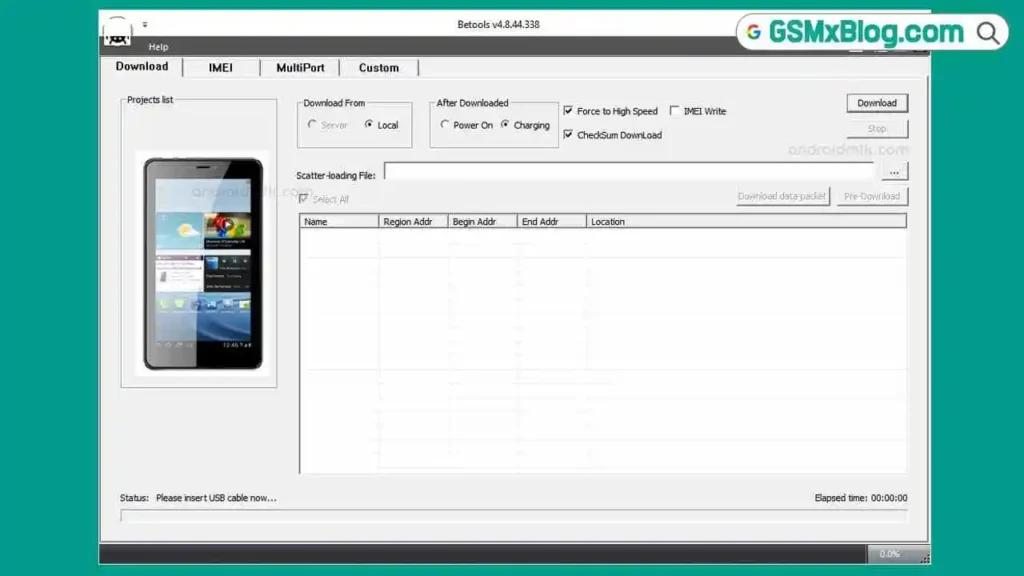
What Is BeTools Flash Tool?
BeTools Flash Tool is a dedicated firmware flashing utility designed for Android devices powered by MediaTek (MTK) and Spreadtrum (SPD/UNISOC) chipsets. Developed by Betrone Communication Co., the tool is widely used by GSM repair technicians and DIY enthusiasts for flashing stock ROMs, installing custom firmware, repairing IMEI numbers, and recovering bricked devices.
Unlike heavy professional box tools, BeTools operates as a standalone Windows application — no dongle, no subscription, no server dependency. Just download, install, and flash.
Key Features of BeTools Flash Tool v7.22.16.353
⚡ Firmware Flashing
- Flash stock firmware on MediaTek (MTK) chipset devices
- Flash stock firmware on Spreadtrum (SPD/UNISOC) chipset devices
- Recover bricked or bootlooped devices by reflashing factory firmware
- Supports both feature phones and smartphones
📄 Scatter File Support
- Compatible with scatter file formats — both .sca and .txt
- Allows precise targeting of individual device partitions for selective flashing
- Prevents unnecessary overwrites by flashing only the required partitions
🔧 IMEI Repair
- Restore or fix a lost or corrupted IMEI number
- Restores network connectivity on devices where IMEI has been wiped or damaged
- Essential for devices that show “invalid IMEI” or have no network signal after repair
📦 Custom ROM Installation
- Install custom ROMs on MediaTek-based feature phones, smartphones, and tablets
- Enables deeper customization and access to unofficial firmware builds
🔓 Pattern / PIN / Password Unlock
- Remove screen lock (pattern, PIN, password) without data loss in supported cases
- Useful for recovering access to locked devices where standard methods fail
Download BeTools Flash Tool v7.22.16.353
- File Name: BeTools Flash Tool v7.22.16.353.zip
- Version: v7.22.16.353
- File Size: 64 MB
- Platform: Windows (32-bit or 64-bit)
- Developer: Betrone Communication Co.
- Price: Free
How to Use BeTools Flash Tool
▶️ Flash Firmware (Stock ROM)
- Download and install BeTools Flash Tool on your Windows PC.
- Prepare your device — ensure it has at least 30% battery charge.
- Launch BeTools Flash Tool as Administrator.
- Connect your device to the PC using a USB cable (power off the device first if required by your chipset).
- Load the scatter file — click “Scatter File” and select your firmware’s .sca or .txt scatter file.
- Select flashing options — choose which partitions to flash (or select all for a full flash).
- Select the firmware/ROM — point the tool to the firmware folder you extracted.
- Click Download (or Flash) to start the flashing process.
- Wait patiently — do not disconnect the device or close the tool during the process.
- When you see “Download OK”, the flash was successful. ✅
- Disconnect your device and power it on normally.
▶️ IMEI Repair
- Open BeTools Flash Tool and connect your device.
- Navigate to the IMEI Repair tab or option.
- Enter the correct IMEI number (found on the device box or original packaging).
- Click Write or Repair and wait for completion.
- Reboot your device — network connectivity should be restored. ✅
▶️ Remove Pattern / PIN / Password Lock
- Connect the locked device via USB.
- Select the Unlock or Format option in BeTools.
- Load the appropriate scatter file for your device.
- Choose the userdata/lock-related partitions only (to minimize data loss risk).
- Click Flash and wait for completion — device will reboot unlocked. ✅
⚠️ Always back up important data before any flashing or format operation. Flashing will erase device data in most cases.
System Requirements
| Component | Requirement |
|---|---|
| OS | Windows XP / 7 / 8 / 10 / 11 (32-bit or 64-bit) |
| Processor | Intel / AMD Dual-Core or faster |
| RAM | 1 GB minimum (2 GB recommended) |
| Storage | 100 MB free space |
| USB Port | USB 2.0 or 3.0 |
| Internet | Not required (fully offline operation) |
⚠️ Warning
Before flashing any device, always back up all important data — flashing stock firmware will wipe user data and internal storage in most cases. Ensure your device has sufficient battery charge (minimum 30%) before starting. If your device powers off mid-flash, it may result in a hard brick that requires a test point or service center recovery. This tool should be used by experienced technicians for IMEI repair and partition-level operations — incorrect IMEI writing can cause permanent network issues.
Important Notes
🛡️ Virus Status: BeTools Flash Tool was scanned with Kaspersky Antivirus before uploading — 100% safe to use. Temporarily disable antivirus during extraction if flagged by your security software, as flash tools commonly trigger false positives.
📌 Credit: Full credit goes to Betrone Communication Co. for developing and maintaining this tool.
🔌 USB Driver: Install the correct USB driver for your chipset before connecting your device. For MediaTek devices use MTK USB Driver, and for Spreadtrum devices use SPD USB Driver. Without the correct driver, your PC may not detect the device.
⚡ Alternative Tools: If BeTools does not support your specific device, consider trying SP Flash Tool for MediaTek or SPD Upgrade Tool for Spreadtrum devices.
Why Use BeTools Flash Tool?
- ✅ Completely free — no dongle, no license, no subscription required
- ✅ Fully offline — runs without any internet connection after installation
- ✅ Supports both MTK and Spreadtrum chipsets in one tool
- ✅ Scatter file support — flash individual partitions or full firmware
- ✅ IMEI repair built-in — restore network functionality without extra software
- ✅ Custom ROM support — install third-party firmware on supported devices
- ✅ Pattern/PIN/Password unlock — recover locked devices
- ✅ Lightweight and fast — works on low-spec Windows PCs
- ✅ Beginner-friendly interface — clear steps, simple layout
Frequently Asked Questions (FAQs)
❓ Is BeTools Flash Tool completely free? Yes — BeTools Flash Tool is 100% free to download and use. There is no paid license or subscription required.
❓ Does BeTools require an internet connection? No. Once installed, BeTools Flash Tool operates fully offline. Internet is only needed to download the tool and firmware files initially.
❓ Which chipsets does BeTools Flash Tool support? BeTools Flash Tool supports MediaTek (MTK) and Spreadtrum (SPD/UNISOC) chipsets. It does not support Qualcomm or Exynos devices.
❓ What scatter file formats does it accept? BeTools supports .sca and .txt scatter file formats, which are the standard scatter formats used by MediaTek and Spreadtrum firmware packages.
❓ Will flashing erase my data? Yes — flashing stock firmware, especially with userdata partition selected, will erase all data on the device. Always back up before flashing. Selective partition flashing (e.g., boot only) may preserve data depending on which partitions are selected.
❓ What should I do if my device is not detected? Install the correct USB driver for your chipset (MTK USB Driver for MediaTek, SPD USB Driver for Spreadtrum), try a different USB port, use a shorter high-quality USB cable, and ensure the device is in the correct mode (powered off or in download mode) before connecting.
❓ Can I use BeTools Flash Tool on Windows 11? Yes — BeTools Flash Tool is compatible with Windows 11 (both 32-bit and 64-bit editions).
❓ My antivirus flagged BeTools — is it safe? Flash tools commonly trigger false positives from antivirus software due to their low-level device access. The file was scanned with Kaspersky Antivirus before uploading and is confirmed clean. Temporarily disable your antivirus during extraction if needed.
Conclusion
The BeTools Flash Tool v7.22.16.353 is a solid, lightweight, and completely free flashing solution for technicians and enthusiasts working with MediaTek and Spreadtrum-powered Android devices in 2026. Its offline operation, scatter file support, built-in IMEI repair, custom ROM support, and straightforward interface make it a genuinely useful tool for any GSM repair toolkit — especially for shops handling budget and mid-range MTK/SPD devices daily.
While it doesn’t support Qualcomm or Exynos devices, for pure MediaTek and Spreadtrum work it delivers reliable results without any licensing costs. Download BeTools Flash Tool v7.22.16.353 now using the links above and get your device up and running! 🚀
Have you used BeTools Flash Tool? Share your experience in the comments below!