iFix Apple Tool V2 Pro Free Download 2026 – Tested on iPhone 4S (iOS 9.3.6)
Tired of manually running complex command-line scripts just to bypass iCloud activation on an old iPhone 4S, iPhone 5, or iPad 2? iFix Apple Tool V2 Pro is a professional Windows desktop utility developed by Ahmed that fully automates the untethered iCloud activation bypass process for legacy iOS devices — handling USB connection, cache clearing, and activation payload injection all in one seamless sequence with zero manual scripting required.
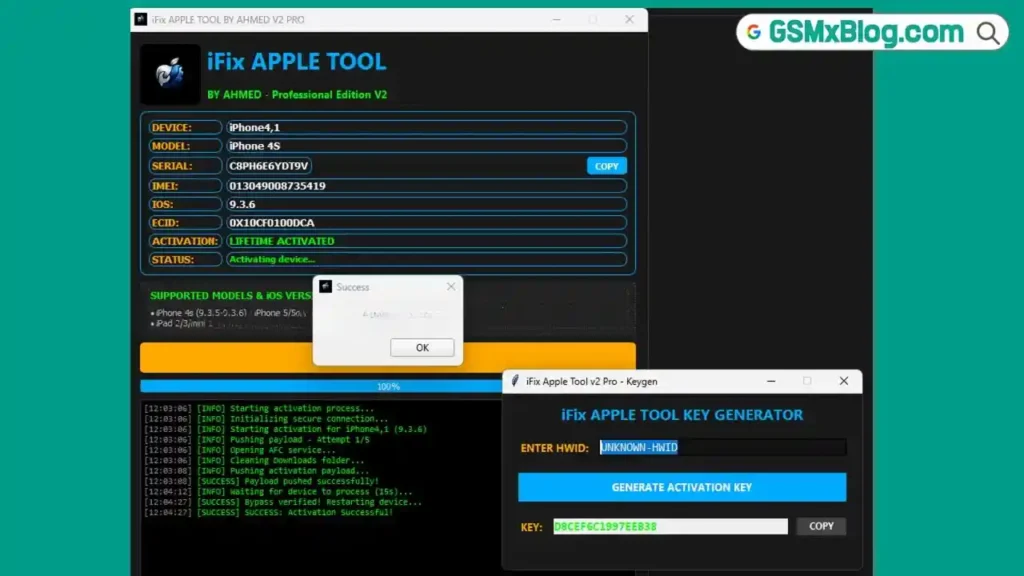
The tool features a live device information scanner that reads Device Type, Serial Number, IMEI, and ECID the moment you plug in, a built-in driver checker for Apple USB components, and a secure HWID licensing system that keeps each activation clean and authenticated. Tested and confirmed working by the GSMxblog team on an iPhone 4S running iOS 9.3.6 with a clean “Activation Successful!” result. This guide covers everything: features, supported devices and iOS versions, file info, activation steps, how-to-use, honest review, FAQs, and the direct download link.
What Is iFix Apple Tool V2 Pro?
iFix Apple Tool V2 Pro is a Windows-based professional utility developed by Ahmed specifically for performing untethered iCloud activation bypasses on legacy Apple devices. It targets older iPhones, iPads, and iPod Touch models that are stuck on the iCloud activation screen — typically after a restore or when the original Apple ID owner is unreachable.
What separates iFix Apple Tool V2 Pro from simpler tools is its fully automated payload injection engine. Instead of requiring the technician to manually run terminal commands, push files via ADB equivalents, or configure activation records by hand, the tool handles the entire sequence automatically — initializing a secure USB connection, clearing cached activation data, and injecting the correct activation payload for the specific iOS version detected.
🔑 Key advantage: iFix Apple Tool V2 Pro is one of the few legacy iCloud bypass tools that adapts its internal cache paths and payload targeting based on the exact iOS version connected — making it significantly more precise and reliable than generic one-size-fits-all bypass scripts.
Key Features
🔓 Core Bypass Engine
- Fully Automated Untethered Activation Bypass
- No Manual Script Typing Required
- Automatic Secure USB Connection Initialization
- Internal Downloads Folder Cleanup via AFC Service
- Customized Activation Payload Push & Injection
- Automatic Bypass Verification After Reboot
🖥️ Interface & Detection
- Live Device Monitor — Instantly reads Device Type, Serial Number, IMEI, and ECID on connect
- Smart Path Targeting — Adjusts internal caching paths based on exact iOS version detected
- Built-in Driver Scanner — Automatically checks for
iTunesMobileDevice.dllon the Windows system - Real-Time Progress Log with Detailed Step-by-Step Status
- Clean “Activation Successful!” Confirmation Popup
- Progress Bar from 0% to 100% during bypass sequence
🔐 Security & Licensing
- Secure HWID Protection System
- 16-Character License Key Activation
- Free Key Generation via gsmyogesh.com
- Windows PC Support
✨ Extra Features
- Portable EXE — No Complex Installation
- Beginner-Friendly One-Click Operation
- Compatible with iTunes & 3uTools Drivers
- 100% Free to Download and Use
Supported Devices & iOS Versions
iFix Apple Tool V2 Pro is specifically designed for legacy Apple devices that use older activation setups:
| Device | Supported iOS Versions |
|---|---|
| iPhone 4S | iOS 9.3.5 / iOS 9.3.6 ✅ |
| iPhone 5 | iOS 10.3.3 / iOS 10.3.4 |
| iPhone 5c | iOS 10.3.3 / iOS 10.3.4 |
| iPad 2 | iOS 8.4.1 / iOS 9.3.5 / iOS 9.3.6 |
| iPad 3 | iOS 8.4.1 / iOS 9.3.5 / iOS 9.3.6 |
| iPad mini 1 | iOS 8.4.1 / iOS 9.3.5 / iOS 9.3.6 |
| iPod Touch 5 | iOS 8.4.1 / iOS 9.3.5 |
✅ Personally tested and confirmed: iPhone 4S on iOS 9.3.6 — GSMxblog Team
⚠️ Note: This tool is designed exclusively for the legacy iOS versions listed above. It is not compatible with newer iPhones, iPads, or iOS versions beyond those specified.
Download iFix Apple Tool V2 Pro
- Tool Name: iFix Apple Tool V2 Pro
- Version: V2 Pro (Latest 2026)
- Developer: Ahmed
- Platform: Windows
- File Name: iFix_Apple_Tool_Client.exe
- File Type: Portable EXE (No Installation Required)
- License: HWID Based (Free Key Available)
- Tested By: GSMxblog Team ✅
How to Activate iFix Apple Tool V2 Pro
- Download the
iFix_Apple_Tool_Client.exefile using the link above. - Right-click the EXE and select “Run as Administrator.”
- The tool will launch and display your Hardware ID (HWID) on screen.
- Copy the HWID shown in the tool.
- Open tinyurl.com/3dstatzw in your browser.
- Paste your HWID into the keygen and generate your 16-character license key — it is free.
- Enter the generated license key into the tool and click Activate.
- The full dashboard unlocks and the tool is ready to use. ✅
✅ Tip: The HWID is tied to your specific PC hardware. If you reinstall Windows or change hardware, a new HWID will be generated — simply generate a new free key from the same website.
How to Use iFix Apple Tool V2 Pro
▶️ Full iCloud Bypass — Step by Step
Step 1: Verify Drivers Before connecting any device, make sure iTunes or 3uTools is installed on your Windows PC. The tool’s built-in driver scanner will automatically check for iTunesMobileDevice.dll — if it is not found, install iTunes first and relaunch the tool.
Step 2: Connect the Device Connect your iCloud-locked iPhone, iPad, or iPod Touch via a USB cable. The tool’s live device monitor will auto-scan and display the device details — Device Type, Serial Number, IMEI, and ECID — and show “Ready to Activate” in green text once detection is confirmed.
Step 3: Start the Bypass Click the “Start Activation” button. Do not touch the USB cable or disconnect the device during this process. Watch the progress bar and log area as the tool automatically:
- Initializes a secure USB connection
- Clears the device’s internal Downloads folder via AFC service
- Identifies the exact iOS version and adjusts cache paths accordingly
- Pushes and injects the customized activation payload
Step 4: Reboot & Confirm The tool sends a reboot command to the device automatically after injection. Once the device boots back up, the tool verifies the bypass status and displays a “Activation Successful!” popup. The device is now fully activated and ready to use. ✅
Honest Review – Tested on iPhone 4S iOS 9.3.6
The GSMxblog team connected an iCloud-locked iPhone 4S to verify if iFix Apple Tool V2 Pro delivers on its promises. Here is a fully transparent account:
✅ Real Test Results
The tool immediately detected the device upon connection, showing the correct Device Type (iPhone4,1), Serial Number, IMEI, and ECID in the live device info panel — a strong sign that driver compatibility and detection are working properly.
After clicking Start Activation, the log window showed the complete automated sequence in real time: secure USB connection initialization → AFC service cache cleanup → iOS version detection and path adjustment → activation payload push on the first attempt → bypass verification. The device rebooted automatically.
A clean “Activation Successful!” popup appeared and the iPhone 4S came up fully activated. The process was smooth, required no manual intervention, and completed faster than comparable command-line methods.
⚠️ What to Know
The tool performed flawlessly in our test, but a few practical notes for technicians:
The HWID key system requires an internet connection on first activation to generate the key from gsmyogesh.com. The tool itself operates locally after that. Ensure iTunes drivers are properly installed before launching — the built-in driver check will catch missing components but cannot install them automatically. Always use a quality USB cable for this type of operation; a faulty cable is the most common cause of mid-bypass disconnections.
Overall Rating: 9/10 — Precise, fully automated, and confirmed working. An excellent free tool for legacy Apple device repair.
Advantages & Limitations
✅ Advantages
- Fully automated — no manual command-line scripting needed
- Smart iOS-version-specific path targeting for precise payload injection
- Live device scanner reads IMEI, Serial, ECID, Device Type instantly
- Built-in driver checker prevents common
iTunesMobileDevice.dllerrors - Confirmed working on iPhone 4S iOS 9.3.6 — GSMxblog Team tested
- HWID license key is completely free via gsmyogesh.com
- Clean success confirmation popup after bypass
- Portable EXE — no complex installation required
⚠️ Limitations
- Designed exclusively for legacy devices (A5/A6 chipset, older iOS versions only)
- Not compatible with iPhone 6 or newer, or any iOS version beyond those listed
- Requires iTunes or 3uTools drivers to be pre-installed on Windows
- Internet connection needed once to generate the free HWID license key
- No signal/cellular support after bypass — WiFi and local use only
- HWID resets if PC hardware changes or Windows is reinstalled
FAQs
Q1: Is iFix Apple Tool V2 Pro completely free? Yes — the tool download and HWID license key generation are both free. The key is generated at no cost from gsmyogesh.com using your Hardware ID.
Q3: Does the iPhone work as normal after bypass? The device is fully activated and usable for apps, Wi-Fi, media, and local functions. However, cellular signal and phone calls do not work after this type of activation bypass — the device functions over WiFi only.
Q4: Why is my device showing “Not Ready” or not detected? Make sure iTunes is installed and updated on your Windows PC. The iTunesMobileDevice.dll driver must be present. Try a different USB cable and different USB port if detection fails.
Q5: Does it work on iPhone 6 or newer? No. iFix Apple Tool V2 Pro is designed specifically for the legacy A5/A6 devices listed in the supported table. It is not compatible with iPhone 6 or any newer Apple device.
Q6: What iOS versions are supported? Supported versions are: iOS 8.4.1, 9.3.5, 9.3.6 (for A5 devices) and iOS 10.3.3, 10.3.4 (for iPhone 5/5c). Other iOS versions are not guaranteed to work.
Q7: What happens if I change my PC or reinstall Windows? A new HWID will be generated. Simply visit gsmyogesh.com again and generate a fresh free key for the new HWID — no cost involved.
Q8: Is this tool safe to use? The tool was personally tested by the GSMxblog team with no issues. Run as Administrator and ensure iTunes drivers are installed before use. As with all GSM tools, use only on devices you are legally authorized to service.
Conclusion
iFix Apple Tool V2 Pro is one of the cleanest and most reliable free legacy iCloud bypass tools available in 2026. Its fully automated payload injection engine, live device scanning, iOS-version-specific path targeting, and built-in driver checking make it a significantly more professional solution than basic manual script methods — and the confirmed success on iPhone 4S iOS 9.3.6 during GSMxblog team testing backs that up with a solid 9/10 rating.
For mobile repair technicians who regularly handle iCloud-locked iPhone 4S, iPhone 5/5c, iPad 2/3, iPad mini 1, and iPod Touch 5 devices, iFix Apple Tool V2 Pro deserves a permanent place in your iCloud toolkit. Download the free EXE using the OneDrive link above, generate your free HWID key in seconds, and get clean activation results with one click. 🚀
Have you tested iFix Apple Tool V2 Pro? Share your device model, iOS version, and result in the comments below!
Related Posts
- FRPFILE A5-A6 Activator – Full iCloud Activation Without Arduino
- Download Ghost Auth Tool v3.3.0 (Latest Version) Free 2026
- Download BMT PRO Android Edition V3.8 Free 2026
- Download PulsarUnlock v1.8.1.4 (Latest Version) Free 2026
- Download RDPowerPlus Tool V19.8 (Latest Version) Free 2026