Download KGPROTOOL NEXT-GEN 2.0 (Latest Version) — MDM Unlocking Tool
If you’re a mobile technician dealing with locked Samsung, OPPO, Motorola, Xiaomi, or Infinix devices daily, you already know how frustrating MDM locks, FRP blocks, and KG restrictions can be. Whether a customer walks in with a corporate-locked device or a carrier-bound handset, having the right tool in your kit makes all the difference. That’s exactly where KGPROTOOL NEXT-GEN 2.0 steps in — a powerful, next-generation Android repair and MDM unlocking solution built for professionals who need real results fast.
KGPROTOOL NEXT-GEN 2.0 is not just another basic flash tool. It’s a multi-brand, multi-chipset platform that handles everything from Samsung KG removal and FRP bypass to Xiaomi EDL flashing and Motorola Payjoy MDM unlocking — all from one clean interface. In this complete guide, you’ll find the full feature list, changelog, download link, installation steps, and step-by-step usage instructions — everything in one place.
What Is KGPROTOOL NEXT-GEN 2.0?
KGPROTOOL NEXT-GEN 2.0 is a professional-grade Windows-based Android servicing software developed by the KGPROTOOL Team at kgprotoolnextgen.com. It helps GSM technicians remove MDM locks, bypass FRP, perform firmware flashing, repair IMEI, manage partitions, and unlock carrier restrictions across a wide range of Android smartphones.
The tool supports major brands including Samsung, Xiaomi, OPPO, Realme, OnePlus, Motorola, Infinix, Itel, Tecno, and Google Pixel. It works across multiple connection modes — ADB, MTP, Download Mode, EDL (9008), META Mode, Diagnostic Mode, and Fastboot — giving technicians maximum flexibility depending on the device condition and task at hand.
🔑 Why choose KGPROTOOL NEXT-GEN 2.0? It delivers multi-brand MDM removal, full Android 15 and 16 support, Qualcomm/MTK/Exynos/UNISOC coverage, and regular updates that keep pace with Samsung’s evolving security system — all in one subscription.
Key Features of KGPROTOOL NEXT-GEN 2.0
🔓 Samsung — Full-Spectrum Support
- KG Lock Remove — Android OS 12–16, All Patch Without Apps
- KG App Method — Broken, Error, Pre-Normal & Active KG States
- Serial Number Change — All Chipsets (Qualcomm & Exynos)
- Knox Remove, FRP Remove, Samsung Account Remove
- Factory Reset Enable / Disable
- Sprint Carrier Unlock (Credit-Based)
- MTP Mode — Enable ADB, Change Serial Number, FRP Remove (Android 16)
- Download Mode — Firmware Flash, Softbrick Repair, Factory Reset
🔓 Xiaomi — EDL, IMEI & MDM
- EDL (9008) Mode — Flash, Factory Reset, FRP Remove, Mi Account Disable/Clean
- EFS Backup & Erase, Partition Manager
- Diagnostic Mode — IMEI Repair, QCN Read/Write, Region Tasks
- CPID Module — Manual, Sideload & Fastboot Build Paths
🔓 OPPO / Realme / OnePlus
- OGUARD MDM Remove — Qualcomm, MTK & Spreadtrum, All OS, All Patches
- Network Unlock & SIM Lock Remove (MTK & Spreadtrum)
- Permanent MDM & OTA Remove
- VBMeta Patching
🔓 Motorola MDM Removal
- PinClaro / Telcel MDM Remove
- Payjoy MDM Remove
- Cricket MDM Remove
- White Screen MDM Remove
- New Security Methods via ADB
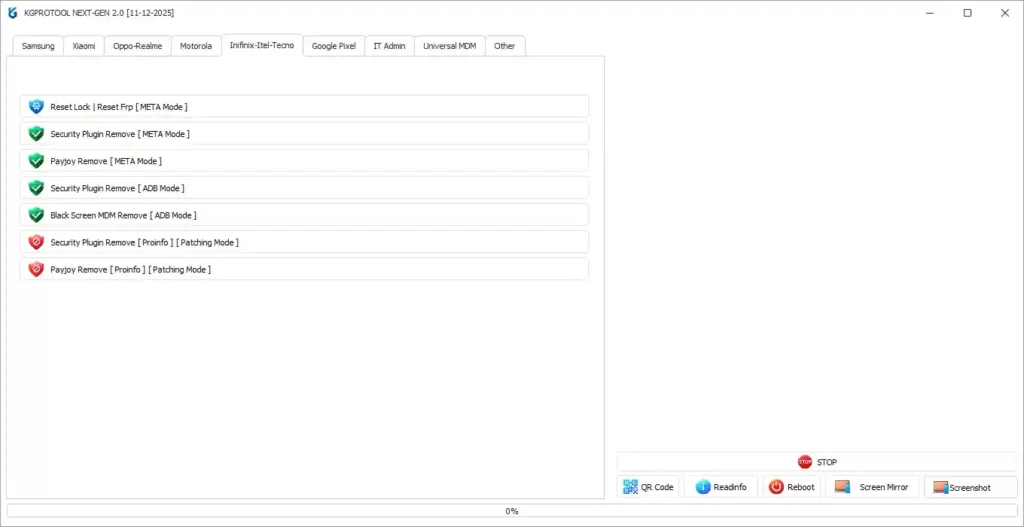
🔓 Infinix / Itel / Tecno
- Security Plugin MDM Remove — ADB & META Mode
- Payjoy MDM Remove — ADB & META Mode
- Black Screen MDM Remove
- Factory Reset with FRP via META Mode
- Patching Mode — Security Plugin & Payjoy Remove
🔓 IT Admin Remove — Multi-Method
- Works Across All Brands
- Origin Playstore Method
- Aurora Store Method
- Android OS 14 & 15 — Multiple Variants
🔓 Google Pixel
- Network Unlock — ADB Mode
- CPID Operations — ADB Mode
⚙️ Universal MDM Tools
- PinClaro (Telcel), Payjoy, Cricket & Kiosko MDM — All Brands
- NVDATA IMEI Editor
- NVRAM IMEI Editor
- Spreadtrum Region Remove
KGPROTOOL NEXT-GEN 2.0 Download Link
- File Name: KGPROTOOL NEXT-GEN 2.0 [05-02-2026].exe
- Version: Build 11-09-2025
- File Size: 60 MB
- Developer: KGPROTOOL Team
- Platform: Windows 7 / 8 / 10 / 11
- License: Paid (Subscription-Based)
How to Install KGPROTOOL NEXT-GEN 2.0
- Download the file from the official Mega.nz link above.
- Disable antivirus temporarily before extraction.
- Extract the archive using WinRAR or 7-Zip.
- Right-click the launcher and select “Run as Administrator.”
- Login with your purchased account credentials from kgprotoolnextgen.com.
- The tool loads your active subscription and unlocks all features.
✅ Tip: Always run KGPROTOOL NEXT-GEN 2.0 as Administrator and install the correct USB driver for your target device before connecting.
How to Use KGPROTOOL NEXT-GEN 2.0
▶️ Samsung KG Remove (ADB Mode)
- Open the tool and login with your credentials.
- Enable USB Debugging on the Samsung device.
- Connect via USB and navigate to Samsung → ADB Mode.
- Select the correct OS version — e.g., OS 15–16 All Patch Without Apps.
- Click Start and do not disconnect the device during the process.
- Wait for the success message and reboot the device.
▶️ Samsung FRP Remove (MTP Mode)
- Open the tool and navigate to Samsung → MTP Mode.
- Connect the device in MTP Mode.
- Select “FRP Remove” and choose the correct Android version.
- Click Start and wait for completion.
- Reboot the device — FRP is cleared.
▶️ Xiaomi EDL Operations
- Boot the Xiaomi device into EDL (9008) Mode.
- Install Qualcomm USB Driver if not already installed.
- Connect the device and navigate to Xiaomi → EDL 9008.
- Select your operation — Flash, FRP Remove, Mi Account Disable, etc.
- Load firmware file if flashing, then click Start.
▶️ MDM Remove (Universal / Motorola / Infinix)
- Enable ADB on the device or use META / Patching Mode as required.
- Connect via USB and navigate to the brand-specific MDM module.
- Select the correct MDM type — Payjoy, Cricket, IT Admin, etc.
- Choose the correct method or patch variant.
- Click Execute and wait for the result.
▶️ IT Admin Remove (All Brands)
- Open the tool and connect the device in ADB Mode.
- Navigate to IT Admin Remove.
- Select your OS version (Android 14 or 15) and preferred method.
- Click Start and wait for the profile removal to complete.
- Reboot and verify full administrative access is restored.
What’s New in KGPROTOOL NEXT-GEN 2.0 — Changelog
✅ Samsung KG — Android 15 & 16 Support
KG Remove now supports Android OS 15 and 16 on all patches — without requiring any app installation. A major step forward for newer Samsung flagship support.
✅ OPPO / Realme / OnePlus OGUARD MDM Updated
OGUARD MDM removal now covers Qualcomm, MediaTek, and Spreadtrum across all OS versions and all patches including cellular variants.
✅ Motorola MDM New Security Methods
PinClaro, Payjoy, Cricket, and White Screen MDM modules updated with new security methods matching the latest Motorola firmware revisions.
✅ IT Admin Remove Expanded
Multiple new methods added — Origin Playstore and Aurora Store approaches now cover Android OS 14 and 15 across all supported brands.
✅ Infinix / Itel / Tecno MDM Updated
Security Plugin MDM and Payjoy removal updated with new security patching via both ADB and META modes.
✅ Xiaomi CPID Module Expanded
Critical Data build now supports Sideload Mode, Fastboot Mode, and Manual methods alongside Diagnostic mode write/read operations.
Supported Chipsets & Brands
| Brand | Chipset | Functions |
|---|---|---|
| Samsung | Exynos / Qualcomm | KG Remove, FRP, MDM, Factory Reset, Serial Change |
| Xiaomi / Redmi | Qualcomm / MTK | EDL Flash, FRP, Mi Account, IMEI, CPID |
| OPPO / Realme / OnePlus | Qualcomm / MTK / SPD | OGUARD MDM, Network Unlock, VBMeta Patch |
| Motorola | Qualcomm | Payjoy, PinClaro, Cricket, White Screen MDM |
| Infinix / Itel / Tecno | MTK / UNISOC | Security Plugin MDM, Payjoy, Black Screen MDM |
| Google Pixel | Qualcomm | Network Unlock, CPID |
Pricing Plans
| Plan | Price | Monthly Rate |
|---|---|---|
| 3 Months | $25 | ~$8.33/mo |
| 6 Months | $35 | ~$5.83/mo |
| 12 Months | $40 ~~($60)~~ | ~$3.33/mo ⭐ Best Value |
All plans include free updates, full feature access, and PC change allowed every 6 hours.
System Requirements
| Component | Requirement |
|---|---|
| OS | Windows 7 / 8 / 10 / 11 (32-bit & 64-bit) |
| RAM | 4 GB minimum (8 GB recommended) |
| Storage | 200 MB free space |
| USB Port | USB 2.0 or 3.0 (direct port preferred) |
| Internet | Required for login and server operations |
| Battery | Minimum 40–50% on target device |
⚠️ Warning
Before performing any unlock, MDM removal, or factory reset operation, always back up important data — it may be permanently lost during the process. Do not disconnect the device mid-process — interrupting an operation can cause a softbrick or permanent damage. KGPROTOOL NEXT-GEN 2.0 is a professional-grade tool intended for experienced GSM technicians only.
Important Notes
🛡️ Virus Status: This tool is distributed via the official Mega.nz folder shared by the KGPROTOOL development team. Always download from the official source only — never use cracked or rehosted versions from unknown sites.
📌 Credit: Full credit goes to the KGPROTOOL NEXT-GEN Team for developing and maintaining this professional MDM unlocking platform.
🔌 USB Driver: Install the correct MTK or Qualcomm USB Driver before connecting any device for the best detection results.
Conclusion
KGPROTOOL NEXT-GEN 2.0 is a serious, professional-grade MDM unlocking tool that delivers genuine value for GSM repair technicians in 2026. Its coverage across Samsung, Xiaomi, OPPO, Motorola, Infinix, and Google Pixel — combined with Qualcomm, MediaTek, Exynos, and Spreadtrum chipset support — makes it one of the most versatile Android repair tools available today.
The regular updates keeping pace with Android OS 15 and 16 show an actively maintained tool that works when newer security patches would stop others cold. The 12-month plan at $40 is particularly strong value for the breadth of features you get. Download KGPROTOOL NEXT-GEN 2.0 now and stop letting MDM locks slow down your repair shop. 🚀
Related Posts
- Android Multi Tool v1.3.5.5 – Latest Version
- Titan Tool v7.0.0 – Free Download
- DeepSmartTool v0.41 – Free Download
- MTK USB Driver – Latest Version
- Qualcomm USB Driver – Latest Version
Frequently Asked Questions (FAQs)
Is KGPROTOOL NEXT-GEN 2.0 free?
No. It is a paid subscription tool. Plans start at $25 for 3 months, with the best value being the 12-month plan at $40. Purchase from the official website at kgprotoolnextgen.com.
Can I use one license on multiple computers?
The tool allows PC changes every 6 hours — so you can switch machines with a cooldown period between each change.
Does it support Android 15 and Android 16?
Yes. Samsung KG Remove specifically supports Android OS 15–16 with all patches — no app installation required.
What is IT Admin Remove used for?
IT Admin removal clears enterprise MDM profiles from devices previously enrolled in a company IT system — commonly needed when corporate or school devices are repurposed or resold.
My device is not detected. What should I do?
Install the correct USB driver — MTK Driver for MediaTek or Qualcomm Driver for Snapdragon. Enable USB Debugging, try a different USB cable or port, and always run the tool as Administrator.