Download Android Root Tool (ART) V4.0.1.0 (Latest Version) 2026
Looking for the most complete Android root and repair tool in 2026? The Android Root Tool (ART) V4.0.1.0 is a major update that brings powerful new capabilities — including expanded Xiaomi Bootloader Unlock support, brand-new Unisoc Flash Mode functions, one-click root for thousands of Samsung and Xiaomi models, IMEI repair, FRP removal, and much more.
Whether you’re a professional GSM technician or an advanced Android user, ART V4.0.1.0 gives you everything you need in a single, lightweight Windows application. In this guide, you’ll find the full changelog, download link, installation steps, and complete supported device list.
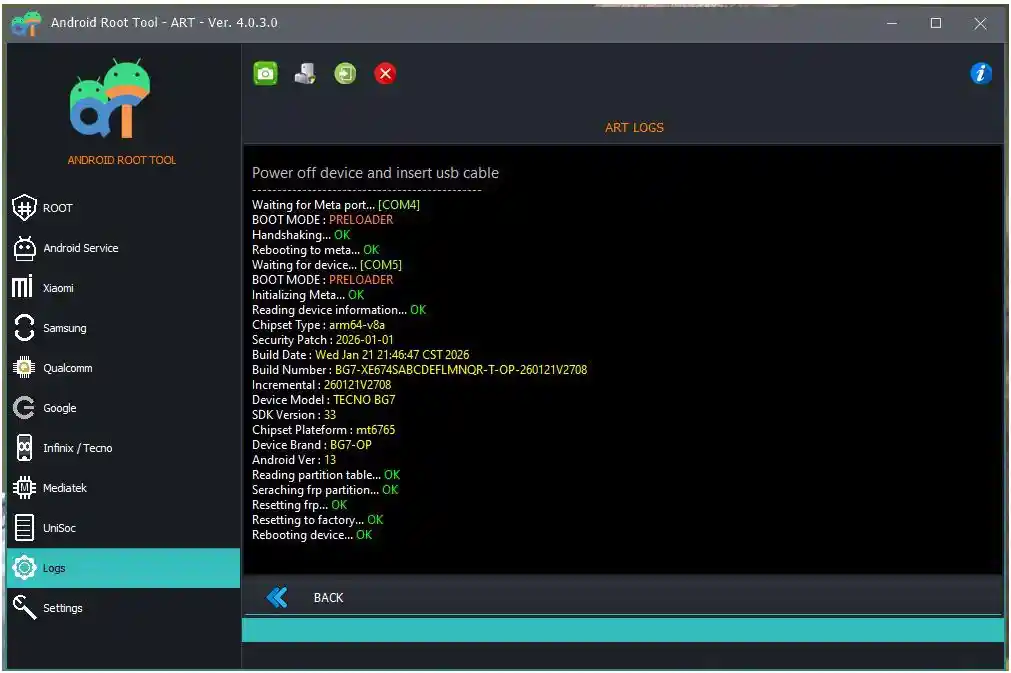
What Is Android Root Tool (ART)?
The Android Root Tool (ART) is a professional Windows-based Android servicing software developed by the ART Team. It is designed to give both technicians and advanced users full administrative control over Android devices — covering one-click rooting, bootloader unlocking, IMEI repair, FRP removal, firmware flashing, and partition management.
It supports devices running on Qualcomm, MediaTek (MTK), Unisoc (SPD/Spreadtrum) chipsets and covers major brands including Xiaomi, Redmi, POCO, Samsung, Itel, Tecno, and many more.
🔑 Why choose ART? Unlike tools that focus on a single brand or chipset, Android Root Tool combines multi-brand, multi-chipset support in one unified platform — saving technicians from switching between multiple tools.
Key Features of Android Root Tool V4.0.1.0
🔓 Rooting
- One-click Auto Root for 5,000+ Samsung models
- One-click Auto Root for 400+ Xiaomi / Redmi / POCO models
- Manual BOOT IMG Root Patcher (ARMv7a & ARMv8a)
- Android BOOT IMG Editor — Unpack & Repack
- Unpack Android Ramdisk
- Fastboot Flash Patched Boot IMG
🔓 Bootloader Unlock
- Xiaomi Temporary Bootloader Unlock (Qualcomm & MTK models)
- Xiaomi Permanent Bootloader Unlock (selected models)
- Unlock / Relock Bootloader for Google Pixel phones
- Improved unlock stability and success rate
🔧 IMEI & Network Repair
- Xiaomi IMEI Repair (Root / ENG ADB / Preloader Port)
- Unisoc IMEI Repair via Flash Mode
- Read and Write QCN files for Qualcomm network repair
- Fix corrupted modem and restore mobile signal
🛡️ FRP & Account Removal
- Samsung FRP Reset — Android 14, 15, 16 (MTP Mode)
- Xiaomi Mi Account Remove (MIUI 11, 12, 13, HyperOS)
- Xiaomi IT Admin Remove (HyperOS)
- Xiaomi Virus Remove — eliminate unauthorized malware from firmware
- Format (Factory Reset) via ADB, Fastboot & Flash Mode
📱 Unisoc (SPD) Flash Mode — New in V4.x
- Unisoc IMEI Repair
- Unisoc Reset FRP
- Unisoc Factory Reset
- Unisoc Firmware Flash
- Supports generic Unisoc chipsets and major budget brands (Itel, Tecno, Infinix, Samsung, etc.)
⚙️ Advanced Tools
- ADB GPT Manager — List, Read, Write & Erase Partitions (Qualcomm, MTK, Unisoc)
- Android Apps Manager — List, Enable & Disable System Apps
- Android BOOT IMG Editor — Full Unpack / Repack workflow
- Fastboot Flash — Flash patched Boot IMG directly
- Full device diagnostics and information read
Android Root Tool V4.0.1.0 Download
- File Name: ART_Setup_V4.0.1.0.exe
- Version: V4.0.1.0 (Latest)
- Platform: Windows 7 / 8 / 10 / 11 (32-bit & 64-bit)
- License: Paid (Subscription)
- Developer: Android Root Tool Team
- Password: ART
Download From👉 Google Drive
📌 Note: Add your MediaFire / Google Drive / Mega download link here before publishing.
How to Install Android Root Tool V4.0.1.0
- Download the setup file using the link above.
- Extract the ZIP/RAR file to a folder on your PC.
- Right-click the
.exeinstaller and select “Run as Administrator.” - Follow the on-screen installation wizard and click “Next.”
- Accept the license agreement and click “Install.”
- Once installation completes, click “Finish.”
- Launch the tool and log in with your ART account.
- Activate your license to unlock all features.
✅ Tip: Always run Android Root Tool as Administrator and keep your USB drivers updated for the best results.
How to Use Android Root Tool V4.0.1.0
▶️ One-Click Root (Samsung / Xiaomi)
- Open ART and connect your device via USB.
- Enable USB Debugging (Settings → Developer Options).
- Select your device brand and model from the list.
- Click “Auto Root” and wait for the process to complete.
- Device will reboot automatically — root is done!
▶️ Unlock Bootloader (Xiaomi)
- Open ART and select your Xiaomi / Redmi / POCO model.
- Go to the Bootloader tab.
- Connect device in Fastboot Mode (Power + Volume Down).
- Select Temporary or Permanent unlock.
- Click “Unlock Bootloader” and wait for completion.
▶️ Flash Firmware (Unisoc)
- Open ART and go to the Unisoc Flash Mode tab.
- Load your Unisoc firmware file.
- Connect the device in Flash / Download Mode.
- Click “Flash Firmware” and wait for the process to finish.
- Device will reboot automatically after flashing.
▶️ Reset FRP (Samsung)
- Open ART and select your Samsung model.
- Go to the FRP tab.
- Connect device in MTP Mode.
- Click “Reset FRP” and wait for completion.
- Reboot the device — FRP is cleared!
▶️ Repair IMEI (Xiaomi / Unisoc)
- Open ART and select your device model.
- Go to the IMEI Repair tab.
- Connect device via ADB Root, ENG ADB, or Preloader Port.
- Enter the original IMEI number.
- Click “Repair IMEI” and reboot when done.
What’s New in Android Root Tool V4.0.1.0 – Changelog
Qualcomm EDL (Sahara) Protocol
- Added Qualcomm EDL (Sahara) Protocol V2, V3, and V4
- Added Read/Write Firmware support
- Added Reset FRP
- Added Format (Factory Reset)
- Added Partition Manager
- List GPT
- Read/Write Partitions
- Erase Partitions
Xiaomi — New Features
Xiaomi China to Global Converter
- Added Xiaomi Convert China to Global Fastboot Flasher
- Supports conversion during Fastboot flashing
Xiaomi Qualcomm Bootloader
- Added temporary bootloader unlock for new Qualcomm models
- Improved Xiaomi Qualcomm temporary unlock bootloader
Xiaomi Mediatek
- Added IMEI Repair support
- Works via Root, ENG ADB, or Preloader Port
Xiaomi Qualcomm Without Auth
- Added support for 150+ new Qualcomm models without authorization
Samsung — New Features
Samsung Qualcomm EDL Support
- Added 800+ new Qualcomm EDL models
- Supports:
- Reset FRP
- Factory Reset
Xiaomi Mediatek — IMEI Repair
- Added Redmi 15C (dew)
- Added Xiaomi 15T (goya)
Xiaomi Qualcomm — EDL (Sahara) Mode
Newly Added Models
- Xiaomi 15 (dada)
- Xiaomi 15 Pro (haotian)
- Xiaomi 15 Ultra (xuanyuan)
- Redmi K80 Pro / POCO F7 Ultra (miro)
- Redmi K90 / POCO F8 Pro (annibale)
- POCO F8 Ultra / Redmi K90 Pro Max (myron)
- Xiaomi Pad 8 Pro (piano)
- MIX Flip (ruyi)
- Xiaomi Mix Flip 2 (bixi)
Legacy & Mid-Range Support
Added support for 150+ models including:
- Mi 3 / 4 / 5 / 6 / 8 / 9 / 10
- Mi Max / Mix / Note Series
- Redmi 1S to Redmi 13 5G
- Redmi Note 3 to Redmi Note 13
- POCO F1–F4, X2/X3, M2/M3
- Black Shark Series
- Mi Pad 4 / 6
Samsung Qualcomm — EDL (Sahara) Mode
Galaxy A Series
- A01, A02s, A05s, A11, A20s
- A23 / A23 5G
- A42 5G
- A52 / A52 5G / A52s
- A6+, A70, A71 / A71 5G
- A72, A73 5G
- A80, A8 Star, A8s
- A90 / A90 5G
- A9, Quantum 2
Galaxy S Series
- Galaxy S7 Edge to Galaxy S25 Ultra
Galaxy Note Series
- Note 8
- Note 9
- Note 10 / 10+ / 10+ 5G
- Note 20 / 20 Ultra 5G
Galaxy Z Series
- Z Flip / Flip 5G / Flip3 / Flip4 / Flip5 / Flip6
- Z Fold / Fold 5G / Fold2 / Fold3 / Fold4 / Fold5 / Fold6
Galaxy Tab Series
- Tab A 8.0 / 10.5
- Tab A7 / A9+
- Tab Active Pro / Active4 Pro
- Tab S3 to Tab S9 Ultra
Galaxy J / M / F / C / E Series
- J2 Pro, J4, J6+, J8
- M01 to M55s
- F02s to F55
- C55 5G, C7
- XCover6 Pro
Japan (Docomo / AU) Models
- SC-02J, SC-03J
- SC-51D / SC-51E
- SC-52B, SC-53B
- SCG01 to SCG20
- SCV41 to SCV45
Xiaomi — China To Global Converter
Newly Added Models
- Redmi Note 14 Pro+ (amethyst)
- Xiaomi 14 Ultra (aurora)
- Xiaomi 15 (dada)
- Xiaomi 15 Ultra (xuanyuan)
- Xiaomi 14 (houji)
- Mi 11 Pro / Ultra (star)
- Xiaomi 13 Ultra (ishtar)
- Redmi K80 / POCO F7 Pro (zorn)
- Redmi K40 / POCO F3 / Mi 11X (alioth)
- Redmi 14C / POCO C75 (lake)
- Redmi A3 Pro (pond)
- Redmi 15C (dew)
- Redmi Note 14 Pro 5G / POCO X7 (malachite)
- Redmi Note 12 5G / 12R Pro (sunstone)
- Redmi Note 12 Turbo (marble)
- Redmi Note 13 / 13R Pro / POCO X6 Neo (gold)
- Redmi Note 13 Pro (garnet)
- Redmi Note 13 Pro Plus (zircon)
Supported Brands & Chipsets
| Brand | Chipset | Functions |
|---|---|---|
| Xiaomi / Redmi / POCO | Qualcomm | Root, Bootloader Unlock, IMEI Repair, FRP, Firmware |
| Xiaomi / Redmi / POCO | MediaTek | Root, Bootloader Unlock, IMEI Repair, FRP |
| Samsung | Qualcomm / Exynos | Root, FRP Reset, Factory Reset |
| Unisoc Devices (Itel, Tecno, Infinix, etc.) | Unisoc | IMEI Repair, FRP, Firmware Flash, Factory Reset |
| Google Pixel | Qualcomm | Bootloader Unlock / Relock |
Supported Unisoc Device Brands
- ✅ Itel — A-series, P-series, S-series, Vision-series, IT-series
- ✅ Tecno — A-series, F-series, K-series, S-series
- ✅ Infinix — Smart series, Hot series, Note series
- ✅ Samsung — Budget models on Unisoc chipsets
- ✅ Generic Unisoc devices — All major SC/Tiger chipset models
System Requirements
| Component | Requirement |
|---|---|
| OS | Windows 7 / 8 / 10 / 11 (32-bit & 64-bit) |
| Processor | Intel / AMD Dual-Core 2.0 GHz or faster |
| RAM | 2 GB minimum (4 GB recommended) |
| Storage | 300 MB free space |
| USB Port | USB 2.0 or 3.0 (direct port preferred) |
| Other | Admin privileges + internet for activation |
⚠️ Warning
Before performing any repair or flashing operation, always back up your important data — it may be permanently lost during the process. Ensure your device has at least 50% battery before starting. Android Root Tool is a professional-grade tool and should be operated by experienced GSM technicians. Incorrect use may result in a bricked device that requires further repair.
Important Notes
🛡️ Virus Status: This setup file was scanned with Kaspersky Antivirus before uploading — 100% safe to use.
📌 Credit: Full credit goes to the Android Root Tool (ART) Team for developing and maintaining this software.
🔌 USB Driver: Install the correct Qualcomm, MTK, or Unisoc USB Driver before using this tool for the best connection results.
Frequently Asked Questions (FAQs)
Is Android Root Tool free to use?
Android Root Tool requires a paid subscription for full feature access. Visit www.androidroottool.com for pricing details.
Does ART V4.0.1.0 support Unisoc devices?
Yes! V4.0.1.0 includes full Unisoc Flash Mode support — covering IMEI Repair, FRP Reset, Factory Reset, and Firmware Flash on all major Unisoc/SPD chipsets.
Can I unlock the bootloader on any Xiaomi device?
ART supports both Temporary and Permanent Bootloader Unlock on a wide range of Xiaomi, Redmi, and POCO models. Check the official supported device list at www.androidroottool.com/en/brands.
Does IMEI repair require root access?
For Xiaomi devices, IMEI Repair requires Root or ENG ADB access. For Unisoc devices, it works via Flash Mode — no root required.
What Samsung Android versions are supported for FRP?
ART supports Samsung FRP Reset up to Android 16 via MTP mode.
What should I do if my device is not detected?
Ensure the correct USB Driver is installed, USB Debugging is enabled, and you are running the tool as Administrator. Try a different USB cable or port if detection fails.
Conclusion
The Android Root Tool (ART) V4.0.1.0 is a comprehensive upgrade that firmly establishes ART as one of the most versatile Android repair platforms available in 2026. With major additions including expanded Xiaomi Bootloader Unlock support, full Unisoc Flash Mode functions, improved IMEI repair on MTK devices, and a steadily growing supported device database, it delivers exceptional value for professional GSM technicians and advanced Android users alike.
Whether you’re dealing with a Xiaomi FRP lock, a dead Unisoc firmware, or a corrupted IMEI — ART V4.0.1.0 handles it all from one clean, intuitive interface. Download it now and take full control of Android device servicing! 🚀