Unlock Turkey Tool V2.0.9 Download – FRP & IMEI Tool
If you work with Android device repair, you already know how time-consuming tasks like FRP removal, IMEI repair, and flashing can be. That’s where Unlock Turkey Tool V2.0.9 stands out.
This latest version brings a powerful mix of modules, improved stability, and broader device support—all in one place. Whether you’re dealing with Samsung, Xiaomi, MediaTek, or Qualcomm devices, this tool is built to handle complex repair tasks efficiently.
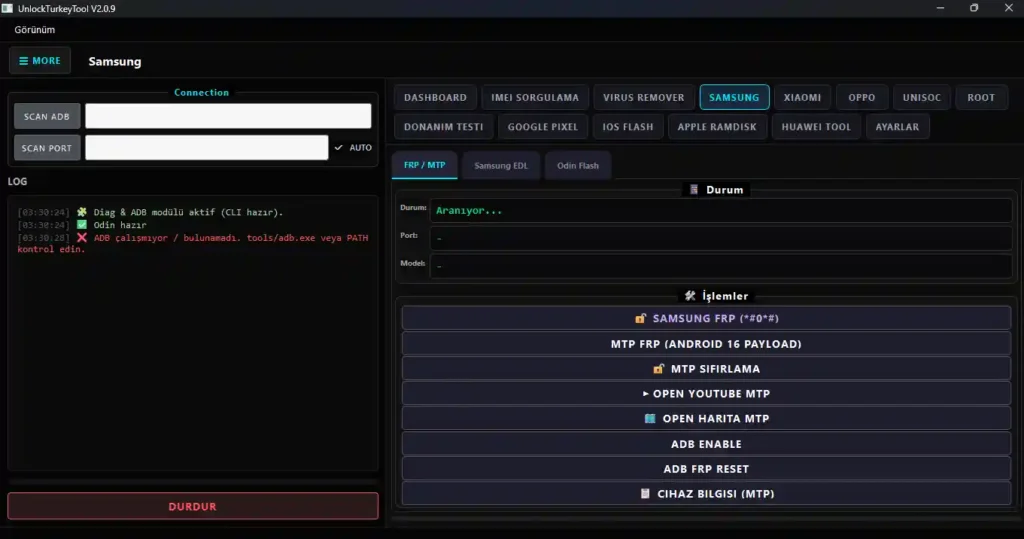
What is Unlock Turkey Tool V2.0.9?
Unlock Turkey Tool is a Windows-based GSM servicing software designed for professional mobile technicians. It allows deep-level access to Android devices using modes like ADB, Fastboot, and EDL.
In simple terms, it helps you:
- Remove FRP locks
- Repair IMEI issues
- Flash firmware
- Fix network and system problems
It operates on a license-based system, meaning full functionality requires account login and activation.
Key Features of Unlock Turkey Tool V2.0.9
- Device Connectivity – ADB/Fastboot control, auto port detect, live logs
- FRP & Security – Samsung, Xiaomi, Huawei FRP bypass, Fastboot reset
- IMEI & Network – IMEI repair, QCN tools, network fixes
- Flashing Tools – Odin, Fastboot, EDL, MTK/Qualcomm/Unisoc support
- Xiaomi Functions – Mi account disable, bootloader unlock, backup/restore
- MTK & Qualcomm – FRP erase, partition tools, loader config
- Root Tools – Magisk patch, boot image patch, root hiding
- iOS Support – Flash firmware, DFU mode, Hello bypass (5S–X)
- Diagnostics – Battery health, hardware info, root & security status
Download Unlock Turkey Tool V2.0.9
- File Name: UnlockTurkeyTool_Setup_v2.0.9.zip
- Version: v2.0.9
- File Size: 73.5 MB
How to Use Unlock Turkey Tool
Getting started is straightforward:
- Download the tool setup file
- Install it on your Windows PC
- Log in with your licensed account
- Connect your device via USB
- Select the correct mode (ADB, Fastboot, EDL)
- Choose the required function
- Click “Start”
Make sure drivers are properly installed before connecting your device to avoid errors.
What’s New in Version 2.0.9?
This update focuses heavily on stability and expanded device compatibility.
- Xiaomi TEMP UBL support for newer models
- Improved authentication system (server-based)
- Free MTK and Qualcomm auth (0 credit)
- New DIAG & ADB tab for better control
- Cleaner UI with redesigned login panel
- More accurate result checks after flashing
Overall, the tool feels faster, more stable, and easier to navigate.
Conclusion
Unlock Turkey Tool V2.0.9 is not a basic utility—it’s a complete servicing platform designed for serious repair work. With its wide chipset support, powerful modules, and improved stability, it can handle most Android repair scenarios without needing multiple tools.
If you regularly deal with FRP locks, firmware flashing, or IMEI issues, this tool can significantly simplify your workflow.
Related Tools
FAQs
Is Unlock Turkey Tool free to use?
No, it is a license-based tool. Some features require login and activation.
Which devices are supported?
It supports a wide range including Samsung, Xiaomi, Huawei, MediaTek, Qualcomm, and Unisoc devices.
Can it repair IMEI safely?
Yes, it includes advanced IMEI repair tools, but always ensure compliance with local regulations.
Does it support the latest Xiaomi models?
It’s designed for technicians. Beginners can use it, but basic knowledge of flashing and device modes is recommended.

![Xiaomi Patch NV V2 & Generate Critical Data [CPID Method] NV Error And IMEI Restore Free Tool](https://gsmxblog.com/wp-content/uploads/2025/08/xiaomi-patch-nv-v2-generate-critical-data-cpid-method-free-768x432.webp "Xiaomi Patch NV V2 & Generate Critical Data [CPID Method] NV Error And IMEI Restore Free Tool 4")