Buildozer (KPT Free) Tool V1.0.0.1 Download – Free FRP & ADB Tool
If you’re looking for a simple yet capable Android servicing tool that doesn’t require paid activation, Buildozer KPT Tool is worth your attention.
It’s designed to handle everyday tasks like FRP unlock, ADB commands, and network fixes without the complexity of heavy professional tools. The best part? It’s completely free and lightweight, making it ideal for quick jobs and routine repairs.
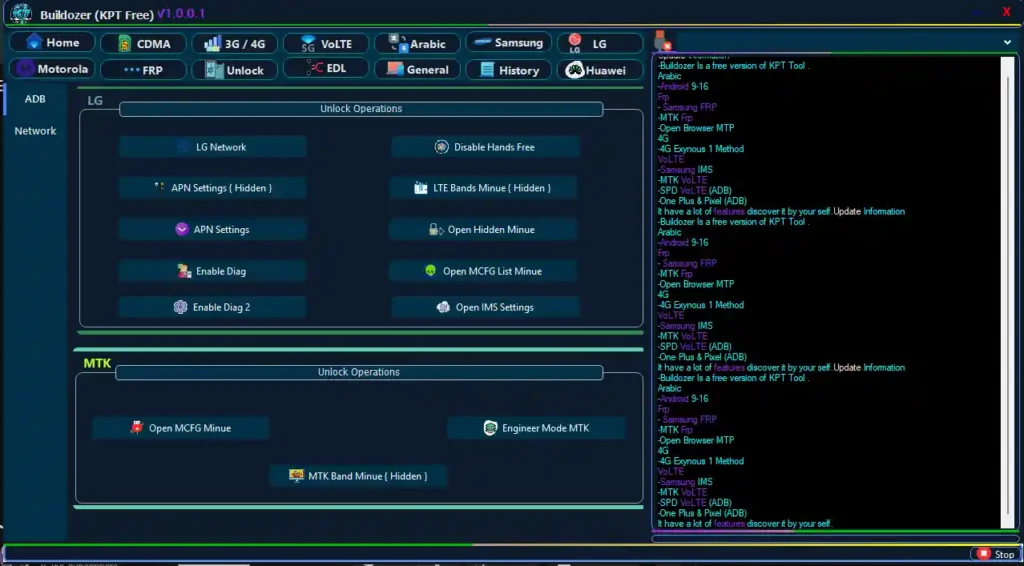
What is Buildozer KPT Tool?
Buildozer KPT Tool is a Windows-based Android utility software built for basic servicing, unlocking, and system-level operations.
Instead of relying on multiple tools, it combines essential features into one clean interface. From enabling hidden settings to performing FRP removal and network adjustments, it helps simplify common repair tasks.
The interface is structured in a way that even less experienced users can navigate easily, while still offering enough depth for technicians.
Key Features of Buildozer KPT Tool
- User Panel – Auto login, save info, update system
- Network Tools – Fix COMA issues, add 4G settings
- 4G Optimization – Enable 4G, device search, carrier fixes
- VoLTE & APN – Enable VoLTE, quick APN access, LTE settings
- Brand Modules – Samsung, LG, ZTE, Pixel, MTK, Motorola tools
- ADB Functions – App install/remove, app management
- Unlock Tools – Network unlock, carrier unlock, LTE bands
- Fastboot – Device info, reset, EFS backup
- Bootloader – Unlock, relock, status check
- Flashing – Firmware flash, partition control
- FRP Tools – MTK/SPD FRP bypass, unlock
- Diag Tools – Network config, real-time diagnostics
- EFS Tools – Backup IMEI, file explorer
- Huawei Support – FRP, test point, Honor devices
Buildozer (KPT Free) Tool Download Link
- File Name: Buildozer.Setup.V1.0.0.1.rar
- Version: V1.0.0.1
- File Size: 162 MB
How to Use Buildozer KPT Tool
Follow these steps to get started:
- Download the tool from the official link
- Extract and install the setup file
- Open the tool on your Windows PC
- Connect your Android device via USB
- Enable USB debugging (ADB mode)
- Select the required function
- Click to execute the task
Make sure you have proper USB drivers installed for best results.
Conclusion
Buildozer KPT Tool is a practical choice for anyone who needs a free, no-nonsense Android servicing tool. It may not replace high-end professional software, but for everyday tasks like FRP unlock, ADB operations, and network fixes, it delivers real value.
If you prefer a lightweight tool that gets the job done quickly without licensing barriers, this one deserves a spot in your toolkit.
Related Tools
FAQs
Is Buildozer KPT Tool really free?
Yes, it is completely free to use without paid activation.
Does it support FRP removal?
Yes, it supports FRP removal for MTK, SPD, and some other devices.
Is it safe to use?
It is generally safe if used correctly. Always follow proper procedures to avoid device issues.