WorldlinkGSM Pro V4.2026 Download (Free Unlimited Credits)
If you’re looking for a powerful Android repair tool without paying for credits, WorldlinkGSM Pro V4.2026 stands out. It offers a wide range of features—from FRP removal to firmware flashing—while claiming unlimited free access.
This guide breaks down everything you need to know before downloading, including features, supported modes, and how to use the tool safely.
What is WorldlinkGSM Pro V4.2026?
WorldlinkGSM Pro is a multi-purpose Android servicing tool designed for technicians and advanced users. It supports a wide range of chipsets and brands, including Samsung, MediaTek, Qualcomm, Pixel, and more.
The V4.2026 version introduces updated patches, improved bypass methods, and broader device compatibility. One of its main highlights is the unlimited credit system, which removes the need for paid activations.
Key Features of WorldlinkGSM Pro V4.2026
General Functions
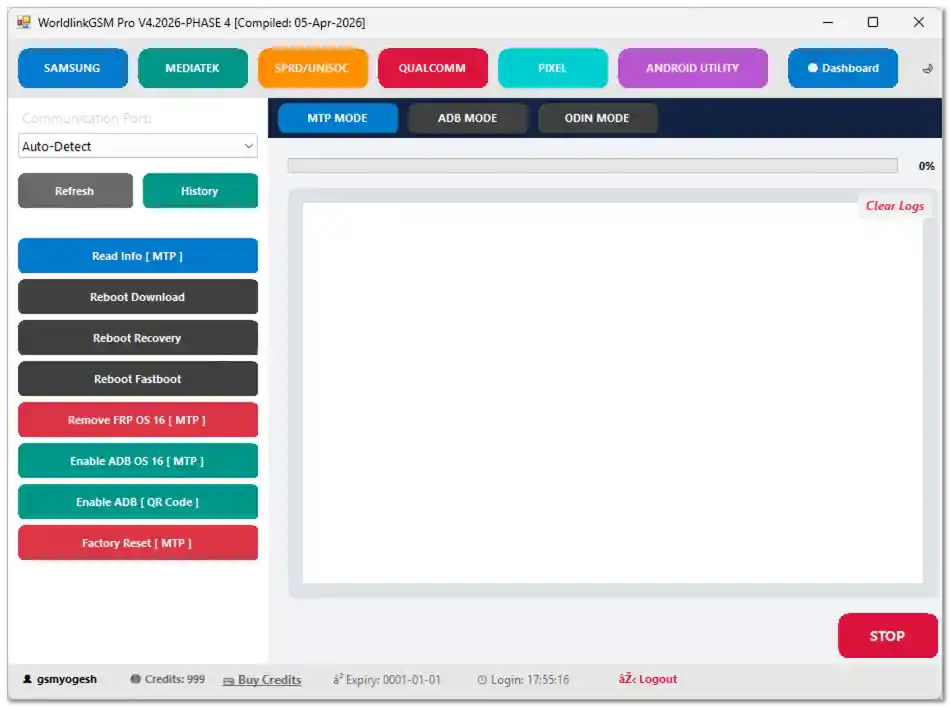
- Auto-detect communication ports
- Logs panel with history tracking
- Progress monitoring and operation control
- Clean and simple dashboard
Supported Modes
- MTP Mode
- ADB Mode
- Odin Mode
- META Mode
- BROM / Preloader Mode
These modes allow the tool to interact with devices in different states, which is critical for repair and unlocking tasks.
FRP, Unlock & Reset Features
WorldlinkGSM Pro includes a strong set of unlocking tools:
- Remove FRP (Factory Reset Protection)
- Enable ADB (including QR-based activation)
- Factory reset options
- Samsung unlock (2025–2026 patches)
- Knox Guard bypass (latest methods)
- KG lock removal via ADB
These features are especially useful when dealing with locked devices after reset or account issues.
MediaTek Advanced Functions
META Mode
- Read device information
- Enable ADB
- Remove MDM locks (PayJoy, Scorpio)
- Backup NV data
BROM / Preloader Mode
- Flash firmware (APP files)
- Format partitions (safe/manual)
- Erase FRP
- Unlock bootloader
- Backup and restore NVRAM/NVDATA
- Read/write RPMB and QCN
This level of control makes it suitable for deep repair operations on MediaTek devices.
ADB Mode Utilities
- Disable OTA updates
- Reset IT admin restrictions
- Apply universal patches
- Remove old plugins
- Execute new bypass methods (2026 patches)
These tools help fix software-level restrictions without flashing firmware.
Download WorldlinkGSM Pro V4.2026
You can download the latest version using the link below:
- File Name: WorldlinkGSMpro_Tester_Release_V1.2026.3.zip
- Version: V1.2026.3
- File Size: 6.6 MB
Download From👉 MediaFire
How to Install and Use WorldlinkGSM Pro
Step 1: Download and Extract
Download the ZIP file and extract it to your desktop using WinRAR or 7-Zip.
Step 2: Run the Main Tool
Open the folder and run:
WorldlinkGSMpro_Tester_Release_V1.2026.3.exe as Administrator.
Step 3: Run the Loader
When prompted for login:
- Run WORLDLINK_GSM_TOOL_Loader.exe
- Use Administrator mode
- Enter any username/password
The loader automatically unlocks all features and adds unlimited credits.
Step 4: Connect Your Device
Connect your Android device via USB and select the appropriate mode (ADB, MTP, BROM, etc.).
Important Tips Before Using
- Always back up your data before any operation
- Do not disconnect the device during processing
- Choose the correct mode for your device
- Ensure your battery is sufficiently charged
- Use the tool only on devices you own or have permission to repair
Conclusion
WorldlinkGSM Pro V4.2026 offers a surprisingly wide range of professional-grade features without requiring paid credits. From FRP removal to advanced MediaTek flashing, it covers most Android repair needs in one place.
If used carefully, it can be a valuable tool for both technicians and experienced users.
FAQ
Is WorldlinkGSM Pro really free?
Yes, this version claims unlimited free credits through a loader, allowing access to all features.
Does it support all Android devices?
It supports many major chipsets and brands, but not every device. Compatibility depends on model and security patch level.
Can it remove FRP lock?
Yes, it includes multiple FRP removal methods for different Android versions.
Do I need internet access to use it?
Some features may require internet, especially login or updates.