Sirens Flash Tool V1.0 Free Download (No Login) FRP & Flash Tool
If you’re working with Android devices—whether for repair, unlocking, or firmware flashing—you already know how complex things can get. From FRP locks to bootloader restrictions, simple fixes are no longer enough.
That’s where Sirens Flash Tool V1.0 stands out. It combines multiple powerful functions into one free, easy-to-use Windows tool—without requiring login or activation.
What is Sirens Flash Tool V1.0?
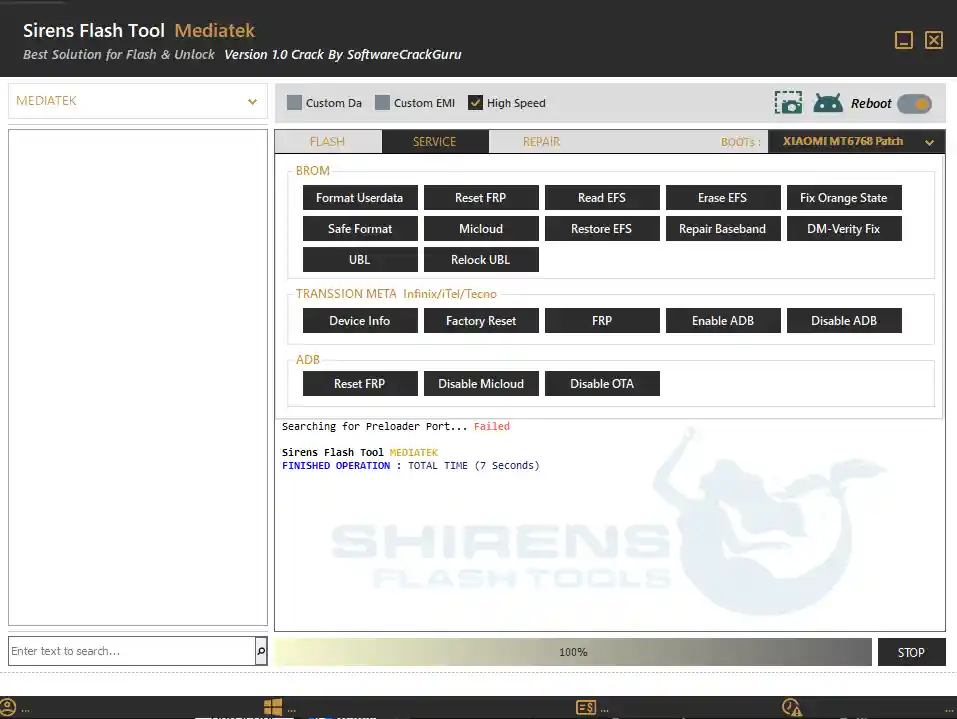
Sirens Flash Tool V1.0 is a Windows-based GSM servicing software designed to handle advanced Android repair tasks. It allows users to flash firmware, bypass security locks, repair IMEI, and perform deep-level device operations using multiple modes like ADB, Fastboot, EDL, and BROM.
Unlike many similar tools, this one works without login credentials, making it accessible for both technicians and beginners.
Key Features of Sirens Flash Tool V1.0
The tool is built with a wide range of functions, organized into clear categories.
🔹 Flash Functions
- Scatter Flash & Firmware Flash
- Custom DA & EMI support
- High-speed flashing
- Read, write, erase, and format options
- Skip preloader for safer flashing
- Android device information detection
🔹 Service (BROM / EDL / META)
- Format userdata and safe format
- FRP reset (Factory Reset Protection)
- EFS backup and restore
- Baseband repair
- Fix Orange State errors
- DM-Verity fix
- MiCloud reset, patch, and disable
- Bootloader unlock and relock
🔹 META Mode Features
- Device info access
- Factory reset
- FRP reset
- Enable/Disable ADB
🔹 ADB Functions
- Reset FRP
- Disable MiCloud
- Disable OTA updates
🔹 Repair (IMEI / CPID)
- Write and read IMEI
- Patch certificate
- Write product ID
- Read/write QCN
- Generate CPID automatically
- Critical data backup and restore
🔹 BROM Exploit & EDL Support
- Vivo (V1 / V2 / V3 / 2025)
- Infinix / Tecno devices
- Oppo / Realme support
- Xiaomi MTK bypass
- Samsung preloader support
Download Sirens Flash Tool V1.0
You can download the tool using the link below:
- Name: Siren Flash Tool V1.0 No Login
- Version: v1.0
- Size: 227 MB
- Password: softwarecrackguru
Download From👉 Google Drive
Supported Brands
Sirens Flash Tool supports a wide range of popular Android brands, including:
This makes it a practical all-in-one solution for multi-brand servicing.
How to Use Sirens Flash Tool (Basic Guide)
- Download and extract the tool on your PC
- Run the executable file as Administrator
- Connect your device using USB
- Choose the required mode (ADB, Fastboot, EDL, or BROM)
- Select the function (Flash, FRP Reset, Unlock, etc.)
- Click Start and wait for the process to complete
Tip: Always install proper USB drivers before using the tool.
Important Notes
- Backup your device before performing operations like flashing or formatting
- Use correct firmware files to avoid bricking
- Some features may not work on newer security patches
- IMEI repair may be restricted in certain regions—use responsibly
Conclusion
Sirens Flash Tool V1.0 is a solid choice if you need a free, no-login GSM tool that covers flashing, unlocking, and advanced repair features in one place. Its wide device support and simple interface make it useful for both beginners and professionals.
If you’re dealing with locked or malfunctioning Android devices, this tool can save time and simplify the process.
Related Tools
- MDM Fix Tool V1.0.9.7 (Latest Version)
- Bader MediaTek V5 Tool Free
- ClanCells Simple Tools V6 (Latest Version)
Is Sirens Flash Tool V1.0 really free?
Yes, the tool is completely free and does not require login or activation.
Does it support all Android devices?
It supports many brands like Xiaomi, Vivo, Oppo, and Tecno, but not every model is guaranteed.
Can it remove FRP lock?
Yes, it includes multiple FRP reset options via ADB, META, and EDL modes.
Do I need internet to use it?
Some features may require internet to download loaders automatically.