Download Unlock Pro Tool v1.0 Free – MDM Tool for Tecno, Infinix, and Itel
If you work with Tecno, Infinix, or Itel smartphones, you know how challenging it can be to manage MDM restrictions, FRP locks, and ADB functions. That’s where Unlock Pro Tool v1.0 comes in. This lightweight yet powerful Android ADB utility is designed to simplify mobile repair, development, and testing tasks. With just a few clicks, you can remove MDM locks, reset FRP, fetch device details, and even perform a full data wipe.
In this article, we’ll cover everything about Unlock Pro Tool v1.0, including its features, supported functions, download link, and why it’s one of the best free tools for Tecno, Infinix, and Itel devices.
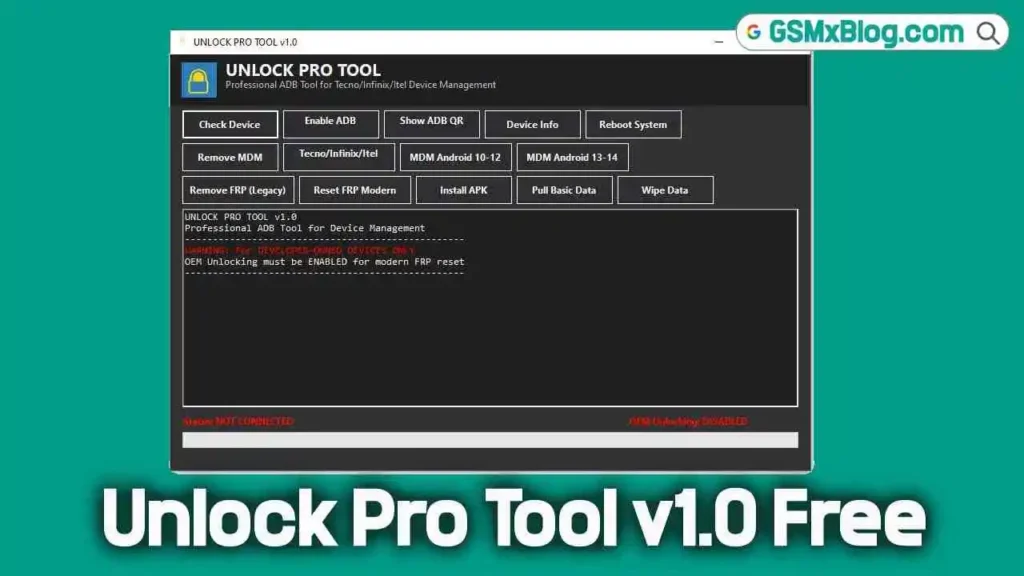
What is Unlock Pro Tool v1.0?
Unlock Pro Tool v1.0 is a professional ADB-based mobile repair utility built specifically for Tecno, Infinix, and Itel Android phones. It allows developers, technicians, and advanced users to manage devices directly through ADB (Android Debug Bridge).
Unlike traditional tools, it combines essential FRP, MDM, and ADB functions into a single application, eliminating the need for multiple software programs.
Key Features of Unlock Pro Tool v1.0
Here’s what makes Unlock Pro Tool a must-have for mobile repair professionals:
Device Management Functions
- Check Device – Detects if the phone is connected via ADB.
- Enable ADB – Activates ADB mode on supported models.
- Show ADB QR – Displays QR code for quick ADB pairing on modern Android versions.
- Device Info – Fetches full details about the connected device.
- Reboot System – Restarts the phone directly from the tool.
Security & Account Features
- Remove MDM – Unlocks Mobile Device Management restrictions on Tecno, Infinix, and Itel.
- MDM Android 10–14 – Specialized support for newer Android versions with MDM locks.
- Remove FRP (Legacy) – Works on older devices to bypass Google FRP locks.
- Reset FRP (Modern) – Handles FRP reset on newer Android versions (requires OEM Unlocking).
Extra Functions
- Install APK – Quickly sideload APKs via ADB.
- Pull Basic Data – Extracts essential files or logs from the device.
- Wipe Data – Factory resets the phone safely.
Download Unlock Pro Tool v1.0 Free
You can download the official Unlock Pro Tool v1.0 setup file below:
- Name: UnlockProTool V1.0.zip
- Version: v1.0
- Size: 4.24 MB
- Download Link: Download Here
How to Use Unlock Pro Tool v1.0
- Download & Extract the UnlockProTool V1.0.zip file.
- Install ADB Drivers on your PC (if not already installed).
- Connect your device via USB (enable USB debugging).
- Launch the tool and select the desired function.
- Follow on-screen instructions for FRP removal, MDM unlock, or APK installation.
Important Notes Before Use
⚠️ Before using Unlock Pro Tool v1.0, keep the following in mind:
- Legal Use Only – This tool must be used for developer-owned or customer-authorized devices. Using it on stolen phones is illegal.
- OEM Unlocking – For modern FRP reset, ensure OEM Unlocking is enabled in the device’s Developer Options.
- Connection Status – The tool provides clear messages such as:
- Status: NOT CONNECTED → No device detected.
- OEM Unlocking: DISABLED → Enable it to proceed.
Final Thoughts
The Unlock Pro Tool v1.0 is an essential utility for anyone working with Tecno, Infinix, and Itel Android phones. Its ability to handle MDM locks, FRP bypass, and ADB management makes it a valuable addition to any technician’s toolkit.
If you’re looking for a free, lightweight, and reliable MDM tool, this version is definitely worth downloading. Just remember to use it ethically and legally.