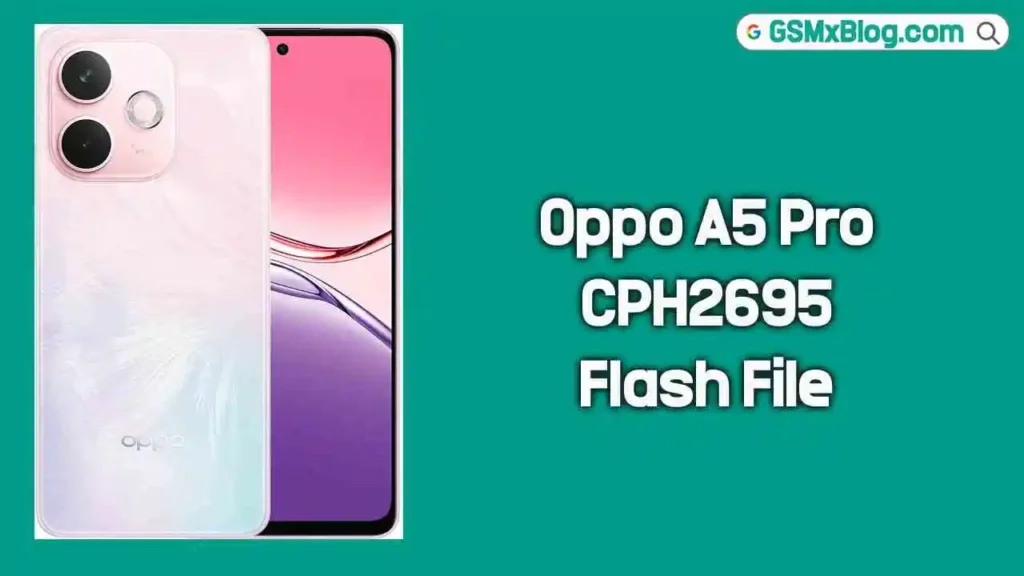
Oppo A5 Pro CPH2695 Flash File (Firmware) Free Download
On this page, you can download the official Oppo A5 Pro CPH2695 Flash File Firmware (Stock ROM) completely free. This full firmware package is made specifically for the Oppo A5 Pro (CPH2695) and can be used to fix a wide range of software problems including bootloop, FRP lock, hang on logo, dead after flash, and general software errors. Follow the steps below to safely restore your device to its original factory condition.
What is Stock Firmware?
Stock firmware — also known as a flash file or Stock ROM — is the official operating system that the manufacturer pre-installs on a device before it reaches the customer. It contains all the core system files the phone needs to run properly. When your Oppo A5 Pro CPH2695 develops serious software issues, flashing the stock firmware wipes out all errors and brings the device back to its original out-of-the-box state.
Stock ROMs are device-specific and cannot be shared across different models. Always verify your exact model number before downloading or flashing any firmware to avoid permanent damage to your device.
📱 About Oppo A5 Pro CPH2695
The Oppo A5 Pro (CPH2695) is a feature-packed mid-range Android smartphone running Android 15 with ColorOS on top. It comes with a capable processor, a smooth display, a high-resolution camera setup, and a large battery with fast charging support — making it a popular choice in the budget-to-mid segment.
Since the Oppo A5 Pro CPH2695 runs on a Qualcomm chipset, flashing its firmware requires the Oplus Download Tool along with a valid .ofp firmware file in EDL (Emergency Download) Mode.
⚠️ Important: This firmware is strictly for the Oppo A5 Pro CPH2695. Do not flash this on any other Oppo or Realme model. Always double-check your model number before proceeding.
Why Do You Need Stock Firmware?
- To fix hang on logo / bootloop issues
- To remove FRP (Factory Reset Protection) lock
- To recover a dead or bricked device
- To fix “dead after flash” or display blank problems
- To resolve lagging, freezing, or app crashing problems
- To downgrade or upgrade the Android / ColorOS version
- To perform a clean re-installation of the system software
- To remove screen lock (pattern, PIN, password)
- To restore the phone to original factory state
📥 Firmware Download Details
| Detail | Info |
|---|---|
| Device Name | Oppo A5 Pro |
| Model Number | CPH2695 |
| Firmware Version | CPH2695export_11_15.0.0.404EX01_2025011800170154 |
| OS Version | Android 15 (ColorOS 15) |
| ROM Type | Full OTA / Stock ROM |
| Region | Export (Global) |
| Password | None (No Password) |
| Root Access | No |
| Flash Tool | Oplus Download Tool |
🔗 Download Links
⚠️ Important Note / Disclaimer
- Always create a full backup of your personal data before flashing — this process will completely erase your device.
- Flashing the wrong firmware or making mistakes during the process can brick your device. Proceed entirely at your own risk.
- This firmware is only for Oppo A5 Pro CPH2695. Do not use it on any other model.
- Charge your device to at least 50% before starting to prevent unexpected shutdown during flashing.
- GSMxBlog is not responsible for any damage that occurs during or after the flashing process.
⚙️ Pre-Requisites Before Flashing
Before you start, make sure all of the following are ready on your Windows PC:
- Install the Oplus / Oppo USB Driver on your PC.
- Install the Qualcomm HS-USB QDLoader 9008 Driver to enable EDL mode communication.
- Download the latest Oplus Download Tool from the link provided above.
- Download the Oppo A5 Pro CPH2695 Firmware (.ofp / .zip) from the download link above.
- Use a good-quality, original USB data cable for a stable connection during flashing.
- Your PC must run Windows 7, 8, 10, or 11 — 64-bit is recommended.
- Have a valid Oppo / Oplus service account ready for tool login (required for SLA-enabled devices).
🔧 How to Flash Oppo A5 Pro CPH2695 Firmware
Follow these steps carefully to flash the stock firmware on your Oppo A5 Pro CPH2695:
Step 1: Download & Extract Files
Download the Oppo A5 Pro CPH2695 firmware ZIP and the Oplus Download Tool from the links provided above. Once downloaded, extract both into the same folder on your PC so everything is easy to locate during the process.
Step 2: Install Oplus USB Driver
Download and install the latest Oplus USB Driver on your computer. This is essential for your PC to detect the Oppo A5 Pro properly during the flashing process. Skip this step if the driver is already installed.
Step 3: Launch Oplus Download Tool
Open the extracted Oplus Download Tool folder and run Download-tool.exe as Administrator. If your antivirus blocks the tool, temporarily disable it — antivirus software sometimes flags flashing tools as false positives.
Step 4: Log In with Oppo / Oplus ID
When the tool launches, log in using your Oppo ID or Oplus service account credentials. This login step is mandatory for SLA-enabled devices like the Oppo A5 Pro CPH2695. The tool will not proceed without a valid login.
Step 5: Import the Firmware File
Inside the Oplus Download Tool, click Import and navigate to the folder where you extracted the firmware. Select the .ofp firmware file for the Oppo A5 Pro CPH2695 to load it into the tool. Make sure the correct region firmware (Export/Global) is selected.
Step 6: Click the START Button
Once the firmware is loaded successfully, click the START button in the Oplus Download Tool. The tool will now be ready and waiting for the device to connect in EDL mode.
Step 7: Boot Device into EDL Mode
Power off your Oppo A5 Pro CPH2695 completely. Then, press and hold Volume Up + Volume Down simultaneously, and while holding both buttons, connect the device to your PC via USB cable. Once the device enters EDL mode, it will appear as Qualcomm HS-USB QDLoader 9008 in Windows Device Manager.
If the device is completely dead and does not respond, you will need to use the test point method on the motherboard to force it into EDL mode manually.
Step 8: Wait for Completion
The Oplus Download Tool will detect your device and begin the firmware installation automatically. Do not disconnect the USB cable or close the tool during this process. Wait patiently until you see a Success message in the tool. Once complete, disconnect the device — it will reboot on its own.
✅ Tip: If the tool does not detect your device, reinstall the Oplus or Qualcomm USB driver, try a different USB port, and make sure you are not using a USB hub. A direct port connection always works best.
📲 Alternative: Install OTA Firmware via ADB
If your Oppo A5 Pro CPH2695 still boots into recovery mode, you can install the OTA firmware without using the Oplus Download Tool. Simply run the following ADB command from your PC while the device is in recovery mode:
adb sideload firmware.zip
Replace firmware.zip with the actual filename of the firmware you downloaded. This method is useful for soft-bricked devices that can still access stock recovery.
✅ Supported Flash Tools
The Oppo A5 Pro CPH2695 firmware is compatible with the following tools:
- Oplus Download Tool — The primary recommended tool for Oppo/Realme Qualcomm devices
- MSM Download Tool — Alternative Qualcomm-based flashing tool
- QFIL Tool — Qualcomm Flash Image Loader for advanced users
- Python EDL — Open-source command-line EDL tool (no login required)
- Miracle Box / UFI Box — Optional, for advanced repair, FRP, and chip-level operations
Important Notes
- This firmware is only for Oppo A5 Pro CPH2695 — never flash it on a different model.
- Never disconnect the USB cable while the flashing process is running — this will hard-brick your device.
- If the tool does not detect your device, reinstall the Oplus USB driver and try again on a different USB port.
- Back up all personal data before starting — the entire process will wipe your phone completely.
- For FRP bypass, region change, unbrick, or root services, reach out via the Telegram support link in the download section above.
Related Posts
- Oppo A1 5G PHS110 Flash File Firmware Free Download
- Realme RMX3366 Flash File Firmware Free Download
- Samsung SM-A236E Bit5 Firehose File Free Download
- Oppo USB Driver Latest Version Free Download
✅ Conclusion
The Oppo A5 Pro CPH2695 Flash File Firmware is the official stock ROM you need to fully recover your device from any software-related problem. Whether your phone is stuck on the boot logo, locked with FRP, dead after a failed flash, or just running slow — flashing this firmware using the Oplus Download Tool will restore your Oppo A5 Pro CPH2695 back to its original factory-fresh condition.
Download the correct firmware version from the links above, follow the step-by-step flashing guide carefully, and your device will be back up and running in no time. If you face any difficulty during the process, feel free to leave a comment below and we will be happy to assist you.