Download MaAnt Maintenance Assistant V2.0.1.23 Free – Schematic Tool for Mobile Repair
If you’re a mobile repair technician looking for a comprehensive, all-in-one Schematic tool to streamline your hardware troubleshooting process, MaAnt Maintenance Assistant V2.0.1.23 is one of the most powerful software solutions available today. Designed with intuitive features like schematic diagrams, point diagrams, signal tracing, and current analysis, this free version offers an intelligent maintenance workflow that helps technicians identify and fix power issues, signal faults, and motherboard problems faster than ever before.
In this detailed guide, we’ll walk you through everything you need to know about downloading and using MaAnt Maintenance Assistant V2.0.1.23. We’ll also explore its advanced features, how it compares to other tools in the market, and provide step-by-step instructions for installation and usage.
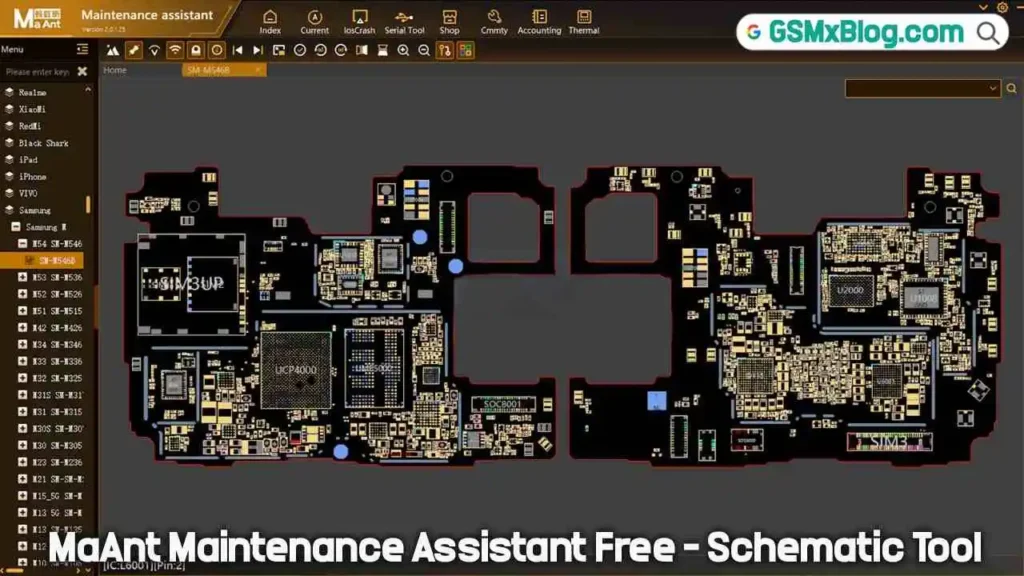
What is MaAnt Maintenance Assistant?
MaAnt Maintenance Assistant is a powerful mobile repair utility designed for technicians who need accurate schematics and diagnostic features. It combines multiple advanced tools into a single platform, allowing users to inspect, trace, and fix hardware issues with maximum efficiency.
The best part? Version 2.0.1.23 is completely free, making it accessible to both beginners and experienced repair professionals.
Key Features of MaAnt Maintenance Assistant V2.0.1.23
1. Schematic Diagrams
Access detailed and well-organized circuit diagrams of popular smartphones and electronic devices to understand board structure and identify defective components.
2. Point Diagrams
Instantly locate test points on the PCB—perfect for micro-soldering, line tracing, and advanced board repairs.
3. Current Analyzer
Monitor voltage and current flow in real time to detect short circuits, weak components, and power-related issues.
4. Signal Detection & Tracing
Trace signal paths, locate broken lines, and diagnose IC-level problems with accuracy.
5. Intelligent Maintenance Workflow
The tool combines all essential functions into a guided workflow, enabling faster and more efficient hardware diagnostics.
Download MaAnt Maintenance Assistant V2.0.1.23 Free
- Tool Name: MaAnt_Maintenance_Assistant_V2.0.1.23
- Version: V2.0.1.23
- File Size: 68 MB
- Supported OS: Windows (32-bit & 64-bit)
- Download Link: From MediaFire
How to Install & Use MaAnt Maintenance Assistant (Free Version)
Follow the steps below to download, install, and get started:
✅ Step 1: Download the Setup File
Download the MaAnt Maintenance Assistant v2.0.1.23 setup file from a trusted source.
✅ Step 2: Install the Program
- Run the setup file to begin installation.
- Important: Add the installation folder to your antivirus exclusion list to prevent false detections or accidental file deletion.
✅ Step 3: First Launch & Auto-Update
- After installation, open the program from the desktop shortcut.
- On first launch, it will automatically download around 36 MB of required files and update itself.
✅ Step 4: Registration / Login
- Click Registration to create a new account.
- Fill out the form with:
- Username
- Nickname
- Password (minimum 8 characters)
- Email address (for verification code)
- Click Send to receive your verification code.
- Enter the code to complete your registration.
✅ Step 5: Login & Explore
- Return to the login screen and enter your newly created credentials.
- Once logged in, you can access all diagrams, test points, and diagnostic tools freely.
Note: As of now, the free version has no usage time limitations.
Conclusion
MaAnt Maintenance Assistant 2.0.1.23 stands out as one of the best free schematic and PCB analysis tools for mobile repair technicians. With features like signal tracing, current analysis, and detailed circuit diagrams, it simplifies diagnostics and speeds up the repair process. Whether you are new to hardware repair or an experienced professional, this tool offers a smart, efficient, and reliable solution.
If you found this guide useful, go ahead and download the software, try it for yourself, and share your feedback. For more tools, schematics, and repair tutorials—stay tuned!


password ki vai?
link updated. no need password