HMT Dump Creator v1.1 Released Free – for Advanced Firmware & Dump Processing
HMT Dump Creator v1.1 is now available, bringing significant upgrades for technicians, repair specialists, and firmware engineers who rely on precision tools for mobile diagnostics and chip-level firmware operations. With improved support for Samsung, Qualcomm, MediaTek, and OPPO/Realme devices, this release enhances reliability, speed, and accuracy. Below is a complete guide to features, workflow, and download links.
What is HMT Dump Creator v1.1?
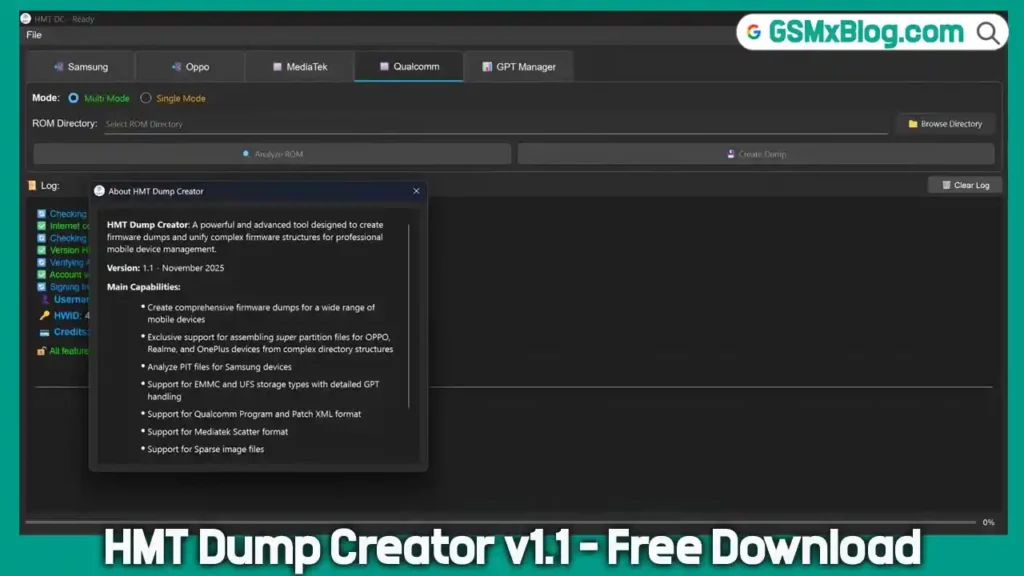
HMT Dump Creator v1.1 is a professional firmware engineering tool designed for creating, analyzing, and reconstructing firmware and dump files. It supports multiple chipsets—Qualcomm Snapdragon, Samsung Exynos, MediaTek (MTK), and OPPO/Realme—making it a multi-platform diagnostic utility for mobile repair labs.
It performs:
- Full operational dump generation
- GPT repair and reconstruction
- Partition extraction and integrity checks
- Firmware-based mapping and analysis
- Dynamic super image reconstruction
Built for reliability, it ensures firmware compatibility and precise memory structure alignment across modern Android devices.
Key Features of HMT Dump Creator v1.1
Automatic Sparse → Raw Conversion
- Converts sparse files to raw format
- Generates a full operational dump, not just bootable
- Essential for fixing no-boot issues and memory replacement
Improved High-Speed I/O
- Enhanced read/write engine
- Faster dump extraction from UFS/eMMC
- Reduced latency for large firmware packages
Qualcomm Snapdragon Support
- Rawprogram.xml + patch.xml deep parsing
- Accurate offset and partition map generation
- Multi Mode & Single Mode support
Samsung Support
- Automatic PIT & CSC parsing
- UFS/eMMC detection
- Auto creation of eng_efs / eng_sec_efs
- Full GPT/MBR writing with CRC and signature validation
- Ready-to-flash folder generation
MediaTek (MTK) Support
- Full scatter analysis
- Smart memory type detection
- Dynamic GPT generation with sector recalculation
- A/B partitions & sparse partition support
OPPO / Realme Exclusive Features
- Dynamic Super Image reconstruction (super.img)
- Automatic OFP extraction (supports encrypted files)
- One-click flash-ready dump creation
Advanced GPT Management
- One-click GPT repair (CRC, header, signature)
- Auto offset + partition size calculations
- GUID editing for disk and partitions
- Userdata auto-resize
Integrity & Security
- CRC32 verification
- Signature checks
- Protected/encrypted partition support
Download HMT Dump Creator v1.1
- File Name: HMT Dump Creator setup v1.1.7z
- Version: v1.1
- Size: 59.53 MB
- Download From👉 Google Drive
How to Use HMT Dump Creator v1.1
Follow these steps for a smooth workflow:
Step 1 — Download & Install
Extract the tool from the .7z archive and install it on Windows 10/11 (64-bit).
Step 2 — Load Firmware or Device Dump
Choose:
- Firmware-based analysis
- Direct dump extraction from UFS/eMMC
Step 3 — Select Operation
Depending on the device, pick tasks such as:
- Partition extraction
- GPT repair
- Dump creation
- Sparse→Raw conversion
Step 4 — Process & Validate
The tool will:
- Verify file integrity
- Create/repair GPT
- Generate operational dumps
Step 5 — Output Dump / FlashFolder
Once complete, the output folder is ready for:
- Flashing
- JTAG
- Device repair
- Data recovery
Conclusion
HMT Dump Creator v1.1 is a powerful, technician-grade tool built for accurate firmware analysis, dump creation, and GPT repair across multiple chipsets. Its new features dramatically improve performance and reliability, making it essential for mobile repair labs and firmware engineers.