OpenRoot V1 (Latest Version) Download Free – Temporary Root Tool
If you need temporary root access on Android phones without unlocking the bootloader — for ADB repair work, debugging, or quick diagnostics — OpenRoot V1 is a free open-source Windows GUI tool that pushes a small payload to the connected device and grants root access that lasts until the next reboot. Developed by the OpenRoot Project with credits to Dfroot and MDMFixTool for the ELF method, it supports Android 12 through Android 16 across GKI kernel families 5.10, 5.15, 6.1, 6.6, 6.12, and 6.18 — working on major brands including Vivo, Oppo, Realme, Xiaomi, Tecno, and Samsung.
This guide covers the complete feature list, full changelog, installation steps, usage guide, and download link for OpenRoot V1 so you know exactly what to expect before connecting your first device.
What Is OpenRoot V1?
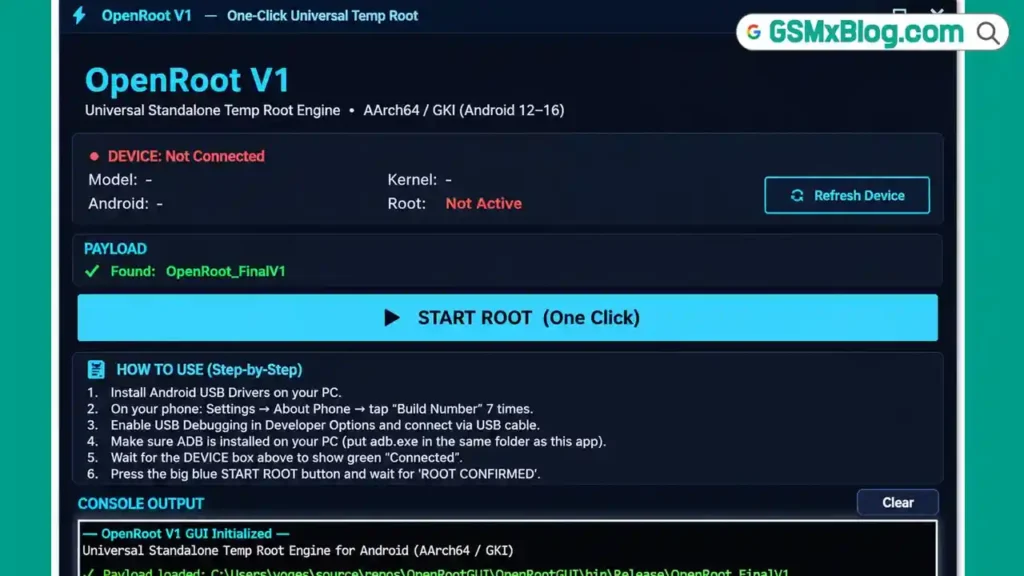
OpenRoot V1 is a free, open-source Windows application developed by the OpenRoot Project that grants temporary root access on Android phones without requiring the bootloader to be unlocked. The tool works by pushing a small payload to the connected device via ADB, which activates root access that persists only until the next reboot — a clean, non-permanent approach that leaves no lasting modification on the device.
The tool auto-detects the connected phone, automatically locates the correct payload file in its own folder, and uses embedded KernelSU modules with runtime vermagic adaptation — meaning it automatically adjusts module headers to match the device’s exact kernel string without manual configuration.
Key Features of OpenRoot V1
🔘 One-Click Root Button
A single button handles the full root process from start to finish — no multi-step manual command execution required.
🔍 Auto-Detection
Automatically detects the connected Android phone and displays the model, Android version, and kernel version — confirming compatibility before starting the root process.
📂 Automatic Payload Detection
Automatically finds the payload file in the app folder without needing to manually browse and select it — as long as the payload file is placed in the same folder as the tool.
🔧 Built-In KernelSU Modules
Includes embedded KernelSU modules for multiple kernel targets — no need to source or download separate kernel modules for different Android/kernel combinations.
🔄 Runtime Vermagic Adaptation
Automatically adjusts module headers to match the device’s exact kernel string (uname -r) at runtime — eliminating the manual kernel-matching step that most root tools require.
📱 Android Version Support
Works on Android 12, 13, 14, 15, and 16.
⚙️ GKI Kernel Family Support
Supports GKI kernel families: 5.10.x, 5.15.x, 6.1.x, 6.6.x, 6.12.x, and 6.18.x.
🌑 Clean Dark Interface
A custom dark interface with its own title bar and minimize/close buttons — no standard Windows chrome cluttering the window.
🖥️ Live Color-Coded Console
Displays live, color-coded console output for every step of the root process — making it easy to follow progress and spot errors immediately.
📄 Full Log File on Device
Writes a complete log file to the phone at /data/local/tmp/openroot.log — useful for troubleshooting if the process does not complete successfully.
✅ Honest Result Reporting
Shows an explicit SUCCESS or FAIL result based on real checks performed after the process — no ambiguous “probably worked” messaging.
📖 Built-In Help Section
A simple six-step help section inside the tool for new users who need a quick reference.
🙏 Credits Section
Clearly credits Dfroot and MDMFixTool for the ELF method the tool is built around.
🆓 Completely Free and Open Source
No activation, no login, no payment — the project is open source.
What’s New in OpenRoot V1 (Full Changelog)
- Added support for Android 16
- Added support for Linux kernel 6.12.x and 6.18.x
- Embedded KernelSU KMI modules for: android13-5.10, android13-5.15, android14-5.15, android14-6.1, android15-6.6, and android16-6.12
- Added precompiled adaptive LKM module targets for: 5.10.245, 5.10.252-dirty, 5.15.202 variants, 6.1.166-dirty, 6.6.127-4k, 6.12.76-4k, and 6.18.32-4k
- Runtime vermagic adaptation now adjusts module headers automatically to match the device’s exact
uname -rkernel string - Improved delivery process with a two-pass DfRoot chain attempt
- Added a mutex check at
/dev/dfto prevent re-entry until reboot - Better diagnostics with filtered logcat output when delivery fails
- Cleaner final verdict reporting at the end of each run
OpenRoot V1 Download (Latest Version)
- File Name: OpenRootGUI.7z
- File Size: 6.7 MB
- Developer: OpenRoot Project
- Platform: Windows PC
- Supported Android: Android 12, 13, 14, 15, 16
- Supported Kernels: GKI 5.10, 5.15, 6.1, 6.6, 6.12, 6.18
- Root Type: Temporary — lost on reboot
- License: Free and Open Source
How to Install OpenRoot V1
- Download the OpenRootGUI.7z file from the MEGA link above.
- Extract the downloaded archive to a folder on your PC using 7-Zip or WinRAR.
- Place the OpenRoot_FinalV1 payload file in the same folder as the tool.
- Make sure adb.exe and its DLL files are also in the same folder — or install Android platform tools on your PC and reference them.
- On your phone, go to Settings → About Phone → tap Build Number seven times to enable Developer Options.
- Turn on USB Debugging under Developer Options and connect the phone to the PC with a USB cable.
- Run OpenRoot V1 on your PC as Administrator.
✅ Tip: All files — the tool EXE, the OpenRoot_FinalV1 payload, and adb.exe with its DLLs — must be in the same folder. Missing any of these will prevent the tool from detecting the device or finding the payload automatically.
How to Use OpenRoot V1
▶️ Enable USB Debugging and Connect
- On the Android phone, go to Settings → About Phone.
- Tap Build Number seven times to unlock Developer Options.
- Go to Settings → Additional Settings → Developer Options.
- Enable USB Debugging.
- Connect the phone to the PC via USB cable.
- Tap Allow on the ADB authorization prompt that appears on the phone.
▶️ Run OpenRoot V1 and Confirm Detection
- Open OpenRoot V1 as Administrator on your PC.
- Wait for the tool to detect your phone — a green connected status appears when detection succeeds.
- Confirm the displayed model, Android version, and kernel version match your device.
- Check that the payload is shown as found in the payload box — this confirms the OpenRoot_FinalV1 file is correctly located.
▶️ Start the Root Process
- Click the large blue START ROOT button.
- Watch the live color-coded console as the tool runs through the root process.
- The tool performs a two-pass DfRoot chain attempt automatically if the first pass does not succeed immediately.
- Wait for the console to finish — do not disconnect the device mid-process.
▶️ Confirm Root Success
- Look for the green ROOT CONFIRMED message at the end of the console output.
- Open a new ADB shell on your PC and run:
adb shell id - Confirm the output shows uid=0 — this confirms root access is active.
▶️ Check the Log File
- If the process fails or you want to review what happened, check the log file written to the device at:
/data/local/tmp/openroot.log - Pull the log via ADB if needed for troubleshooting:
adb pull /data/local/tmp/openroot.log
▶️ Remember — This Is Temporary Root
- Root access granted by OpenRoot V1 is temporary and lasts only until the next reboot.
- If you reboot the device, root access is gone and you will need to run the tool again to regain it.
- The mutex check at /dev/df prevents re-entry of the root process until the device has been rebooted — this is intentional.
System Requirements
| Component | Requirement |
|---|---|
| Operating System | Windows PC |
| Permissions | Run as Administrator |
| USB Debugging | Must be enabled on the Android device |
| Connection | USB data cable |
| Required Files | Tool EXE + OpenRoot_FinalV1 payload + adb.exe + DLLs (same folder) |
| Supported Android | 12, 13, 14, 15, 16 |
| Supported Kernel | GKI 5.10.x, 5.15.x, 6.1.x, 6.6.x, 6.12.x, 6.18.x |
⚠️ Warning
OpenRoot V1 grants temporary root only — it is lost on the next reboot. Do not use it expecting persistent root. The mutex check at /dev/df prevents re-running the root process until the device reboots — this is a safety feature, not a bug. Always confirm the device is in the supported Android version and kernel family range before attempting root — devices outside the listed GKI kernel versions are not supported. Use root access responsibly and only on devices you own or are authorized to service.
Important Notes
🛡️ Virus Status: The tool executable may trigger a Windows SmartScreen warning because it is not widely recognized. This is a standard false positive for open-source rooting utilities. Download only from the official MEGA link above and allow the security prompt manually.
📌 Credit: Full credit goes to the OpenRoot Project for developing and releasing OpenRoot V1 as a free open-source tool, with credits given to Dfroot and MDMFixTool for the ELF method the tool is built around.
📁 Folder Requirements: The tool EXE, the OpenRoot_FinalV1 payload file, and adb.exe with its DLL files must all be in the same folder. The automatic payload detection only works if the payload file is present alongside the tool.
🔄 Vermagic Adaptation: The runtime vermagic adaptation feature means you do not need to manually match kernel module versions to your specific device — the tool reads the device’s exact kernel string and adjusts automatically.
📄 Log File: Every run writes a full log to
/data/local/tmp/openroot.logon the device — use this for troubleshooting any failed attempt.
Conclusion
OpenRoot V1 is a well-engineered free and open-source tool for anyone who needs quick temporary root access on Android 12 through 16 devices without touching the bootloader. The one-click process, automatic device and payload detection, embedded KernelSU modules with runtime vermagic adaptation, and honest SUCCESS/FAIL reporting make it straightforward to use even for people who are not deeply familiar with Android rooting internals. The expanded kernel support in this release — now covering 6.12.x and 6.18.x alongside Android 16 — keeps it current with the latest Android builds.
Have you tested OpenRoot V1 on a real device? Share your experience in the comments below!
Related Posts
- MJT ADB Tool Pro v1.2.7 (Latest Version)
- S-Tool Pro (Latest Version)
- MTK AI Agent v2.0.0 (Latest Version)
Frequently Asked Questions (FAQs)
❓ Does this unlock the bootloader?
No. OpenRoot V1 specifically grants root access without unlocking the bootloader — this is the core feature of the tool.
❓ Is the root permanent?
No. Root access granted by OpenRoot V1 is temporary and lasts only until the next device reboot. After rebooting, you need to run the tool again to regain root access.
❓ Which brands work with OpenRoot V1?
The tool has been tested and works on major brands including Vivo, Oppo, Realme, Xiaomi, Tecno, and Samsung — compatibility depends on the Android version and kernel matching the supported list.
❓ What is vermagic adaptation?
It is a feature that automatically adjusts the kernel module headers to match the exact kernel string (uname -r) reported by the connected device — eliminating the need to manually find or build a kernel module matching your specific device’s kernel build.
❓ What if the root process fails?
Check the log file written to /data/local/tmp/openroot.log on the device for diagnostic information. The tool also shows filtered logcat output in the console when delivery fails, helping identify the specific issue.
❓ Why can’t I run the root process again immediately after a successful attempt?
The tool includes a mutex check at /dev/df that prevents re-entry of the root process until the device has been rebooted. This is intentional behavior to avoid conflicts from repeated execution.