NCK Online Samsung Tool v3.7 Download – Exynos FRP Reset 2026
Samsung repair in 2025–2026 is a different challenge compared to a few years ago. Exynos-based models with no ADB authorization prompt, newer Qualcomm Z Fold and Z Flip flagship security patches, and the need for deep Download Mode info reading have pushed most generic Samsung tools to their limits. NCK Online Samsung Tool v3.7 is a focused, professional Windows-based Samsung repair utility developed by the NCK Team that addresses exactly these scenarios — with dedicated Exynos FRP Reset via third-party ADB method, expanded Qualcomm model support across Galaxy A, M, S, Z, and Tab series, improved Download Mode info reading, and general GUI improvements across the board.
This guide covers the complete feature breakdown, full supported device list, what’s new in v3.7, download table, installation steps, usage walkthrough, system requirements, and FAQs — everything a mobile technician needs before downloading.
What Is NCK Online Samsung Tool?
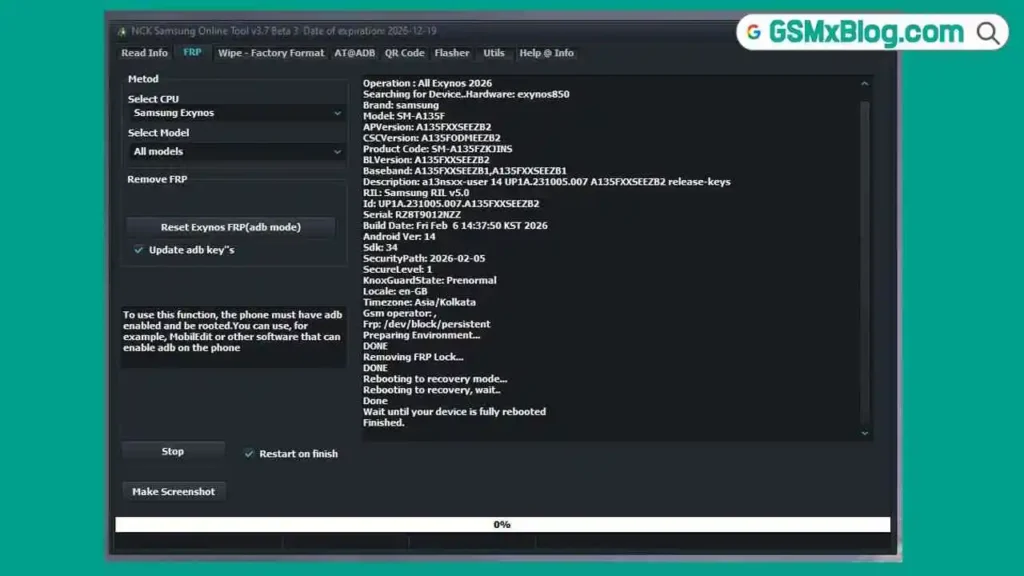
NCK Online Samsung Tool is a dedicated Windows-based Samsung repair utility developed by the NCK Team. It targets the three core daily Samsung repair operations — Read Info, Factory Reset, and FRP Bypass — across both Exynos and Qualcomm Samsung devices, with a clean tabbed interface that separates operations by chipset type.
Version 3.7 is a significant update that introduces the new Exynos 2026 FRP Reset method — a third-party ADB-enabled approach that removes the requirement for ADB authorization confirmation on the device screen. This alone resolves one of the most common bottlenecks in Samsung Exynos FRP jobs where the device screen is unresponsive or completely broken. On the Qualcomm side, v3.7 expands the supported model list to include Galaxy Z Flip 3/4/6, Z Fold 4/5/6, Galaxy S22+, S23 series, Tab A7, Tab A9+, and several A and M series models at specific BIT levels.
The tool operates on the standard NCK credit-based activation system with accounts available through the authorized NCK reseller network.
Key Features of NCK Online Samsung Tool v3.7
📱 Read Device Information
- Read complete Samsung device info including model name, software version, IMEI, and hardware details
- Improved Download Mode info reading in v3.7 — now pulls more data including model name and software version strings that were previously unavailable
- Works across both Exynos and Qualcomm Samsung models
🔄 Factory Reset
- Full factory reset across supported Samsung Exynos and Qualcomm models
- Clears user data, screen locks, and settings
- Useful for pre-FRP bypass preparation and post-repair device cleanup
🔓 FRP Bypass
- Samsung Exynos FRP Reset — Exynos 2026 Method (New in v3.7)
- Uses third-party software to enable ADB on the device
- Navigate to: FRP Reset → Method → Exynos 2026
- No ADB Authorization prompt required on the device screen — critical for broken-screen or unresponsive device FRP jobs
- Covers 28 Exynos platforms from Exynos 7570 through Exynos W1000
- Samsung Qualcomm FRP Reset across expanded model and BIT level support added in v3.7
Supported Exynos Chipsets – FRP Reset (Exynos 2026 Method)
| Exynos Platform | Supported |
|---|---|
| Exynos 7570 | ✅ |
| Exynos 7870 | ✅ |
| Exynos 7880 | ✅ |
| Exynos 7884 | ✅ |
| Exynos 7885 | ✅ |
| Exynos 7904 | ✅ |
| Exynos 850 | ✅ |
| Exynos 9610 | ✅ |
| Exynos 9611 | ✅ |
| Exynos 980 | ✅ |
| Exynos 9810 | ✅ |
| Exynos 9820 | ✅ |
| Exynos 9825 | ✅ |
| Exynos 990 | ✅ |
| Exynos 1280 | ✅ |
| Exynos 1330 | ✅ |
| Exynos 1380 | ✅ |
| Exynos 1480 | ✅ |
| Exynos 1580 | ✅ |
| Exynos 2100 | ✅ |
| Exynos 2200 | ✅ |
| Exynos 2400 | ✅ |
| Exynos 2500 | ✅ |
| Exynos 8890 | ✅ |
| Exynos 8895 | ✅ |
| Exynos W920 | ✅ |
| Exynos W930 | ✅ |
| Exynos W1000 | ✅ |
Newly Added Samsung Qualcomm Models (v3.7)
| Device | Model | BIT |
|---|---|---|
| Galaxy A23 | SM-A235M | BIT F |
| Galaxy A73 | SM-A736B | BIT B |
| Galaxy F23 | SM-E236B | BIT E |
| Galaxy Z Flip 3 | SM-F711B | BIT H |
| Galaxy Z Flip 4 | SM-F721N | BIT 7 |
| Galaxy Z Flip 6 | SM-F741B | BIT 3 |
| Galaxy Z Fold 4 | SM-F936N | BIT 7 |
| Galaxy Z Fold 5 | SM-F946N | BIT 6 |
| Galaxy Z Fold 6 | SM-F956B | BIT 3 |
| Galaxy M14 4G | SM-M145F | BIT B |
| Galaxy M23 | SM-M236B | BIT E |
| Galaxy M55 | SM-M556E | BIT 5 |
| Galaxy S22+ | SM-S906E | BIT D |
| Galaxy S23 | SM-S911B | BIT 9 |
| Galaxy S23 5G | SM-S911U | BIT 7 |
| Galaxy S23+ | SM-S916B | BIT 9 |
| Galaxy Tab A7 LTE | SM-T505C | BIT 7 |
| Galaxy Tab A9+ | SM-X210R | BIT 6 |
What’s New in v3.7
- ✅ Samsung Exynos FRP Reset via new Exynos 2026 method — third-party ADB, no authorization prompt required
- ✅ 28 Exynos platforms supported from Exynos 7570 to Exynos W1000
- ✅ 18 new Samsung Qualcomm models added across A, F, M, S, Z, and Tab series
- ✅ Improved Read Info in Download Mode — now reads model name, software version, and more
- ✅ Improved GUI with general bugfixes and performance improvements
Download NCK Online Samsung Tool v3.7
- File Name: NCKOnline_Tool_Samsung_installer_v3.7.rar
- Version: v3.7
- File Size: 72.0 MB
- RAR Password: NckTeam
- Platform:Windows PC
- Activation: Credit-Based Account System
- Developer: NCK Team
How to Install NCK Online Samsung Tool v3.7
- Download the NCKOnline_Tool_Samsung_installer_v3.7.rar file using the link above.
- Extract the RAR file using WinRAR or 7-Zip with the password: NckTeam
- Open the extracted folder and locate the setup installer file.
- Right-click the installer and select Run as Administrator.
- Follow the on-screen installation steps to complete the setup.
- Once installed, launch the tool from the installation directory.
- Register a new NCK account or log in with existing credentials.
- Purchase credits through any authorized NCK reseller to activate operations.
- Connect your Samsung device via USB and select the required operation. ✅
Note: Install the correct Samsung USB Driver on your Windows PC before connecting any device. This ensures proper detection in Download Mode and ADB mode.
How to Use NCK Online Samsung Tool v3.7
▶️ FRP Reset – Samsung Exynos (Exynos 2026 Method)
- Open NCK Online Samsung Tool and log in with your activated account.
- Navigate to FRP Reset → Method → Exynos 2026.
- Follow the on-screen instructions to enable ADB on the device using the required third-party software (as guided by the tool’s log panel).
- Connect the Samsung Exynos device to your PC via USB.
- The tool establishes ADB connection — no ADB authorization prompt appears on the device screen.
- Click FRP Reset and wait for the operation to complete.
- Reboot the device — FRP lock will be cleared. ✅
Tip: This method is particularly useful for Samsung Exynos devices with broken or unresponsive screens where tapping “Allow” on an ADB prompt is not possible.
▶️ FRP Reset – Samsung Qualcomm
- Go to the Qualcomm or Samsung tab.
- Select your device model from the supported list.
- Boot your Samsung device into Download Mode.
- Connect via USB — the tool detects the device automatically.
- Select FRP Reset and confirm the operation.
- Wait for completion and reboot. ✅
▶️ Read Device Info – Download Mode
- Navigate to Read Info in the tool.
- Boot your Samsung device into Download Mode.
- Connect via USB.
- Click Read Info — the tool reads model name, software version, IMEI, and hardware details from the device.
- All data populates in the log panel. ✅
▶️ Factory Reset – Samsung Device
- Select the appropriate chipset tab (Exynos or Qualcomm).
- Boot your Samsung device into Download Mode or the required mode as indicated.
- Connect via USB.
- Click Factory Reset and confirm.
- Wait for the process to complete and reboot. ✅
System Requirements
| Component | Requirement |
|---|---|
| OS | Windows 7 / 8 / 10 / 11 (32-bit & 64-bit) |
| Processor | Intel / AMD Dual-Core or faster |
| RAM | 2 GB minimum (4 GB recommended) |
| Storage | 200 MB free space |
| USB Port | USB 2.0 or USB 3.0 |
| Internet | Required for login and credit-based operations |
⚠️ Warning
Always verify the exact device model number and BIT level before running any FRP or factory reset operation. Running an operation on a mismatched BIT level or unsupported variant can result in a bootloop or soft brick. The Exynos 2026 FRP method requires third-party ADB software — follow the tool’s on-screen guidance carefully and do not skip steps. Do not disconnect the USB cable during any active operation. This tool is intended for trained mobile technicians only.
Important Notes
🛡️ Antivirus Note: The tool installer may be flagged by antivirus software as a false positive due to its ADB and Download Mode communication routines. Use on a dedicated repair PC with standard caution.
📌 Credit: Full development credit goes to the NCK Team for developing and maintaining NCK Online Samsung Tool.
💳 Credit System: The installer download is free. All Read Info, Factory Reset, and FRP operations consume credits purchased through authorized NCK resellers.
🔑 RAR Password: The archive password is NckTeam — enter it exactly when extracting the RAR file.
⚠️ BIT Level Matters: Each Qualcomm model entry in v3.7 is tested and confirmed for a specific BIT level. Always check your device’s current software BIT before selecting an operation.
Frequently Asked Questions (FAQs)
❓ What is NCK Online Samsung Tool used for? It is a professional Windows-based Samsung repair tool for Read Info, Factory Reset, and FRP Bypass across Samsung Exynos and Qualcomm devices — covering both budget and flagship Samsung Galaxy models.
❓ What is the Exynos 2026 FRP method? The Exynos 2026 method is a new FRP bypass approach introduced in v3.7 that uses third-party software to enable ADB on the device without requiring the user to tap “Allow” on an ADB authorization prompt. This makes it usable on devices with broken or unresponsive screens.
❓ How many Exynos chipsets are supported? Version 3.7 supports 28 Exynos platforms — from Exynos 7570 (budget A-series) through Exynos W1000 (Galaxy Watch) covering the full range of Samsung Exynos devices currently in active repair circulation.
❓ Does the tool support Galaxy Z Fold and Z Flip series? Yes. v3.7 adds Qualcomm support for Galaxy Z Flip 3 (SM-F711B BIT H), Z Flip 4 (SM-F721N BIT 7), Z Flip 6 (SM-F741B BIT 3), Z Fold 4 (SM-F936N BIT 7), Z Fold 5 (SM-F946N BIT 6), and Z Fold 6 (SM-F956B BIT 3).
❓ What improved in Download Mode reading? The v3.7 update improves Read Info in Download Mode to pull additional details including model name and software version — data that was not previously available in earlier versions.
❓ Is NCK Online Samsung Tool free? The installer is free to download and extract. All device operations (Read Info, Factory Reset, FRP) require credits purchased through authorized NCK resellers.
❓ What is the RAR password? The RAR archive password is NckTeam — enter it when extracting the downloaded RAR file using WinRAR or 7-Zip.
❓ Can I use this on Windows 11? Yes. NCK Online Samsung Tool v3.7 supports Windows 7, 8, 10, and 11 in both 32-bit and 64-bit configurations.
Conclusion
NCK Online Samsung Tool v3.7 brings two major upgrades that matter directly to technicians handling Samsung repair daily — the new Exynos 2026 FRP Reset method that eliminates the ADB authorization prompt bottleneck across 28 Exynos platforms, and an expanded Qualcomm model list covering 18 new Galaxy A, M, S, Z Fold, Z Flip, and Tab devices at specific BIT levels. The improved Download Mode info reading and GUI refinements round out a solid update that makes this one of the more capable dedicated Samsung GSM tools on Windows PC in 2026.
If your repair bench handles Samsung Exynos or Qualcomm devices regularly — especially broken-screen FRP jobs or latest Galaxy Z series models — download NCK Online Samsung Tool v3.7 using the link above and activate your account through an authorized NCK reseller. 🚀
Tested it on a specific Samsung model? Drop the model number and result in the comments — your feedback helps the community confirm support across more devices.
Related Posts
- NCK Online MTK Preloader Tool v0.2.5 (Latest Version)
- MH Unlocker Pro Tool V6.9 (Latest Version)
- E-GSM Tool v19 (Latest Version)
- 360 Tool v1.2.0 (Latest Version)

![XTM GRT Dongle PRO v1.3.0 Setup Rebirth [Crack]](https://gsmxblog.com/wp-content/uploads/2025/07/xtm-grt-dongle-pro-v1-3-0-setup-rebirth-free-768x432.webp "Download XTM GRT Dongle PRO v1.3.0 Rebirth (Crack) Free – No Activation Required 4")