Download QuickADB Tool V4.0.2 – Free ADB and Fastboot Tool for Windows
If you’re tired of memorizing ADB commands every time you need to flash a partition, sideload an APK, or reboot a device into bootloader mode, QuickADB turns all of that into a one-click process. This GSM tool brings together ADB operations, Fastboot operations, and firmware flashing in one clean Windows application, making it useful for both everyday Android users and mobile technicians who handle repairs daily.
This guide covers the full feature breakdown, installation steps, and download details for QuickADB V4.0.2.
What Is QuickADB?
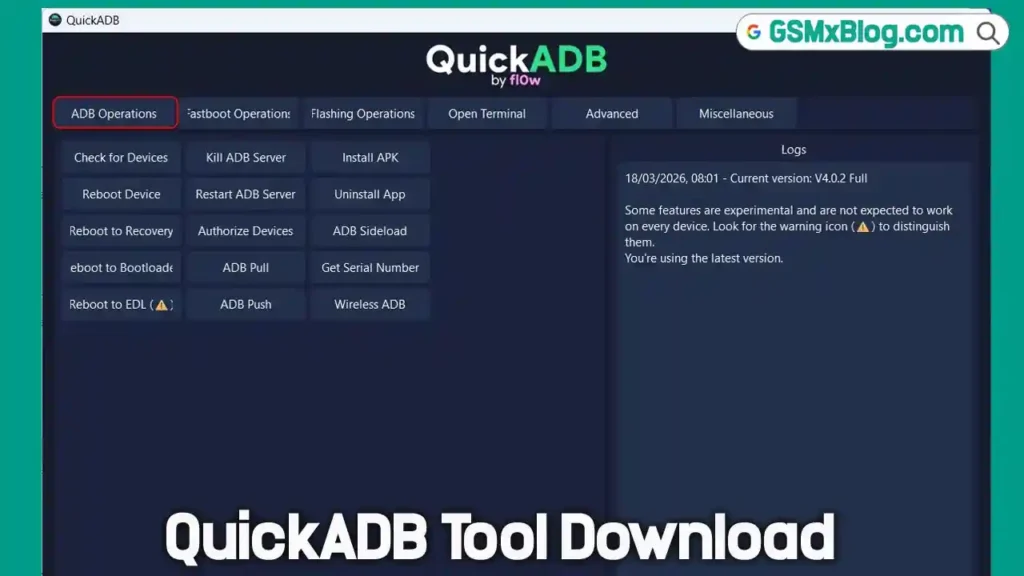
QuickADB is a portable, all-in-one ADB and Fastboot tool for Windows 10/11 developed by CodeFl0w. It lets you perform major ADB and Fastboot tasks with a single click instead of typing commands manually, covering everything from sideloading APKs and uninstalling bloatware to flashing system images and installing USB drivers. The tool also includes built-in USB drivers for all major OEMs, which explains why the package size is over 100 MB despite having a simple, plain interface.
Earlier versions of QuickADB were unstable, but the latest release is faster, more reliable, and packed with more features than before.
Key Features of QuickADB
QuickADB organizes its functions into five sections, covering more than 65 tasks in total without needing a single manual command.
📲 ADB Operations
- Check for Devices
- Reboot Device / Recovery / Bootloader / EDL
- Kill ADB Server / Restart ADB Server
- Authorize Devices
- ADB Pull / ADB Push
- Install APK / Uninstall App
- ADB Sideload
- Get Serial Number
- Wireless ADB
⚡ Fastboot Operations
- List of Fastboot Devices
- Reboot to System / Recovery / Bootloader / Fastbootd
- Get All Variables
- Get Device Codename
- Check Anti-Rollback
- Check Unlockability
- Get Token
- Check Active Slot / Activate Slot A / Activate Slot B
- Unlock Bootloader / Lock Bootloader
💾 Flashing Operations
QuickADB offers 24+ flashing options, including Boot, init_boot, System, Vbmeta, Vbmeta_system, Vbmeta_vendor, Cust, Userdata, Preloader, Logo, Super, Recovery, dtbo, lk, nvdata, nvram, tee, md1img, rescue, dpm, efuse, scp, spmfw, sbl, xbl, abl, and Modem.
🖥️ Open Terminal
QuickADB has the SDK Platform Tools built in, so there’s no need to separately download Android SDK Platform Tools. Clicking Open Terminal launches a command window directly from the platform tools directory, without needing to add anything to your system PATH.
🛠️ Advanced Functions
- Dump payload.bin
- Dump super.img
- Get Device Info
- GSI (Google System Image) Flasher
- App Manager
- File Explorer
Download QuickADB V4.0.2
- File Name: QuickADB.exe
- Version: V4.0.2
- File Size: 70 MB
- Platform: Windows 10/11
How to Install and Use QuickADB
- Download QuickADB_V4.0.2.exe from the link above.
- Double-click the file to launch the program.
- If Windows Defender SmartScreen blocks the app with a “Windows protected your PC” warning, unblock the app from its Properties or temporarily disable your antivirus to bypass the false positive. This happens because the tool is compiled with PyInstaller and isn’t digitally signed.
- On your Android phone, enable USB Debugging from Developer Options.
- Connect your phone to your Windows PC via USB.
- Authorize the ADB connection when the prompt appears on your device screen.
- Once authorized, QuickADB is ready to use.
Why QuickADB Is Useful for Android Repair
For any mobile technician or Android enthusiast who regularly works with ADB and Fastboot, QuickADB removes the need to memorize or type commands for routine tasks. Compared to similar utilities, it offers a broader feature set in one place — covering device operations, partition flashing, bootloader management, and even GSI flashing — all through a simple graphical interface rather than a terminal window.
System Requirements
| Component | Requirement |
|---|---|
| OS | Windows 10 / 11 |
| File Size | 70 MB |
| USB Port | USB 2.0 or 3.0 |
| Device Setting | USB Debugging enabled (Developer Options) |
⚠️ Warning
Antivirus software like Kaspersky, McAfee, or Windows Defender may flag QuickADB as a Trojan because the tool isn’t digitally signed. This is a known false positive caused by the PyInstaller compilation, not an indication of malicious code. Always download QuickADB only from the official GitHub source linked above.
Important Notes
🛡️ Antivirus Flag: QuickADB may trigger a false positive warning since it lacks a code signature. Unblock it from file Properties or use a dedicated repair PC. 📌 Credit: QuickADB is developed and maintained by CodeFl0w. 🔌 USB Driver: QuickADB includes built-in USB drivers for all major OEMs, so a separate driver installation usually isn’t required.
Frequently Asked Questions (FAQs)
❓ Is QuickADB free to download? Yes, QuickADB is a free, portable tool available directly from its official GitHub releases page.
❓ Why does QuickADB get flagged by antivirus software? Because it’s compiled with PyInstaller and has no digital signature, which causes some antivirus tools to flag it as a false positive Trojan.
❓ Do I need to install Android SDK Platform Tools separately? No. QuickADB has the SDK Platform Tools built in, so ADB and Fastboot commands work out of the box.
❓ Does QuickADB support Fastboot operations? Yes, but Fastboot functions only work when the connected device is booted into Fastboot mode.
❓ How many features does QuickADB offer in total? QuickADB offers more than 65 ADB, Fastboot, and flashing-related tasks across its five main sections.
Related Posts
Conclusion
QuickADB V4.0.2 brings together ADB operations, Fastboot operations, and firmware flashing in one simple, free Windows tool, making it a strong addition to any Android repair or flash tool kit. With built-in USB drivers, a terminal shortcut, and over 65 one-click functions, it saves real time for any mobile technician who works with ADB and Fastboot regularly. If commands aren’t your thing, download QuickADB V4.0.2 and get the same results with a few clicks.