Download MR GSM PRO v9.1.0.0 (Latest Version) Free 2026 – iPhone iCloud Bypass Tool
Are you looking for the most complete and up-to-date iPhone and iPad iCloud bypass, jailbreak, and MDM removal tool in 2026? The MR GSM PRO v9.1.0.0 is a powerful Windows-based tool used by Apple device repair technicians worldwide — covering iCloud bypass, RAMDisk operations, jailbreak, FMI OFF, MDM bypass, IMEI repair, and much more across iOS 12 all the way to iOS 18xx.
The latest v9.1.0.0 update brings A5/A6 chip bypass support without Arduino, full automatic A12+ bypass up to iOS 26.2 Beta 1, Checkm8 jailbreak for iOS 15–18xx, and no Gestalt Dump file requirement — making it one of the most advanced and accessible iPhone repair tools available in 2026. In this guide, you’ll find the full feature list, what’s new, supported devices, step-by-step installation, and download links.
What Is MR GSM PRO?
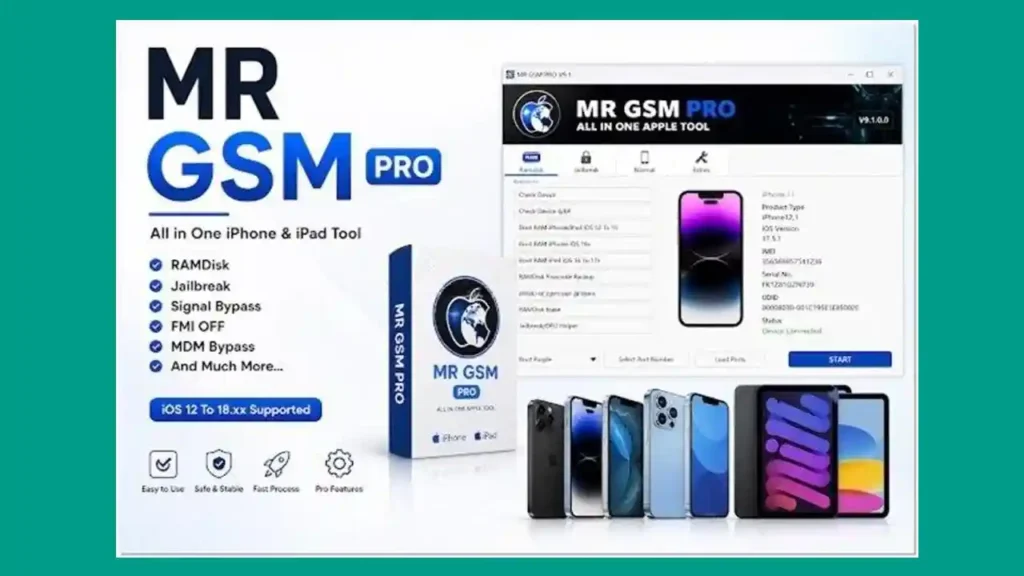
MR GSM PRO is a professional Windows-based iPhone and iPad repair software designed for mobile technicians and Apple device repair shops. It brings together multiple Apple repair functions — iCloud bypass, RAMDisk, jailbreak, MDM removal, FMI OFF, passcode backup, and more — into a single clean interface.
It supports a massive range of Apple devices from iPhone 4 (A5) all the way to iPhone 17 Pro Max and covers iOS 12 through iOS 18xx, making it one of the broadest coverage tools for Apple repair available today.
🔑 Key advantage: MR GSM PRO v9.1.0.0 requires no Gestalt Dump file and features a fully automatic process for A12+ bypass — saving technicians significant time on every job.
Key Features of MR GSM PRO v9.1.0.0
💾 RAMDisk Options
- Check Device — verify device status and compatibility
- Check Device 6/6P — specific check for iPhone 6/6 Plus
- Boot RAM iPhone/iPad iOS 12 to 15
- Boot RAM iPhone iOS 16x
- Boot RAM iPad iOS 16 to 17x
- RAMDisk Passcode Backup — back up passcode via RAMDisk
- RAMDisk Passcode Activate — activate device using RAMDisk
- RAMDisk Erase — wipe device data via RAMDisk
- Jailbreak / DFU Helper — assist with jailbreak and DFU entry
🔓 Jailbreak Options
- Read Info — pull complete device information
- Bypass GSM Signal iOS 12 to 14.5
- Bypass No Signal MEID iOS 12 to 14.8
- Bypass 6S to X & iPads iOS 15 to 18xx
- Fix iCloud Login iOS 12 to 18xx
📱 Normal Mode Options
- Bypass A5/A6 CPU — No Arduino Required (new in v9.0)
- Verify Compatibility 6S to 17 Pro Max
- Bypass 6S to X — No Jailbreak 2026
- Bypass XR to 17 Pro Max / iPads A12+
- Fix iCloud Login After Bypass
- Open Menu FMI OFF
- MDM Bypass — No Jailbreak required
- Erase Device
⚡ Extra Functions
- Boot Purple mode support
- Select Port Number manually
- Load Ports automatically
- Change SN (Serial Number)
- Factory Reset
- Fix Diag Recovery
- CheckM8 Device Support
- Hello Screen Without Signal Bypass
- Passcode With Signal Bypass
- Full support for iOS 12 to 18xx
What’s New in MR GSM PRO v9.1.0.0
🔓 Checkm8 Jailbreak — iOS 15 to 18.xx
Added full Checkm8 jailbreak support for all compatible devices running iOS 15 through iOS 18.xx — significantly expanding jailbreak coverage for older Checkm8-compatible hardware on newer iOS versions.
📱 A12+ Bypass — iOS 14 to 26.2 Beta 1
Added A12+ Bypass support extended all the way up to iOS 26.2 Beta 1, covering iPhone XR through iPhone 17 Pro Max — the widest iOS version coverage this tool has ever offered.
⚡ No Gestalt Dump File Required
The new bypass process is now fully automatic — no Gestalt Dump file preparation needed. This removes one of the most time-consuming steps in the previous workflow, making bypass jobs significantly faster and simpler.
🔌 Open Menu USB Method — iOS 14 to 26xx
Added Open Menu USB Method support for iOS 14 through iOS 26xx — providing an additional bypass pathway for supported devices on the latest iOS versions.
📲 A5/A6 Chip Bypass — No Arduino, No Signal
Added iPhone A5/A6 chip Hello Screen bypass without requiring Arduino hardware and without needing a signal — a major improvement for technicians working on older iPhone 4, 4S, 5, 5C, iPad 2, 3, 4, and iPod Touch 5th Gen devices.
🔧 iPhone 6S to X — Hello Bypass Without JB & No Signal
Added iPhone 6S through iPhone X Hello bypass without jailbreak and without signal requirement — making the bypass process on this device range faster and more accessible.
✅ iPhone 6S to 17 Pro Max — Fix iCloud Login
Added full Fix iCloud Login support covering iPhone 6S all the way through iPhone 17 Pro Max — ensuring post-bypass iCloud login functionality works correctly across the entire supported device range.
📋 Full Changelog v9.1.0.0
- ✅ Added Checkm8 jailbreak for iOS 15 to 18.xx
- ✅ Added A12+ Bypass for iOS 14 to 26.2 Beta 1
- ✅ No Gestalt Dump file required — fully automatic process
- ✅ Added Open Menu USB Method for iOS 14 to 26xx
- ✅ Added A5/A6 Hello Bypass without Arduino and without signal
- ✅ Added iPhone 6S to X Hello Bypass without JB/signal
- ✅ Added iPhone 6S to 17 Pro Max iCloud Login Fix
- ✅ General stability and performance improvements
Download MR GSM PRO v9.1.0.0
- File Name: MR_GSM_PRO_v9.1.exe
- Version: v9.1.0.0 (Latest 2026)
- Platform: Windows (64-bit)
- Tool Type: iPhone / iPad Repair Tool
- Price: Free (with shared login)
- RAR Password: softwarecrackguru
- Login Username: gsmyogesh@free.com
- Login Password: 12345678
How to Install MR GSM PRO v9.1.0.0
- Download the setup file using the links above. Extract using the password
softwarecrackguruif prompted. - Run
MR_GSM_PRO_v9.1.exeas Administrator. - The setup wizard opens — click “Next” to proceed.
- Select installation folder or keep the default path, then click “Next.”
- Select additional tasks — Create Desktop Icon and Create Start Menu Folder — then click “Next.”
- Click “Install” and wait for installation to complete.
- Click “Finish” when done.
- Open the “MRGSM Launch” shortcut from your Desktop.
- Wait until the MR GSM V9.1 loader opens and all modules become active.
- Login using the credentials above and click “Sign In.”
- Connect your iPhone or iPad via USB — the tool is ready! ✅
⚠️ Important Notes:
- Always run as Administrator for proper operation
- Keep internet enabled during login
- If a module error appears, click OK and reopen the tool
- Use an original Apple USB cable for stable device connection
How to Use MR GSM PRO v9.1.0.0
▶️ iCloud Bypass (A12+ — iPhone XR to 17 Pro Max)
- Open MR GSM PRO and log in.
- Connect iPhone via USB.
- Go to Normal Mode tab.
- Select “Bypass XR To 17 Pro Max / iPads A12+”
- Follow on-screen instructions — process is fully automatic.
- Wait for completion — device will show Home Screen. ✅
▶️ iCloud Bypass (iPhone 6S to X — No Jailbreak)
- Open the tool and connect device via USB.
- Go to Normal Mode tab.
- Select “Bypass 6S To X No Jailbreak 2026.”
- Follow the on-screen steps carefully.
- Wait for the process to complete and reboot.
▶️ A5/A6 Bypass (No Arduino)
- Connect your A5/A6 iPhone (4, 4S, 5, 5C) via USB.
- Go to Normal Mode tab.
- Select “Bypass A5/A6 CPU No Arduino.”
- Follow the on-screen instructions.
- Device will complete bypass automatically — no Arduino hardware required. ✅
▶️ RAMDisk Passcode Backup
- Connect device via USB.
- Go to the RAMDisk tab.
- Select your iOS version and click “Boot RAM.”
- Once booted into RAMDisk, click “RAMDisk Passcode Backup.”
- Wait for the backup process to complete.
▶️ MDM Bypass (No Jailbreak)
- Connect device via USB.
- Go to Normal Mode tab.
- Select “MDM Bypass No JB.”
- Follow on-screen steps.
- Device will reboot with MDM removed. ✅
▶️ Fix iCloud Login After Bypass
- After completing bypass, go to Normal Mode tab.
- Select “Fix iCloud Login After Bypass.”
- Follow the on-screen instructions.
- Device will reboot — iCloud login will now work correctly.
Supported Apple Devices
📱 iPhone Models
| Series | Models |
|---|---|
| iPhone 4/4S | A5 chip — bypass supported |
| iPhone 5/5C | A6 chip — bypass supported |
| iPhone 6/6P | Full support |
| iPhone 6S/6S+ | Full bypass & jailbreak support |
| iPhone 7/7+ | Full support |
| iPhone 8/8+/X | Full bypass & jailbreak support |
| iPhone XR/XS/XS Max | A12+ bypass supported |
| iPhone 11 Series | A13 — full support |
| iPhone 12 Series | A14 — full support |
| iPhone 13 Series | A15 — full support |
| iPhone 14 Series | A15/A16 — full support |
| iPhone 15 Series | A16/A17 — full support |
| iPhone 16 Series | A18 — full support |
| iPhone 17 Pro Max | Latest — full support |
📱 A5 Chip Devices
- ✅ iPhone 4
- ✅ iPhone 4S
- ✅ iPad Mini 1
- ✅ iPad 2
- ✅ iPad 3
- ✅ iPod Touch 5th Gen
📱 A6 Chip Devices
- ✅ iPhone 5
- ✅ iPhone 5C
- ✅ iPad 4
📱 iPad Support
- ✅ iPads — iOS 12 to 15
- ✅ iPads — iOS 15 to 18xx
- ✅ iPads — A12+ (iOS 14 to 26.2 Beta 1)
- ✅ iPads — iOS 16 to 17x
📱 Supported iOS Versions
- ✅ iOS 12 to 14.5 (GSM Bypass)
- ✅ iOS 12 to 14.8 (MEID Bypass)
- ✅ iOS 12 to 15 (RAMDisk)
- ✅ iOS 15 to 18xx (Jailbreak & Bypass)
- ✅ iOS 16x (RAMDisk iPhone)
- ✅ iOS 16 to 17x (RAMDisk iPad)
- ✅ iOS 14 to 26.2 Beta 1 (A12+ Bypass)
- ✅ iOS 12 to 18xx (Full General Support)
System Requirements
| Component | Requirement |
|---|---|
| OS | Windows 10 / 11 (64-bit) |
| Processor | Intel / AMD Dual-Core or faster |
| RAM | 4 GB minimum (8 GB recommended) |
| Storage | 500 MB free space |
| USB Port | USB 2.0 or 3.0 (direct port preferred) |
| Cable | Original Apple USB cable recommended |
| Internet | Required for login and module activation |
⚠️ Warning
MR GSM PRO is a professional Apple device repair tool intended for use by authorized mobile technicians only. Always ensure you have the legal right and proper authorization to perform any operation on the device being serviced. Bypassing iCloud Activation Lock on devices you do not own or have no authorization to service may violate Apple’s Terms of Service and local laws. The developer and this blog are not responsible for any misuse of this software.
Important Notes
🛡️ Virus Status: This tool was scanned with Kaspersky Antivirus before uploading — 100% safe to use. Temporarily disable antivirus during extraction if needed.
📌 Credit: Full credit goes to the MR GSM PRO Team for developing and maintaining this tool.
🔌 iTunes / Apple Drivers: Ensure iTunes or Apple Mobile Device Support is installed on your PC before connecting any iPhone or iPad. Missing Apple drivers are the most common cause of device detection failures.
Why Use MR GSM PRO v9.1.0.0?
- ✅ Supports iPhone 4 (A5) to iPhone 17 Pro Max in one tool
- ✅ Covers iOS 12 all the way to iOS 26.2 Beta 1
- ✅ No Gestalt Dump file required — fully automatic A12+ bypass
- ✅ A5/A6 bypass without Arduino — saves hardware cost
- ✅ Covers RAMDisk, Jailbreak, FMI OFF, MDM, and iCloud bypass in one place
- ✅ Checkm8 jailbreak support for iOS 15–18xx
- ✅ Regular updates — stays current with latest iOS versions
- ✅ Clean, tabbed interface — easy for both beginners and pros
Frequently Asked Questions (FAQs)
❓ Is MR GSM PRO v9.1.0.0 free? Yes — the tool can be accessed using the shared login credentials provided above. Download is completely free.
❓ Does it support the latest iPhone 17 Pro Max? Yes. MR GSM PRO v9.1.0.0 supports iPhone 17 Pro Max and covers iOS up to iOS 26.2 Beta 1 for A12+ bypass.
❓ Is Arduino hardware required for A5/A6 bypass? No. The new v9.0+ update added A5/A6 bypass without Arduino — no additional hardware needed.
❓ Does A12+ bypass require a Gestalt Dump file? No. The new fully automatic process in v9.1.0.0 eliminates the need for Gestalt Dump files entirely.
❓ Can I fix iCloud login after bypass? Yes. MR GSM PRO includes a dedicated “Fix iCloud Login After Bypass” function for iPhone 6S through 17 Pro Max.
❓ Why is my iPhone not detected? Ensure iTunes or Apple Mobile Device Support is installed, use an original Apple cable, run the tool as Administrator, and ensure the phone is powered on and unlocked when connecting.
❓ Does the MDM bypass require jailbreak? No. MR GSM PRO includes a “MDM Bypass No JB” option that works without jailbreaking the device.
❓ What Windows versions are supported? MR GSM PRO works on Windows 10 and Windows 11 (64-bit). Always run as Administrator for best results.
Conclusion
MR GSM PRO v9.1.0.0 is without doubt one of the most comprehensive iPhone and iPad repair tools available for Windows in 2026. With support spanning iPhone 4 (A5 chip) all the way to iPhone 17 Pro Max, coverage from iOS 12 through iOS 26.2 Beta 1, and powerful new additions including Checkm8 jailbreak for iOS 15–18xx, no Gestalt Dump A12+ bypass, A5/A6 bypass without Arduino, and Open Menu USB Method — it covers virtually every Apple repair scenario a technician will encounter daily.
Whether you’re dealing with an iCloud-locked iPhone XR, a jailbroken iPhone 12, or a vintage iPhone 4S bypass — MR GSM PRO v9.1.0.0 handles it all from one window. Download it now using the links above and add one of the most powerful free iPhone repair tools of 2026 to your arsenal! 🚀
Have you used MR GSM PRO before? Share your experience in the comments below!
Related Posts
- RDPower LG Tool V8.3 (Latest Version)
- DFT PRO Tool V7.0.0 (Latest Version)
- Android Root Tool (ART) V4.0.1.0 (Latest Version)
- Extra-Tools SPD Diag Tool v1.0 (Latest Version)