TMT Pro Tool v3.0.0.3 (TroxMultiToolPro) Free Download – Latest Updete
Mobile technicians often face problems such as FRP lock, pattern lock, MDM restrictions, or dead phones stuck on the logo. Fixing these issues manually can take a lot of time and technical knowledge.
TMT Pro Tool v3.0.0.3 (2026) is a powerful Android servicing software designed for mobile repair shops and technicians. It supports Qualcomm, Mediatek (MTK), Unisoc (SPD), and Hisilicon devices and allows users to perform tasks like FRP reset, firmware flashing, IMEI repair, network unlock, and bootloader operations.
With support for Android 15 and the latest Snapdragon, MTK, and Unisoc CPUs, this tool makes smartphone servicing faster and easier.
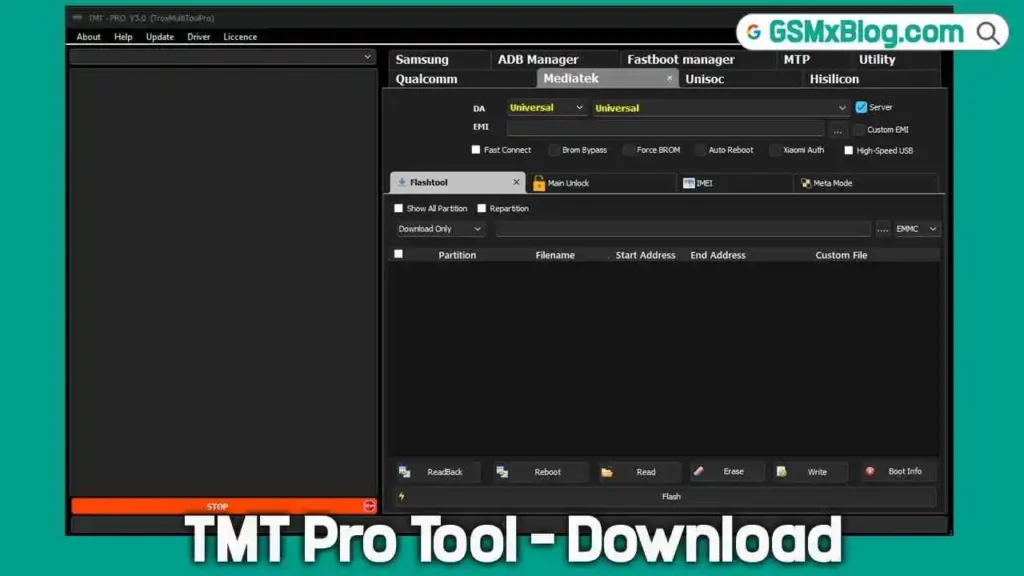
Key Features of TMT Pro Tool v3.0.0.3
Advanced Phone Unlocking
- Remove Pattern Lock / PIN Lock
- Bypass Google Account (FRP)
- Remove Huawei ID and Mi Cloud
- Unlock bootloader or relock bootloader
FRP & Security Lock Removal
- Remove MDM Lock
- Remove PayJoy Lock
- Remove IT Admin Lock
- Samsung KG Lock Removal
- Works on Android 12 to Android 16
Firmware Flashing
- Flash firmware for Qualcomm, MTK, and Unisoc devices
- Fix bootloop or logo stuck phones
- Restore damaged firmware
- Partition read, write, and erase functions
IMEI Repair & Network Fix
- Repair single or dual IMEI
- QCN read/write
- Fix unknown baseband issues
- Network unlock support
Device Maintenance Tools
- Factory reset phones
- Backup and restore EFS data
- Fix System Destroyed error
- Format devices via Fastboot or ADB
Download TMT Pro Tool – Latest Updete
- File Name: TMT-PRO_Tool_V3.0.0.3.zip
- Version: V3.0.0.3
- File Size: 146.12MB
How to Install TMT Pro Tool
Follow these simple steps to install the software:
- Download the setup file from the Download Page.
- Extract the ZIP file if required.
- Open the TMT-PRO.exe file.
- Click Next → Next → Install.
- Wait for the installation to complete.
Once finished, the tool icon will appear on your desktop.
How to Use TMT Pro Tool (Quick Guide)
- Right-click the TMT Pro Tool icon.
- Select Run as Administrator.
- The login screen will appear.
- Click Register to create an account.
- Verify your email address.
- Log in using your email and password.
You will get a 30-day free account to use the tool.
Supported Phone Brands
TMT Pro Tool supports many popular Android brands including:
- Samsung
- Xiaomi
- Oppo
- Realme
- OnePlus
- Motorola
- Tecno
- Infinix
- Itel
- Huawei
- Honor
CPU Support
Qualcomm Snapdragon
Supported processors include:
- Snapdragon 662 / 6s 4G Gen
- Snapdragon 695 5G
- Snapdragon 7+ Gen 3
- Snapdragon 888 / 888 Plus
- Snapdragon 8+ Gen 1
- Snapdragon 8 Gen 2
- Snapdragon 8+ Gen 2
- Snapdragon 8 Gen 3
- Snapdragon 8s Gen 4
Mediatek (MTK)
Supports many MTK chipsets including:
- MT6789
- MT6835
- MT6855
- MT6878
- MT6886
- MT6893
- MT6895
- MT6896
- MT6897
- MT6983
- MT6985
- MT6989
- MT6993
Unisoc (SPD)
Supported CPUs include:
- T760
- T820
- T606 V2
- T610 V2
- T616 V2
TMT Pro Tool v3.0.0.3 Changelog (March 2026)
Release Date: 04 March 2026
New improvements in this update include:
- Added Android 15 support
- Improved Qualcomm Snapdragon compatibility
- Added support for new CPUs and devices
- Improved tool stability and performance
- Added new support for Oppo, Realme, and OnePlus models
- Added MDM support for all OS versions
- Supports latest security patches
Conclusion
TMT Pro Tool v3.0.0.3 (2026) is a powerful Android servicing software for mobile technicians and repair shops. It supports a wide range of devices and CPUs and provides essential features like FRP bypass, firmware flashing, IMEI repair, bootloader unlock, and MDM removal.
With support for Android 15 and the latest processors, it has become a reliable tool for fixing many smartphone software issues quickly.
To get started, download the latest version from the [Download Page] or visit the [Official Website] for updates.
Frequently Asked Questions (FAQ)
Is TMT Pro Tool free?
Yes. New users can get a 30-day free account after registering on the official website.
Which Android versions are supported?
The latest version supports Android 12 to Android 16, including Android 15.
Can TMT Pro Tool remove FRP lock?
Yes. The tool can remove Google FRP lock from many Android devices.
Does it support Samsung KG lock removal?
Yes. It supports Samsung KG lock removal using multiple methods.
Can it repair IMEI numbers?
Yes. The tool supports IMEI repair for Qualcomm and MTK devices.