EMT Tool v4.08.00 (EME Mobile Tool) Latest Version Free Download
If you’re searching for a powerful all-in-one mobile servicing utility, EMT Tool v4.08.00 is the latest update you shouldn’t miss. This version introduces major improvements in speed, stability, and device compatibility, especially for OPPO, Realme, and OnePlus smartphones. With no login or credits required, EMT Tool makes advanced operations like flashing, factory reset, and FRP removal simple and efficient. Whether you’re a professional technician or an advanced user, this update ensures reliable and smooth performance.
What Is EMT Tool?
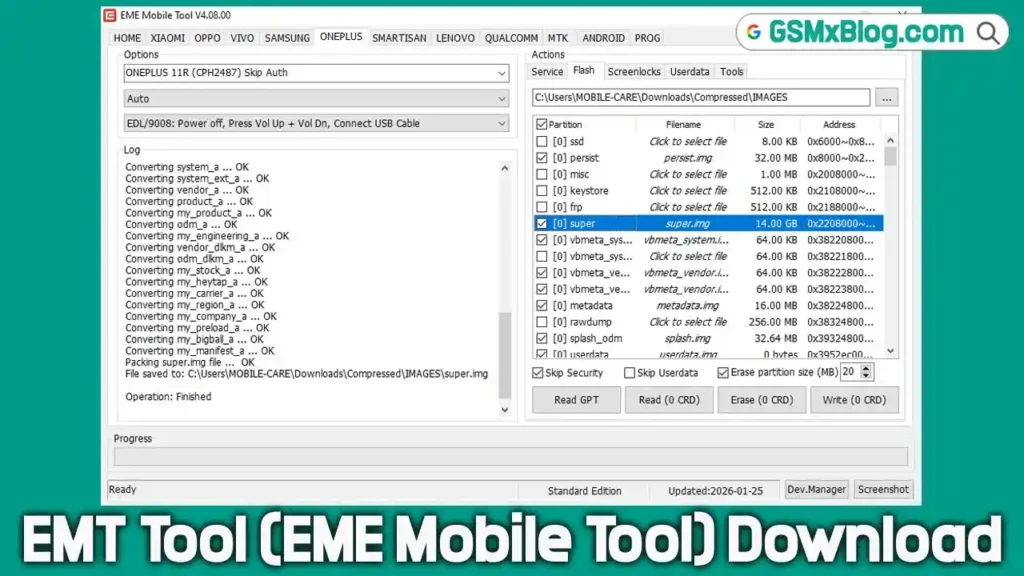
EMT Tool (EME Mobile Tool) is a professional mobile repair and flashing software designed primarily for Qualcomm-based devices. It allows users to flash firmware, read and write partitions, reset FRP locks, and perform factory resets without authentication on supported models. Due to its clean interface, powerful modules, and frequent updates, EMT Tool is widely trusted by mobile repair technicians.
Key Features of EMT Tool v4.08.00
- No login or credits required
- Supports OPPO, Realme, and OnePlus devices
- Flash, read, erase, and write partitions
- Factory reset and FRP reset options
- EDL Mode support with No Auth solution
- New Super.img packing methods (MULTI & META)
- Improved Qualcomm protocol
- Faster performance with enhanced stability
- Bug fixes for smoother and more reliable operation
EMT Tool v4.08.00 Download
Below are the official download details for the latest version:
- File Name: EMT_V4.08.00_Setup.zip
- Version: v4.08.00
- File Size: 481.42 MB
⚠️ Note: Temporarily disable your antivirus software during installation, as some security tools may falsely flag the setup file.
How to Use EMT Tool
- Download and extract EMT_V4.08.00_Setup.zip
- Install the setup file on your Windows PC
- Run EMT Tool as Administrator
- Select the required module (OPPO / Realme / OnePlus / Qualcomm)
- Connect your smartphone in EDL Mode
- Choose the desired function (Flash, Reset FRP, Factory Reset, etc.)
- Click Start and wait for the process to finish
EMT Tool v4.08.00 – What’s New (Changelog)
✨ Added Features
OPPO / REALME / ONEPLUS
- Snapdragon 8 Gen1, 870, 865 DDR4/DDR5 series supported with No Auth solution
- Supported functions include:
- Flash
- Read / Erase / Write Partition
- Factory Reset
- Reset FRP
🆕 New Functions
- OPPO / ONEPLUS: Pack Super.img (MULTI files)
- OPPO / ONEPLUS: Pack Super.img (META files)
📲 OPPO Module (EDL Mode – No Auth / No Credits)
Supported operations:
- Flash
- Read / Erase / Write Partition
- Factory Reset
- Reset FRP
Supported Models:
- OPPO Find X5 Pro (PFEM10, CPH2305)
- Realme GT2 Pro (RMX3300, RMX3301)
📲 ONEPLUS Module (EDL Mode – No Auth / No Credits)
Supported operations:
- Flash
- Read / Erase / Write Partition
- Factory Reset
- Reset FRP
Supported Models:
- OnePlus 10 Pro (NE2210, NE2211, NE2213, NE2215, NE2217)
🔄 Improvements & Bug Fixes
- Added No Auth solution for Snapdragon 8 Gen1, 870, and 865 series
- Improved Qualcomm communication protocol
- Fixed known bugs
- Increased overall tool stability and reliability
ℹ️ Information – Packing Super.img
🔹 MULTI Files Method
- Unpack the OFP firmware file after downloading
- Open EMT Tool and select the OPPO/ONEPLUS Module
- Click Packing Super.img (MULTI files)
- Select all
super*.imgfiles from the unpacked directory - Wait until the packing process completes
Tip:
The packed super.img is non-sparse. Before flashing, edit rawprogram0.xml and change:sparse="true" ➜ sparse="false"
🔹 META Files Method
- Unzip the firmware file after downloading
- Open EMT Tool and select the OPPO/ONEPLUS Module
- Click Packing Super.img (META files)
- Select the correct
super_def.*.jsonfile from the META directory - Wait for the process to complete
Tip:
The packed super.img is non-sparse. Modify rawprogram0.xml and set:sparse="false"
Conclusion
EMT Tool v4.08.00 is a highly recommended update for users working with OPPO, Realme, and OnePlus devices. With its No Auth solution, enhanced Qualcomm support, and advanced Super.img packing options, this version delivers excellent performance and reliability.