Download ADB Master v1.0 By ALi Hassani (Latest Version) Free
Looking for a reliable tool to bypass Android FRP, remove screen locks, and fix MI Cloud issues? Download ADB Master v1.0 by ALi Hassani (Latest Version) Free – a powerful and easy-to-use software that runs on Windows and supports various Android devices. Whether you’re a mobile technician or just someone trying to regain access to your phone, ADB Master Tool offers a one-click solution for multiple Android repair functions.
In this article, you’ll find the latest download link, key features, and a step-by-step guide on how to use the tool safely and effectively.
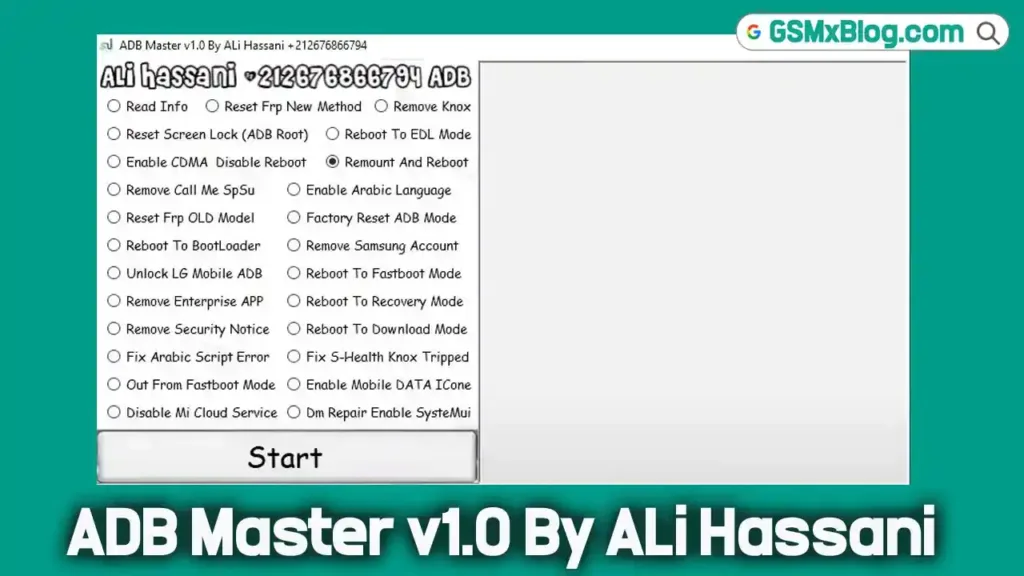
What is ADB Master v1.0 by ALi Hassani?
ADB Master v1.0 is a lightweight Windows utility designed to help users manage and repair Android devices through ADB (Android Debug Bridge) commands. Developed by ALi Hassani, this tool focuses on essential functions such as:
- FRP bypass
- Screen lock reset
- Samsung account removal
- MI Cloud disable
- DM repair
Key Features of ADB Master v1.0
ADB Master comes packed with essential tools for Android device management and troubleshooting. Here are some of its standout features:
- ✅ Read Device Info : Get detailed information about your connected Android device.
- ✅ Reset FRP Lock : Bypass Google’s Factory Reset Protection easily.
- ✅ Remove Screen Lock : Unlock your device without knowing the password.
- ✅ Disable Knox : Remove Samsung Knox restrictions.
- ✅ Enable Arabic Language : Change language settings quickly.
- ✅ Factory Reset : Perform a full factory reset directly from your PC.
- ✅ Remove Samsung Account : Log out of previously signed-in Samsung accounts.
- ✅ Reboot to Bootloader/EDL/Fastboot Modes : Useful for flashing firmware or recovery.
- ✅ Remove Enterprise Apps : Clean up unwanted enterprise applications.
- ✅ Security Notice Removal : Eliminate persistent security warnings.
- ✅ Disable MI Cloud : Sign out of Xiaomi cloud services remotely.
- ✅ DM Repair Enable : Fix Device Manager issues.
Download ADB Master v1.0 By ALi Hassani (Latest Version)
- File Name: ADB_Master_v1.0.zip
- File Size: 59 MB
- Developer: ALi Hassani
- Version: v1.0 (Latest)
- Platform: Windows (32-bit or 64-bit)
How to Use ADB Master Tool
Follow these steps to install and use the tool properly:
Download & Extract
- Download the .zip file from the link above.
- Extract the archive using WinRAR or 7-Zip.
Install USB Drivers
- Install the proper USB drivers for your Android device.
Launch the Tool
- Run
ADBService.exeas Administrator. - Wait a few seconds for the interface to load.
Connect Your Device
- Enable USB Debugging on your Android phone.
- Connect the phone to the PC via USB cable.
Choose the Operation
- Select your desired action (e.g., “Reset FRP” or “Remove Screen Lock”).
- Click the Start button and wait for the operation to complete.
Conclusion
The ADB Master v1.0 by ALi Hassani is a powerful, all-in-one tool that simplifies Android repair tasks like FRP bypass, screen lock removal, MI Cloud disabling, and more. Whether you’re a technician or a DIY user, this utility can save you hours of work.
Credits: Full credit goes to ALi Hassani, the original developer of the ADB Master Tool. Thanks to his contribution
Have questions? Drop a comment below! 🚀