Download Otako Soft Tool V2.0 (Latest Version) Free 2026
Looking for a completely free, no-activation Android repair tool for Samsung FRP bypass, Knox removal, VoLTE fixing, and Arabic language setup in 2026? The OTAKO SOFT TOOL V2.0 is a lightweight portable Windows utility — no installation, no license, no activation file required — that handles some of the most common daily repair tasks for Samsung and LG devices in just a few clicks.
Whether you need to bypass FRP via ADB or Test Mode, remove Knox, fix VoLTE IMS on Android 12+, set up Arabic language support, or simply reboot a device into EDL/Recovery/Download mode — OTAKO SOFT TOOL V2.0 covers it all through a clean, tabbed interface. In this guide you’ll find the complete feature list, step-by-step usage instructions, supported functions, and download link.
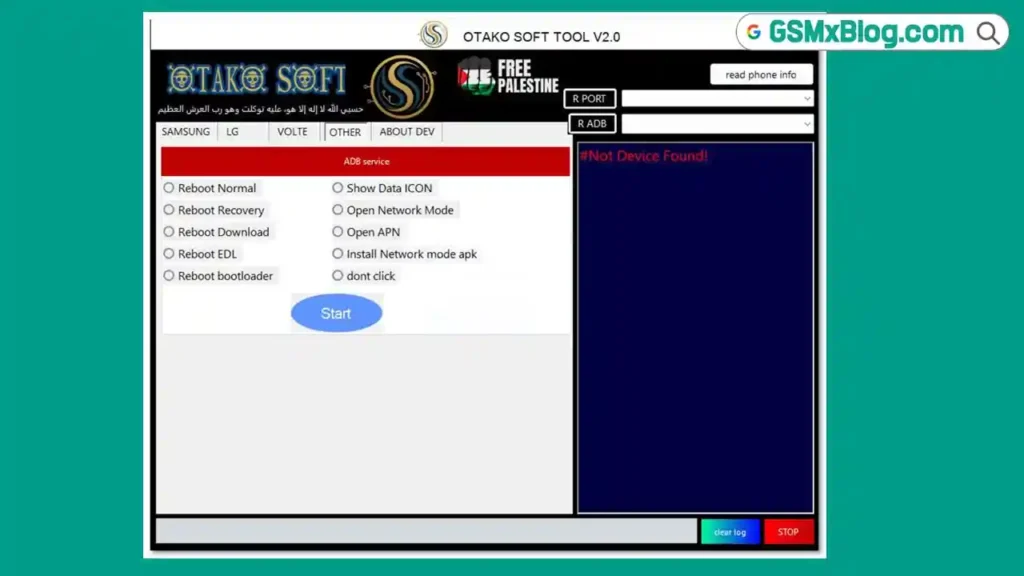
What Is OTAKO SOFT TOOL?
OTAKO SOFT TOOL V2.0 is a free portable ADB-based Android repair utility developed by the OTAKO SOFT TEAM. It is designed specifically for mobile technicians and repair shops handling Samsung and LG Android devices on a daily basis.
Unlike most repair tools that require dongles, paid licenses, or complex activation procedures, OTAKO SOFT TOOL is a completely plug-and-play portable EXE — just download, move to your desktop, run as Administrator, and start working immediately. No setup wizard, no registration, no server authentication required.
Key Features of OTAKO SOFT TOOL V2.0
📱 Samsung Features
- FRP Bypass via Test Mode — bypass Google FRP using Samsung Test Mode
- FRP Bypass via ADB — ADB-based FRP removal for Samsung devices
- Remove Knox via Test Mode — disable Samsung Knox security via Test Mode
- Remove Knox via ADB — Knox removal through ADB connection
- Enable *#0*# Verizon (Beta) — unlock hidden service menu on Verizon Samsung models
📱 LG Features
- Arabic Language Setup — add Arabic language support to LG devices
- Hidden APN Access — access hidden APN settings on LG phones
📶 VoLTE Features
- VoLTE IMS for Samsung Android < 11 (Beta) — restore VoLTE on older Samsung Android versions
- VoLTE IMS for Samsung Android ≥ 12 (Beta) — fix VoLTE on Samsung Android 12 and above
- APN VoLTE Setup — configure APN settings for VoLTE functionality
- Install Shizuku and Pixel IMS — install necessary IMS components for VoLTE activation
⚙️ Other Features (ADB Service)
- Reboot Normal — standard device restart
- Reboot Recovery — boot device into Recovery Mode
- Reboot Download — boot device into Download/Odin Mode
- Reboot EDL — force device into EDL (Emergency Download) Mode
- Reboot Bootloader — boot device into Fastboot/Bootloader Mode
- Show Data Icon — force display of mobile data icon
- Open Network Mode — access network mode settings directly
- Open APN — open APN configuration
- Install Network Mode APK — install network mode switcher application
🌐 Arabic Tools
- Arabic Language Support for Android 14 — add Arabic on latest Android versions
- Arabic UI for Android 6 and above — without theme modification
- Arabic for Android 8 — without theme modification
- Auto-Install and Set Arabic Keyboard — one-click Arabic keyboard setup
- Remove Arabic Language — cleanly uninstall Arabic language pack
- Set Arabic as Default Language — make Arabic the primary device language
- Arabic via Mobalocal Method — alternative Arabic installation method
- Fix Night Mode Issue — fix display issues after Arabic language installation
Download OTAKO SOFT TOOL V2.0
- File Name: Otako Soft V2.0.exe
- Version: V2.0
- File Size: 48.68 MB
- File Type: Portable EXE (No Installation)
- Platform: Windows (64-bit)
How to Install OTAKO SOFT TOOL V2.0
Since this is a fully portable tool, there is no traditional installation process:
- Download the
.exefile using the link above. - Move
Otako Soft V2.0.exeto your Desktop or C: drive root. - Right-click the
.exefile and select “Run as Administrator.” - The tool launches instantly — no setup, no activation, no extra files needed. ✅
- Connect your Android device via USB cable.
- If your phone shows a USB Debugging prompt, tap “Allow.”
- Select the correct tab and start using the tool!
How to Use OTAKO SOFT TOOL V2.0
▶️ Samsung FRP Bypass (ADB Method)
- Open OTAKO SOFT TOOL as Administrator.
- Enable USB Debugging on the Samsung device (Settings → Developer Options).
- Connect device via USB and wait for ADB detection.
- Go to the Samsung tab.
- Click “FRP Bypass via ADB.”
- Watch the log panel on the right — wait for “Done / Success” message.
- Reboot device — FRP bypassed! ✅
▶️ Samsung FRP Bypass (Test Mode Method)
- Open the tool and connect Samsung device.
- Go to the Samsung tab.
- Click “FRP Bypass via Test Mode.”
- Follow on-screen prompts.
- Wait for success confirmation — FRP removed! ✅
▶️ Remove Knox (Samsung)
- Connect Samsung device via USB with ADB enabled.
- Go to the Samsung tab.
- Click “Remove Knox via ADB” or “Remove Knox via Test Mode.”
- Wait for the process to complete.
- Reboot — Knox removed! ✅
▶️ Fix VoLTE (Samsung Android 12+)
- Connect Samsung device via USB.
- Enable USB Debugging.
- Go to the VoLTE tab.
- Click “VoLTE IMS for Samsung Android ≥ 12.”
- Wait for the IMS components to install.
- Reboot device — VoLTE restored! ✅
▶️ Reboot to EDL / Recovery / Download Mode
- Connect device via USB.
- Go to the Other Features (ADB Service) tab.
- Click the desired reboot mode:
- Reboot EDL — for Qualcomm EDL flashing
- Reboot Recovery — for recovery operations
- Reboot Download — for Samsung Odin flashing
- Device will switch modes automatically. ✅
▶️ Add Arabic Language (Android 14)
- Connect device via USB with ADB enabled.
- Go to the Arabic Tools tab.
- Click “Arabic Language Support for Android 14.”
- Wait for the language pack to install.
- Click “Auto-Install and Set Arabic Keyboard” for keyboard setup.
- Click “Set Arabic as Default Language” if needed.
- Reboot — Arabic fully configured! ✅
⚠️ If “Device Not Found” appears: Click “Read Phone Info” first, re-plug the USB cable, or try a different USB port. Ensure USB Debugging is enabled and authorized.
Supported Brands & Functions Summary
| Tab | Brand | Key Functions |
|---|---|---|
| Samsung | Samsung | FRP Bypass (ADB + Test Mode), Knox Remove, *#0*# Verizon |
| LG | LG | Arabic Language, Hidden APN Access |
| VoLTE | Samsung | VoLTE IMS (Android <11 & ≥12), APN VoLTE, Shizuku + Pixel IMS |
| Other (ADB) | All Android | Reboot (All modes), Data Icon, Network Mode, APN, Network APK |
| Arabic Tools | All Android | Arabic Language (Android 6–14), Keyboard, Mobalocal, Night Fix |
System Requirements
| Component | Requirement |
|---|---|
| OS | Windows 10 / 11 (64-bit) |
| Processor | Any modern Intel / AMD CPU |
| RAM | 2 GB minimum |
| Storage | 100 MB free space |
| USB Port | USB 2.0 or 3.0 |
| Cable | Good quality USB data cable (not charge-only) |
| Internet | Not required after download |
⚠️ Warning
OTAKO SOFT TOOL is designed for legitimate device repair purposes only. Always ensure you have proper authorization to perform any operation on the device being serviced. FRP and Knox removal should only be performed on devices you own or have explicit written authorization to repair. The developer and this blog are not responsible for any misuse of this software.
Important Notes
📌 Credit: Full credit goes to the OTAKO SOFT TEAM for developing and sharing this tool completely free of charge with the GSM repair community.
🔌 USB Driver: Ensure the correct Samsung USB Driver or ADB Driver is installed on your PC before connecting devices. Without proper drivers, ADB will not detect the device.
🐛 USB Debugging: For ADB-based functions, always ensure USB Debugging is enabled on the device and authorized (tap “Allow” when prompted). Without this, ADB functions will not work.
Frequently Asked Questions (FAQs)
❓ Is OTAKO SOFT TOOL V2.0 completely free? Yes — OTAKO SOFT TOOL V2.0 is 100% free. No activation, no license file, no HWID registration, and no internet connection required after download.
❓ What is the difference between FRP via ADB and FRP via Test Mode? ADB method requires USB Debugging to be already enabled on the device. Test Mode works through Samsung’s hidden test interface and can bypass FRP on devices where USB Debugging is not yet active — making it useful for locked devices.
❓ Does it support Samsung Android 14 devices? Yes — FRP bypass, Knox removal, and Arabic language tools support Samsung Android 14 devices.
❓ Can I use Arabic Tools on non-Samsung devices? Yes — Arabic Tools work on any Android device (Android 6 and above) connected via ADB, not just Samsung.
❓ Does this tool work on Windows 11? Yes — OTAKO SOFT TOOL V2.0 is compatible with Windows 10 and Windows 11 (64-bit).
Conclusion
The OTAKO SOFT TOOL V2.0 is a genuinely impressive free portable utility that punches well above its weight for a 48 MB download with zero activation requirements. Its combination of Samsung FRP bypass (ADB + Test Mode), Knox removal, VoLTE IMS fix for Android 12+, comprehensive Arabic language toolkit, and one-click ADB reboot modes covers a surprising range of common daily repair tasks that normally require expensive paid tools.
For repair shops regularly servicing Samsung devices — especially in Arabic-speaking markets where language setup is a daily request — OTAKO SOFT TOOL V2.0 is an absolute must-have in your free toolkit. Download it now using the link above and save time on your most common Samsung repair jobs every day! 🚀
Have you used OTAKO SOFT TOOL before? Share your experience in the comments below!