Download iRemoval Pro Premium Edition V6.1 (Latest Version) 2026
In 2026, iRemoval Pro Premium Edition V6.1 is now officially available, bringing expanded iOS support, improved stability, and important fixes. This latest version continues to offer a powerful iCloud activation lock bypass supporting a wide range of devices from iPhone XS to iPhone 16 Pro Max, now running iOS up to 18.7.3 and iOS 26.5.1. Whether you’re locked out of your device or seeking a reliable solution to unlock an iPhone or iPad, iRemoval Pro Premium Edition V6.1 delivers an updated and more stable experience. In this comprehensive guide, we’ll explore the tool’s features, what’s new in V6.1, pricing, and how to safely download iRemoval Pro Premium Edition V6.1 (Latest Version) 2026.
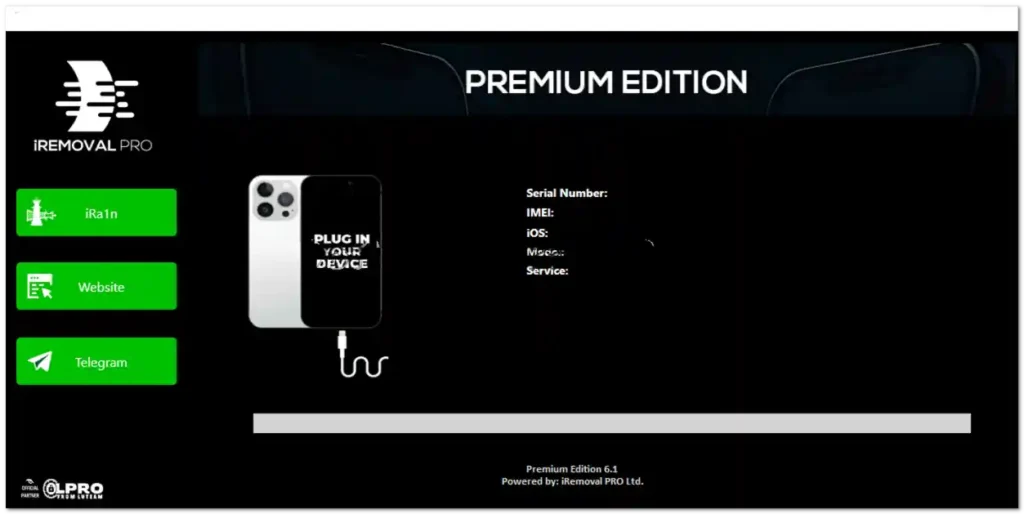
What Is iRemoval Pro?
iRemoval Pro is a professional iOS utility tool designed to bypass the iCloud Activation Lock on Apple devices. This lock, while crucial for device security, can lock users out if they don’t have the original Apple ID credentials. iRemoval Pro helps users regain access to their iPhones and iPads in legitimate recovery or forgotten-password scenarios. The tool is widely trusted in the mobile technician community for its server-side bypass method, which sets it apart from traditional jailbreak or baseband-based approaches.
Key Use Cases:
- Devices stuck at iCloud activation screen
- Forgot Apple ID or password
- Restoring second-hand or auctioned iPhones
Key Features of iRemoval PRO Premium Edition V6.1
- ✅ Signal-Free iCloud Bypass
- ✅ Supports iPhone XS to iPhone 16 Pro Max
- ✅ Compatible with iOS 14.0.1 – 18.7.3 and iOS 26.5.1
- ✅ iCloud Login via Dedicated Proxy Server
- ✅ Secure & Easy to Use
- ✅ Windows OS Support
- ✅ Postpaid Registration Option Available
iRemoval PRO V6.1 – What’s New (Latest Update)
✅ New iOS Support Added
- iOS 14.0.1 to iOS 18.5
- iOS 18.7.3
- iOS 26.5.1
✅ New Features & Fixes
- Added temporary fix for iCloud login
- Users can now log in to iCloud using the dedicated proxy server
- Improved overall compatibility and stability
⚠️ Upcoming Update
- Notification fix will be added in the next update
Version History & Changelog
iRemoval PRO Premium Edition V5.2 – World-First Features
- ✅ iOS Support Expanded: Officially supports 18.6 | 18.62 | 18.7 | 26
- 🔔 All Notifications Work After Bypass – First in the world!
- 💳 Apple Pay Fully Functional after bypass
- 🛍️ App Store Loads Faster – smoother experience
- ☁️ iCloud Login via Proxy – now faster than ever
iRemoval PRO Premium Edition V5.1
- Full iOS Support: iOS 17.0.1 → 18.5
- Beta Support: iOS 18.6 (Beta 1/2/3), iOS 26.0 (Beta 1/2/3)
- Temporary iCloud login fix via proxy server
- Enhanced compatibility and reliability
iRemoval PRO Premium Edition V5.0
- Full Device Support: iPhone XS to iPhone 16 Pro Max
- Chimera Jailbreak Support added
- iCloud Bypass (No Signal) fully supported
- Instant Service introduced – pay and bypass in real time
Download iRemoval PRO Premium Edition (2026)
| Version | Download Link |
|---|---|
| V6.1 (Latest) | Download |
| V5.2 | Download |
| V5.1 | Download |
| V5.0 | Download |
| V4.1 | Download |
| V4.0 | Download |
| V3.3 | Download |
| V3.0 | Download |
| V2.3 | Download |
| V2.2 | Download |
| V2.0 | Download |
Tool Name: iRemoval PRO Premium Edition 6.1 Version: V6.1 File Size: ~48 MB OS Support: Windows XP / Vista / 7 / 8 / 8.1 / 10 / 11 (32-bit & 64-bit)
Installation Tips:
- Extract the downloaded .zip file.
- Run the setup on your Windows PC.
- Connect your iOS device via USB.
- Follow the on-screen instructions to begin the bypass.
Fix for 0xR Error on iRemoval Pro
If you encounter the 0xR Error, follow these steps:
1. Open Command Prompt as Administrator
- Right-click the Start button → Select Command Prompt (Admin) or Windows Terminal (Admin)
2. Disable Integrity Checks
bcdedit.exe -set loadoptions DISABLE_INTEGRITY_CHECKS
3. Enable Test Signing Mode
bcdedit.exe -set TESTSIGNING ON
4. Restart Your PC
5. Download the Latest iRemoval Pro and Run the Bypass
⚠️ This fix is specifically for the 0xR Error. Works best on Windows 10/11.
Why “No Signal” Bypass Matters
Many tools attempt to restore full network capabilities after a bypass, but Apple’s newer server-side protections often block SIM functionality. iRemoval Pro bypasses the lock without relying on a cellular signal, making it ideal for users who primarily need Wi-Fi access and want to use apps, browse the web, or sync content.
Benefits of “No Signal” Bypass:
- No carrier lock required
- Safe and stable bypass
- Suitable for Wi-Fi-only use
Supported Devices
- iPhone XS / XR / XS Max
- iPhone 11 / 11 Pro / 11 Pro Max
- iPhone SE (2nd & 3rd Gen)
- iPhone 12 Mini / 12 / 12 Pro / 12 Pro Max
- iPhone 13 Mini / 13 / 13 Pro / 13 Pro Max
- iPhone 14 / 14 Plus / 14 Pro / 14 Pro Max
- iPhone 15 / 15 Plus / 15 Pro / 15 Pro Max
- iPhone 16 / 16 Plus / 16 Pro / 16 Pro Max
iRemoval PRO Premium Edition – Official Pricing
| Model | Price (USD) |
|---|---|
| iPhone XR / XS / XS MAX | $53 |
| iPhone 11 | $58 |
| iPhone 11 PRO | $63 |
| iPhone 11 PRO MAX | $68 |
| iPhone SE (2nd/3rd) | $58 |
| iPhone 12 Series | $58–$73 |
| iPhone 13 Series | $58–$88 |
| iPhone 14 Series | $88–$98 |
| iPhone 15 Series | $88–$113 |
| iPhone 16 Series | $93–$118 |
🔗 Postpaid registration: iFPDZ Telegram 🌐 Official site: iremovalpro.com
Legal & Ethical Considerations
Using tools like iRemoval Pro comes with responsibility. It is intended for educational and recovery purposes only. You must own the device or have permission to use this software. Illegal unlocking or use on stolen devices may violate laws in your country.
This guide is for informational purposes only. Use responsibly.
Conclusion
If you’re dealing with an iCloud-locked iPhone and need a proven, updated solution, iRemoval Pro Premium Edition V6.1 is your go-to tool in 2026. With support for the latest iPhone models and iOS versions including iOS 18.7.3 and iOS 26.5.1, iCloud login via proxy server, and a breakthrough signal-free bypass, this release continues to set the standard in iOS repair tools.