DM-GSM (Latest Version) Download Free – COM Port Monitor, Device Detection
If you spend your repair shop day chasing disappearing COM ports, unstable USB connections, and driver conflicts across Qualcomm, MediaTek, Unisoc, Samsung, Android, and Apple devices — DM-GSM is a focused portable Windows utility built exactly for that problem. Developed by Amin Ghasemizadeh, the tool’s 30-Second Ghost Hold technology catches short-lived COM ports before they vanish, its Smart GSM Detection system automatically recognizes a dozen different connection modes across all major chipsets, and built-in tools let you clean ghost COM entries, reassign port numbers, kill locked ports, and stop Windows USB sleep interruptions — all from one lightweight single EXE.
This guide covers the complete feature list, full changelog, installation steps, and download link for DM-GSM so you know exactly what it does before adding it to your workshop PC.
What Is DM-GSM?
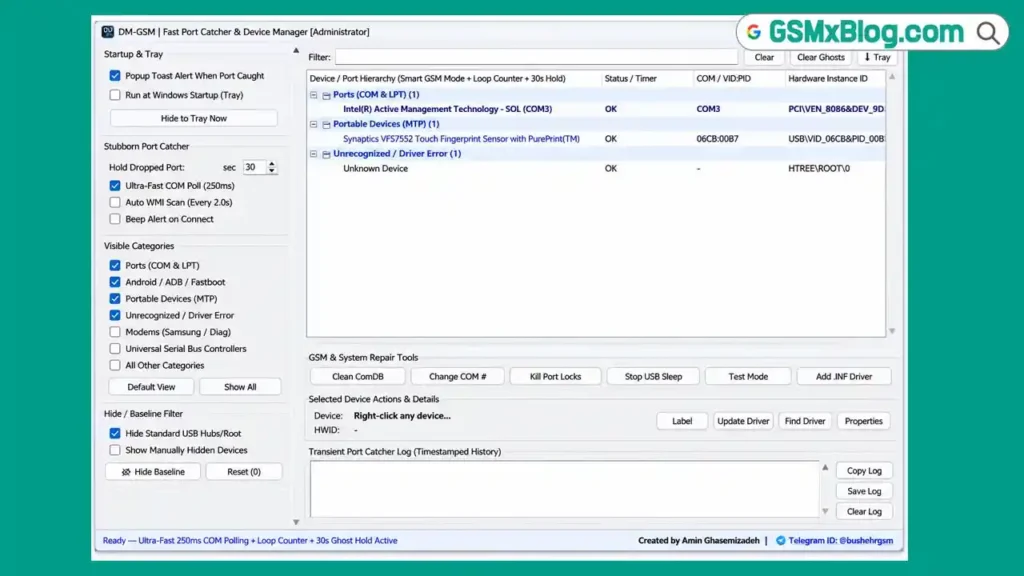
DM-GSM is a free, completely portable Windows utility developed by Amin Ghasemizadeh for mobile repair technicians who deal with device detection, COM port management, and driver issues every single day. Rather than guessing which connection mode a phone is in or watching a COM port vanish before you can note its number, DM-GSM runs in the background monitoring every port in real time, automatically identifying the chipset and mode of any connected device, and giving you direct tools to fix the most common port and driver headaches without opening Device Manager manually.
Being completely portable, there is no installation process — open the single EXE and the tool is immediately active.
Key Features of DM-GSM
👻 30-Second Ghost Hold Technology
Catches short-lived COM ports that disappear within seconds — a common frustration when a device briefly enters BROM, EDL, or a similar transitional mode. The tool displays disconnected ports for a configurable period, giving you time to note the port number before moving to the next step.
🔍 Smart GSM Device Detection
Automatic recognition across all major chipset connection modes:
| Chipset / Brand | Detected Modes |
|---|---|
| Qualcomm | EDL 9008 mode, Diag mode |
| MediaTek | BROM mode, Preloader VCOM mode |
| Unisoc / SPD | Boot mode, Diag mode |
| Samsung | Odin mode, Download mode |
| Android | ADB device mode, Fastboot mode |
| Apple | DFU mode, Recovery mode |
📊 Real-Time Monitoring
- Real-time COM port monitoring — live view of all active ports
- Device hierarchy view — see the full connection structure
- COM and LPT port monitoring
- MTP device monitoring
- Unrecognized device detection — flags devices Windows cannot identify
- Driver error detection — highlights driver-related problems as they occur
🔄 Loop Counter
- Counts repeated disconnect and reconnect events on a port
- Helps identify faulty USB cables
- Helps identify driver-related connection issues
Useful for diagnosing an unstable connection that keeps dropping during a flash or repair operation before you waste time troubleshooting the wrong component.
🧹 Clean ComDB Tool
- Removes ghost COM port entries left behind in the Windows registry
- Frees occupied COM port numbers that are stuck even though no device is connected
🔢 Change COM Number Tool
Quick COM port reassignment — change a device’s assigned COM port number directly without digging through Device Manager’s advanced port settings.
🔓 Kill Port Locks Tool
Terminates processes that are locking a serial port, preventing another application from accessing it. Compatible with:
- ADB-locked ports
- Fastboot-locked ports
- FH Loader locked ports
😴 Stop USB Sleep Tool
Prevents Windows USB power-saving interruptions that can disconnect a device mid-operation — particularly useful during long flashing operations where an unexpected USB sleep event could corrupt a write.
🪟 Windows Test Mode Activation
Supports enabling Windows Test Mode to allow installation of unsigned drivers — a common requirement for older or unofficial GSM repair tool drivers that are not digitally signed.
📄 Add .INF Driver Feature
- Direct INF driver installation
- Driver backup support
- Driver removal support
🏷️ Custom Device Labeling System
- Assign custom names to boxes and dongles
- Label UART cables for easy identification — useful when multiple cables and hardware boxes are connected to the same workshop PC
🔔 Notifications and System Integration
- Popup notification when a port is detected
- Startup with Windows option
- System tray support
- Real-time port notifications
⚡ Ultra-Fast COM Polling Mode
- 250ms port scanning support for near-instant detection of port changes
🗂️ Filter and Category Management
Organize and filter the displayed device and port list by category for a cleaner view when multiple devices are connected.
💻 Portable Single-File Executable
- No installation required
- Lightweight design
- Designed specifically for GSM repair workshops
What’s New in DM-GSM
- 30s Ghost Hold functionality introduced for temporary port detection
- Smart GSM Detection added for multiple phone chipsets and modes
- Loop Counter added for connection stability monitoring
- Clean ComDB utility integrated
- Change COM Number feature added
- Kill Port Locks utility added
- Stop USB Sleep function added
- Test Mode activation option integrated
- Direct INF driver installation support added
- Custom labels added for boxes, UART devices, and dongles
- System tray support and connection notifications added
DM-GSM Download – Latest Version
- Software Name: DM-GSM
- File Name: DM-GSM.exe
- File Size: 14 MB
- Developer: Amin Ghasemizadeh
- Platform: Windows PC
- Supported Chipsets/Brands: Qualcomm, MediaTek, Unisoc, Samsung, Android, Apple
- License: Free
How to Install DM-GSM
No installation wizard is involved — the tool is a single portable executable:
- Download the DM-GSM package from the Google Drive link above.
- Extract the downloaded archive if it is compressed.
- Open the extracted folder.
- Right-click DM-GSM.exe and select Run as Administrator.
- Allow Windows permissions if prompted.
- The software starts immediately.
- DM-GSM is now ready to monitor and manage connected devices.
✅ Tip: Enable Startup with Windows from inside DM-GSM if you want the tool running automatically in the system tray every time your workshop PC boots up — ready to catch port events without manual launching.
How to Use DM-GSM
▶️ Monitor COM Ports in Real Time
- Open DM-GSM as Administrator.
- The main interface shows all active COM and LPT ports along with the device hierarchy.
- Connect any GSM repair device — a box, dongle, or phone — and watch the port appear in real time.
- Use the filter and category management options to narrow the view when multiple devices are connected simultaneously.
▶️ Catch a Short-Lived COM Port with Ghost Hold
- Connect a device that briefly enters a transitional mode (e.g., BROM, EDL) before disappearing.
- DM-GSM’s 30-Second Ghost Hold keeps the port displayed for the configurable hold period even after disconnection.
- Note the port number and any connection details while it remains visible.
▶️ Identify Device Connection Mode Automatically
- Connect any supported device — Qualcomm, MediaTek, Unisoc, Samsung, Android, or Apple.
- DM-GSM’s Smart GSM Detection automatically identifies the specific mode — EDL 9008, Diag, BROM, Preloader VCOM, SPD Boot mode, Odin mode, Download mode, ADB, Fastboot, DFU, or Recovery mode.
- Use this confirmation before selecting the matching mode in your flashing or repair tool.
▶️ Diagnose an Unstable Connection
- If a device keeps disconnecting and reconnecting during a repair operation, check the Loop Counter in DM-GSM.
- A high repeat count on the same port suggests either a faulty USB cable or a driver-related issue — swap the cable first, then check drivers if the problem persists.
▶️ Clean Ghost COM Port Entries
- If Windows shows a COM port as occupied even though no device is connected, open the Clean ComDB tool.
- Run the cleanup — this removes ghost COM port entries from the registry and frees the occupied port number for reuse.
▶️ Change a Device’s COM Port Number
- Open the Change COM Number tool.
- Select the device and assign a new COM port number.
- Confirm the change applies correctly in Device Manager.
▶️ Unlock a Stuck Serial Port
- If a port is locked by a background process and no other application can access it, open Kill Port Locks.
- The tool terminates the process locking the port — works for ADB-locked, Fastboot-locked, and FH Loader-locked ports.
- Reconnect the device and confirm the port is now accessible.
▶️ Prevent USB Sleep During Long Flashes
- Before starting a long firmware flash or dump operation, open the Stop USB Sleep tool.
- Activate it to prevent Windows power-saving settings from putting the USB port to sleep mid-operation.
- This reduces the risk of an interrupted flash caused by an unexpected USB disconnect.
▶️ Install an Unsigned Driver
- If you need to install a driver that is not digitally signed, use the Windows Test Mode Activation option inside DM-GSM.
- Enable Test Mode, then use the Add .INF Driver feature to install the driver directly.
- Use the built-in driver backup option before making changes, and driver removal if needed afterward.
▶️ Label Your Hardware
- Open the Custom Device Labeling system.
- Assign a custom name to each box, dongle, or UART cable connected to your workshop PC.
- This makes it immediately clear which hardware is connected to which port when multiple tools are plugged in at once.
System Requirements
| Component | Requirement |
|---|---|
| Operating System | Windows PC |
| Permissions | Run as Administrator |
| Installation | Not required — portable EXE |
| Connection | USB |
| Supported Devices | Qualcomm, MediaTek, Unisoc, Samsung, Android, Apple |
| Internet | Not required for core operation |
⚠️ Warning
Windows Test Mode allows installation of unsigned drivers — only enable this and install drivers from sources you trust, since unsigned drivers bypass a standard Windows security check. Kill Port Locks terminates background processes — confirm you are not interrupting an active flash or write operation on another port before using this tool. Always identify the correct connection mode using Smart GSM Detection before selecting a matching mode in your flashing tool to avoid mismatched operations.
Important Notes
🛡️ Virus Status: DM-GSM.exe may trigger a Windows SmartScreen warning because it is not widely recognized by Windows security systems. This is a standard false positive for portable GSM workshop utilities. Download only from the official Google Drive link above and allow the prompt manually.
📌 Credit: Full credit goes to Amin Ghasemizadeh for developing and releasing DM-GSM as a free tool for the GSM repair community.
Frequently Asked Questions (FAQs)
❓ Does it require installation?
No. DM-GSM is a portable single-file executable. Run it directly from any folder — no setup wizard is involved.
❓ Which chipsets and brands does it detect?
DM-GSM automatically detects Qualcomm (EDL 9008, Diag), MediaTek (BROM, Preloader VCOM), Unisoc/SPD (Boot mode, Diag), Samsung (Odin, Download mode), Android (ADB, Fastboot), and Apple (DFU, Recovery mode).
❓ What is 30-Second Ghost Hold?
It is a feature that keeps a disconnected COM port displayed in the interface for a configurable period after it disappears — solving the common problem of a port vanishing too quickly to note its number during a BROM or EDL mode transition.
❓ What does the Loop Counter do?
It counts how many times a device repeatedly disconnects and reconnects on the same port — a high count suggests a faulty USB cable or a driver-related issue rather than a problem with the device itself.
❓ Can DM-GSM fix a locked COM port?
Yes. The Kill Port Locks tool terminates background processes holding a serial port open — compatible with ADB-locked, Fastboot-locked, and FH Loader-locked ports.
❓ Can I install unsigned drivers with DM-GSM?
Yes. Use the Windows Test Mode Activation option together with the Add .INF Driver feature to install drivers that are not digitally signed.
Conclusion
DM-GSM solves a frustration that every GSM repair technician has experienced — watching a COM port vanish before you can even read its number, guessing which connection mode a phone just entered, or fighting a locked port that won’t release. Amin Ghasemizadeh’s portable utility handles all of that with 30-Second Ghost Hold, Smart GSM Detection across six chipset families and a dozen connection modes, a Loop Counter for diagnosing cable and driver issues, and direct tools to clean ghost COM entries, reassign ports, kill locks, and stop USB sleep during long operations.
Have you used DM-GSM in your repair shop? Share your experience in the comments below!
Related Posts
- OpenRoot V1 (Latest Version) Download Free
- Download KS Tool V5.0 (Latest Version)
- S-Tool Pro (Latest Version)