Smart Screen Unlocker Recovery v1.0 – ADB Pattern Inject Tool for Broken Android Display
Do you have an Android phone with a completely broken display, dead touch digitizer, or unresponsive screen — and you know your lock pattern but can’t enter it? The Smart Screen Unlocker Recovery v1.0 is a groundbreaking free and open-source forensic utility that solves this exact problem — by injecting raw kernel-level touch gestures via ADB, simulating the physical screen touch without ever needing the actual display to work.
Developed by Ali Sakkaf and published on GitHub and XDA Developers, this Python-based tool uses a 6-engine sequential math matrix system — each engine dynamically calculating the correct screen coordinates for your specific device — making it compatible with any Android device that has USB Debugging already enabled. In this guide you’ll find the full feature breakdown, all 6 engine strategies, supported devices, installation steps, and download link.
What Is Smart Screen Unlocker Recovery?
Smart Screen Unlocker Recovery v1.0 is a free, open-source forensic and accessibility framework written in Python by developer Ali Sakkaf. It is designed for mobile technicians, forensic experts, and everyday users who need to recover access to Android devices with broken screens by simulating touch input through ADB — without ever touching the physical display.
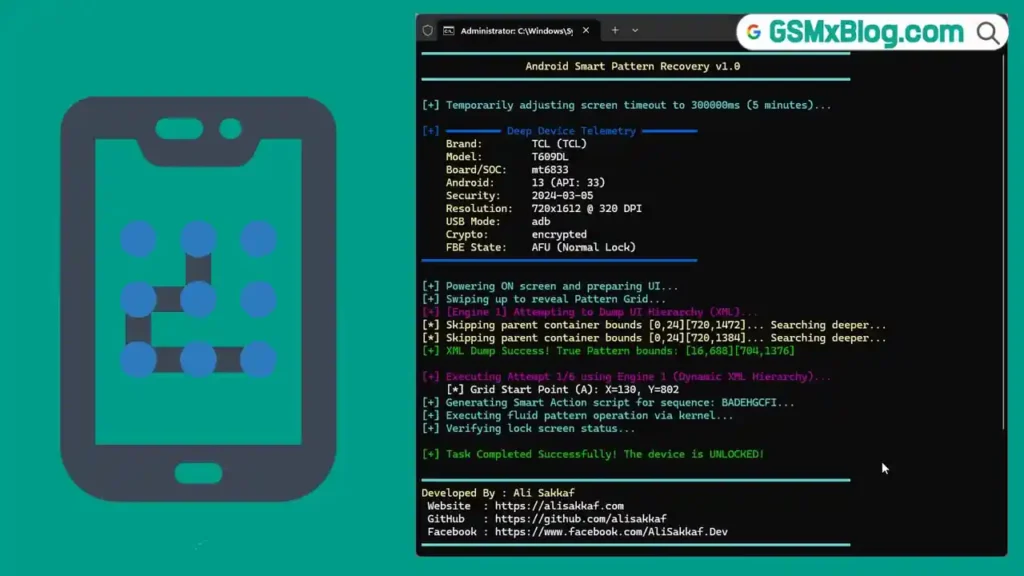
The tool works by spawning a graphical canvas on your PC where you draw the pattern using your mouse. It then translates your drawn pattern into precise kernel-level touch coordinates and injects them into the locked device over ADB — effectively acting as a synthetic hardware digitizer.
🔑 Key advantage: Unlike software tools that operate through Android’s UI framework (easily blocked by modern security patches), Smart Screen Unlocker injects gestures at the raw kernel input level — bypassing OEM-specific UI blockers like Samsung OneUI 8+ transparent security containers.
Key Features of Smart Screen Unlocker Recovery v1.0
📱 Core Recovery Technology
- Raw kernel-level touch gesture injection via authorized ADB interface
- Acts as a synthetic hardware digitizer — simulates physical screen touch
- Interactive visual GUI — draw your pattern on a graphical canvas using your mouse
- Works on devices with completely broken displays or dead touch digitizers
- Compatible with Windows and Linux
🧠 Multi-State Device Awareness
- AFU/BFU State Detection — dynamically detects if device is in After First Unlock (AFU) or Before First Unlock (BFU) state
- Automatically adjusts the vertical matrix geometry based on device state
- Handles Knox and SystemUI desynchronization via Engine 6 cross-over failsafe
🛡️ Smart Security Bypass
- Smart XML Container Bypassing — intelligently ignores fake full-screen transparent containers deployed by modern security patches (Samsung OneUI 8+)
- Locates the true lock screen grid beneath security overlay elements
- Handles Android 13+ shifted notification shade layouts (Engine 4)
⏱️ Auto-Timeout Prevention
- Automatically boosts
screen_off_timeoutto 5 minutes during operation - Prevents screen sleep mid-injection without user intervention
- Seamlessly restores original timeout settings after injection completes
✅ Deep Kernel Verification
- Interrogates Android OS via
dumpsys windowanddumpsys keyguard - Mathematically verifies successful unlock without relying on visual screen feedback
- Works even when the physical screen shows nothing
🔗 Post-Unlock Integration
- Seamless integration with scrcpy for full screen mirroring after unlock
- Supports forensic data recovery workflows after successful pattern injection
- Audio forwarding and peripheral control via scrcpy post-unlock
The 6-Engine Multi-Attack Strategy
Smart Screen Unlocker Recovery’s most powerful feature is its sequential 6-engine cascade — if one engine fails, the tool dynamically adjusts geometry and fires the next engine automatically, maximizing success across diverse Android devices and OEM customizations:
| Engine | Strategy Name | Description | Target Devices |
|---|---|---|---|
| 1 | Dynamic XML Hierarchy | Pulls exact pixel bounds directly from the UI Automator tree | Universal (if not blocked) |
| 2 | Golden Ratio Base Matrix | Uses empirical OEM aspect ratios to calculate a mathematically perfect grid | Samsung & Generic AOSP |
| 3 | DPI Shifted Matrix | Compensates for altered display scaling (Small/Large UI sizes) | Universal |
| 4 | Custom High Matrix | Targets shifted notification shade layouts in Android 13+ environments | Samsung & Custom ROMs |
| 5 | Custom Extreme Matrix | Built from extreme-case hardware telemetry for unique screen resolutions | Tall Aspect Ratios (21:9) |
| 6 | Cross-Over Failsafe | Tests BFU matrices on AFU states (and vice-versa) for Knox/SystemUI desync | Universal |
💡 How it works in practice: If Engine 1 is blocked by Samsung’s UI security layer, Engine 2 fires automatically with a calculated golden-ratio grid. If that also fails, Engine 3 adjusts for DPI scaling — and so on until one engine achieves a confirmed unlock or all 6 engines have been exhausted.
Download Smart Screen Unlocker Recovery v1.0
| File Name | Smart_Screen_Unlocker.exe / main.py |
|---|---|
| Version | v1.0 — “The Genesis Update: 7 Engines of Pure Automation” |
| Release Date | June 6, 2026 |
| Platform | Windows & Linux |
| Language | Python 3.8+ |
| License | MIT (Free & Open Source) |
| Developer | Ali Sakkaf |
| GitHub | github.com/alisakkaf/Smart-Screen-Unlocker-Recovery |
How to Install Smart Screen Unlocker Recovery v1.0
▶️ Method 1 — Standalone Windows EXE (Recommended)
No Python installation required:
- Go to the GitHub Releases page.
- Download
Smart_Screen_Unlocker.exe. - Ensure USB Debugging is already enabled on the target Android device.
- Connect the device via USB and authorize the ADB connection on the device.
- Run
Smart_Screen_Unlocker.exe— no installation needed. - The interactive canvas opens — draw your pattern and let the tool automate the injection. ✅
▶️ Method 2 — Run from Python Source (Windows / Linux)
- Clone the repository:
git clone https://github.com/alisakkaf/Smart-Screen-Unlocker-Recovery.git
cd Smart-Screen-Unlocker-Recovery
- Install dependencies:
pip install -r requirements.txt
- Run the tool:
python main.py
▶️ Method 3 — Compile to EXE (For Developers)
python -c "from PIL import Image; img = Image.open('icon.png'); img.save('icon.ico', format='ICO')" ; pyinstaller --noconfirm --onefile --console --icon="icon.ico" --name="Smart_Screen_Unlocker" --clean main.py
How to Use Smart Screen Unlocker Recovery v1.0
Step 1 — Prepare the Device
- Confirm that USB Debugging is enabled on the target device.
⚠️ If USB Debugging was not already enabled before the screen broke, this tool cannot work — ADB authorization is a mandatory prerequisite.
- Connect the device to your PC via USB cable.
- If an ADB authorization prompt appeared before the screen broke and was accepted — the RSA fingerprint is already stored. If not, the connection will be blocked.
Step 2 — Launch the Tool
- Run
Smart_Screen_Unlocker.exe(orpython main.py). - The tool detects the connected device automatically.
- It reads device state — identifying BFU or AFU mode and adjusting geometry.
Step 3 — Draw Your Pattern
- The interactive visual canvas opens on your PC screen.
- Using your mouse, draw the exact lock screen pattern you used on the device.
- The canvas mirrors the device’s grid layout — draw as if you were touching the actual phone screen.
Step 4 — Injection & Verification
- After drawing, click “Inject” — the tool translates your pattern into raw kernel touch coordinates.
- Engine 1 fires first — if blocked by OEM security layers, Engine 2 automatically takes over.
- The cascade continues through Engines 3–6 as needed.
- The tool queries
dumpsys windowanddumpsys keyguardto mathematically verify if the unlock succeeded — without needing visual confirmation. - On success: “Unlock Verified ✅” appears in the terminal log.
Step 5 — Post-Unlock Data Recovery with Scrcpy
Once unlocked, use scrcpy for full display mirroring and data recovery:
# Standard high-performance mirroring with screen off
scrcpy --always-on-top --turn-screen-off --stay-awake

# Forensic-optimized stream for backup operations
scrcpy --max-fps=30 --video-bit-rate=4M --audio-bit-rate=128k --window-title="Recovered Device Screen"
Supported & Tested Devices
Smart Screen Unlocker dynamically calculates matrices for any Android device — it is theoretically universally compatible. The following have been specifically tested and optimized:
| Brand | Tested Models | UI Environment | Success Rate |
|---|---|---|---|
| Samsung | Galaxy S24 (SM-S921U), Galaxy S23 (SM-S911U) | OneUI 5.0–8.5 | 🟢 100% |
| TCL | T609DL, 30 SE, 40 XL | TCL UI / AOSP 12–13 | 🟢 100% |
| Xiaomi / POCO | Redmi Note 12, POCO X5 | MIUI 14 / HyperOS | 🟢 High |
| Motorola | Moto G Stylus, Edge Series | MyUX / AOSP | 🟢 High |
| Google Pixel | Pixel 6, Pixel 7, Pixel 8 | Pixel UI | 🟢 High |
💡 Universal Compatibility: Since all 6 engines calculate coordinates dynamically from device display parameters, the tool is designed to work on virtually any Android device — not just the tested models above.
System Requirements
| Component | Requirement |
|---|---|
| OS | Windows 10/11 or Linux |
| Python | Python 3.8+ (for source method only) |
| ADB | Built-in (included in the EXE) |
| USB | USB 2.0 or 3.0 |
| Internet | Not required |
| Device Requirement | USB Debugging enabled + ADB authorized |
⚠️ Warning
Smart Screen Unlocker Recovery requires USB Debugging to be pre-enabled and an authorized ADB RSA fingerprint on the target device. It will not work if these conditions are not already met before the screen broke. This tool is intended for lawful data recovery on devices you own or have explicit authorization to service. It is not a brute-force, bypass, or unauthorized access tool. Using it on devices you do not own or have no authorization for may violate computer access laws in your jurisdiction.
Important Notes
🛡️ Virus Status: Smart Screen Unlocker Recovery is 100% open-source — the full Python source code is publicly available on GitHub for inspection. Always download from the official GitHub repository only.
📌 Credit: Full credit goes to developer Ali Sakkaf for creating and publishing this tool as a free, open-source contribution to the mobile repair and forensics community.
🔧 USB Debugging Prerequisite: This is the single most important requirement. If USB Debugging was never enabled, or if ADB was never authorized on the PC being used, the tool cannot connect to the device regardless of which engine is used.
📱 Pattern Only: The current v1.0 release is optimized for pattern unlock injection. PIN and password input through this method may have different compatibility results.
Why Use Smart Screen Unlocker Recovery v1.0?
- ✅ 100% free and open-source — MIT license, full code on GitHub
- ✅ Works on completely broken displays — no screen interaction needed
- ✅ 6-engine sequential cascade — automatically tries multiple strategies
- ✅ BFU/AFU state awareness — adjusts for device encryption state
- ✅ Smart XML container bypass — defeats Samsung OneUI 8+ security overlays
- ✅ Deep kernel verification — confirms success without visual feedback
- ✅ Auto-timeout prevention — no screen sleep during injection
- ✅ Windows & Linux support
- ✅ scrcpy integration — seamless post-unlock data recovery workflow
- ✅ No credits, no subscription, no activation required
Frequently Asked Questions (FAQs)
❓ Does Smart Screen Unlocker work without USB Debugging enabled? No — USB Debugging must have been already enabled on the device before the screen broke. Without it, ADB cannot connect to the device at all.
❓ Can it crack or brute-force the pattern? No — this is explicitly not a brute-force tool. You must already know the correct pattern. The tool simply injects that known pattern as a hardware-level touch gesture when you physically cannot touch the broken screen.
❓ What is the difference between BFU and AFU states? BFU (Before First Unlock) means the device has rebooted and the user hasn’t unlocked it yet — encryption keys are not yet in memory. AFU (After First Unlock) means the device has been unlocked at least once since the last reboot. Smart Screen Unlocker automatically detects and adjusts for both states.
❓ Why does Engine 1 fail on Samsung devices? Samsung OneUI 8+ deploys fake full-screen transparent security containers over the lock screen grid that block standard UI Automator coordinate detection. Engine 2 (Golden Ratio Base Matrix) is specifically designed to bypass this by calculating coordinates mathematically instead of reading them from the UI tree.
❓ Does it support PIN or password locks? The v1.0 release is optimized primarily for pattern unlock. PIN and password injection may have variable results depending on device and Android version.
❓ What is scrcpy and why is it recommended post-unlock? scrcpy is a free screen mirroring tool. Once Smart Screen Unlocker successfully unlocks the device, scrcpy gives you full visual control over the device from your PC — letting you back up data, navigate the UI, and perform recovery operations even with the physical screen still broken.
❓ Is the source code publicly available? Yes — the complete Python source code is available at github.com/alisakkaf/Smart-Screen-Unlocker-Recovery under the MIT license.
❓ Does it work on any Android version? The tool has been tested on Android 12–15 (OneUI 5.0–8.5, MIUI 14, HyperOS, AOSP, Pixel UI). Dynamic matrix calculation makes it theoretically compatible with most Android versions that support ADB.
Conclusion
Smart Screen Unlocker Recovery v1.0 is a genuinely innovative and technically impressive open-source tool for the mobile repair community. Its 6-engine sequential matrix cascade, kernel-level ADB touch injection, BFU/AFU state awareness, Samsung OneUI security container bypass, and deep kernel verification put it in a class of its own for broken display data recovery scenarios.
For technicians who regularly encounter shattered or unresponsive touchscreen devices — where the customer knows their pattern but simply can’t interact with the display — this tool offers a clean, free, and technically sound solution that avoids the cost of screen replacement purely for data access. Download it now from the official GitHub repository and add this powerful forensic utility to your repair toolkit! 🚀
Have you used Smart Screen Unlocker Recovery? Share your experience and results in the comments below!