Download Typhon Tool (Latest Version) Free 2026 – Professional Xiaomi Service Tool
Looking for the most advanced Xiaomi repair and servicing tool in 2026? The Typhon Tool is a professional Windows-based mobile service software developed specifically for Xiaomi, Redmi, and POCO devices — covering Qualcomm EDL flashing, MediaTek V6 & V5 flashing, BROM/Preloader bypass, Fastboot to EDL conversion, FRP removal, EFS wipe, and much more.
Trusted by thousands of technicians and service centers worldwide, Typhon Tool has earned its reputation as one of the most reliable multi-chipset Xiaomi service solutions available today. With support for the latest Snapdragon 8 Elite and Dimensity 9400 chipsets and a growing global network of certified partners, it is built for professional repair shops handling high volumes of Xiaomi devices daily. In this guide you’ll find the complete feature list, supported chipsets, installation steps, activation guide, and download links.
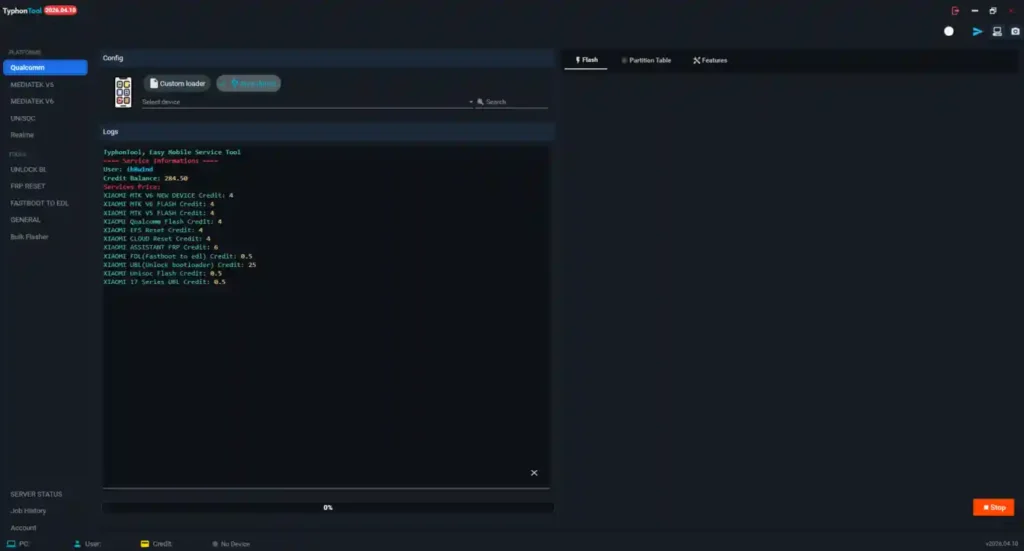
What Is Typhon Tool?
Typhon Tool (also known as Typhon Auth Tool) is a professional Windows-based Xiaomi service software developed by the Typhon Team. It is purpose-built for Qualcomm and MediaTek-powered Xiaomi devices and provides deep-level repair capabilities including EDL and BROM-mode flashing, FRP bypass, EFS management, and Fastboot operations — all from one clean, modern interface.
The tool uses a secure license authentication system and is available through an official global network of certified resellers — making it a professionally supported, regularly updated service platform rather than a one-off release.
Key Features of Typhon Tool
⚡ Qualcomm EDL Flash
- Flash firmware directly to Qualcomm Xiaomi devices in EDL mode
- Support for the latest Snapdragon device models including Snapdragon 8 Elite
- Custom Qualcomm loader support — use your own loader files
- Auto detect loaders from connected device
- Fastboot to EDL conversion — quickly switch devices from Fastboot to EDL mode
- Wipe EFS partition securely for clean-slate repair
- EFS backup and restore before and after repair
- Mi Cloud reset for Xiaomi account removal
- FRP reset on supported Qualcomm models
- Erase userdata partition
- Firmware dump support
- Partition backup and erase
- Read full device information
🔧 MediaTek V6 & V5 Flash
- MediaTek V6 Flash — comprehensive support for latest MTK chipsets
- MediaTek V5 Flash — backward compatible with older MTK devices
- BROM/Preloader Bypass — bypass MTK V5 BROM/Preloader for advanced system access
- Custom DA, Auth, and Cert file support
- Format All + Download mode
- Firmware flashing via scatter/XML
- Erase FRP and userdata
- Security backup and restore
- ENG Preloader flashing
- Partition manager tools
- Firmware dump support
🔓 FRP & Security
- Reset FRP (Factory Reset Protection) — remove Google account lock
- Standalone FRP Tool — lightweight separate app for quick FRP jobs
- Works on latest Android security patch levels
- Supports multiple FRP removal methods
⚙️ ADB & Fastboot Features
- Read full device information
- Reboot to System, Recovery, or Bootloader
- Reboot to EDL mode directly from ADB
- Xiaomi Diagnostic mode activation
- Flash selected partitions via Fastboot
- Erase EFS and NV data
📡 Unisoc Features
- Firmware flashing for Unisoc-powered Xiaomi/Redmi devices
- FRP reset and factory reset
- Bootloader unlock support
- Partition operations and Fastboot support
📦 Bulk Flashing
- Flash multiple devices simultaneously
- Automated reboot support
- Start All / Stop All control
- Skip EFS option for safe batch flashing
- Loader and firmware configuration per device
- Ideal for high-volume repair shop environments
🛠️ Extra Utilities
- Automatic device detection on USB connection
- Job history logs — track all repair operations
- Server status monitoring panel
- Built-in download manager
- IMEI premium checker
- Multi-language support (English, Turkish, Russian, Spanish, Portuguese, Chinese, Arabic, Hindi, Azerbaijani)
- Regular updates via official server
Download Typhon Tool (Latest Version)
- File Name: TyphoneTool.rar
- Version: Latest 2026
- File Size: 70 MB
- Platform: Windows (64-bit)
- Password: softwarecrackguru
OneDrive Google Drive MEGA ProtonDrive
Standalone FRP Tool — Free Download
Typhon Tool also offers a free standalone FRP removal application — a lightweight, separate tool for quick Google FRP bypass jobs without needing the full Typhon Tool suite installed.
| File | TyphonFRP.exe |
|---|---|
| Type | Standalone FRP Tool |
| Price | Free |
| Download | Official Link |
✅ Ideal for: Technicians who only need FRP bypass functionality without the full repair suite.
How to Install Typhon Tool
Step 1 — Open the Archive
- Download the
TyphoneTool.rarfile. - Open using WinRAR or 7-Zip.
- Enter password: softwarecrackguru
⚠️ If Windows Defender blocks the file, temporarily disable antivirus before extraction.
Step 2 — Install the Tool
- Open
TyphoneTool.exefrom the extracted folder. - Enter the extraction password when prompted.
- Click “Next” through the setup wizard.
- Enter the setup password when prompted.
- Complete the installation and click “Finish.”
Step 3 — Activate the Tool
- Open the Typhon Tool registration window.
- Click “Get Free Activation Key.”
- Copy your HWID (Hardware ID).
- Open the activation page in your browser.
- Paste your HWID and click “Generate Key Now.”
- Copy the generated activation token.
- Paste the token into the tool registration box.
- Click “Register License” ✅
How to Use Typhon Tool
▶️ Flash Firmware (Qualcomm EDL Mode)
- Open Typhon Tool and log in.
- Go to the Qualcomm tab.
- Load your custom Qualcomm loader file (recommended over server loader for best results).
- Connect device in EDL Mode (9008 port).
- Load your firmware XML file.
- Click “Flash” and wait for completion.
- Device reboots automatically. ✅
▶️ Flash Firmware (MediaTek V6 Mode)
- Go to the MediaTek tab.
- Select V6 mode.
- Load your custom DA file (custom DA files give better results than server DA).
- Load your scatter/XML firmware.
- Connect device in BROM Mode (Power OFF + plug USB).
- Click “Flash” and wait for completion. ✅
▶️ Fastboot to EDL Conversion
- Connect device in Fastboot Mode.
- Go to the Fastboot tab.
- Click “Fastboot to EDL.”
- Device will switch to EDL mode (9008) automatically.
- Proceed with EDL operations. ✅
▶️ Wipe EFS (Qualcomm)
- Connect device in EDL Mode.
- Go to Qualcomm tab.
- Click “Wipe EFS.”
- Confirm the action.
⚠️ Always back up EFS before wiping! Use “EFS Backup” first — a wiped EFS without backup can permanently destroy IMEI and network functionality.
▶️ Reset FRP
- Connect device in the appropriate mode.
- Navigate to the FRP tab.
- Select your device model.
- Click “Reset FRP” and wait for completion.
- Reboot — FRP removed! ✅
Supported Chipsets
🔴 Qualcomm Snapdragon
| Chipset | Series |
|---|---|
| Snapdragon 8 Elite | Latest 2025–2026 Flagship |
| Snapdragon 8 Gen 3 | 2024 Flagship |
| Snapdragon 8 Gen 2 | 2023 Flagship |
| Snapdragon 888 / 888+ | 2021 Flagship |
| Snapdragon 870 / 865 / 855 | 2019–2021 |
| Snapdragon 778G / 765G / 750G | Upper Mid-Range |
| Snapdragon 695 / 680 / 665 / 660 | Mid-Range |
| Snapdragon 480 / 460 / 450 | Entry-Level |
🔵 MediaTek Dimensity & Helio
| Chipset | Series |
|---|---|
| Dimensity 9400 / 9300 / 9200 | Flagship 2024–2026 |
| Dimensity 8300 / 8200 / 8100 | Upper Mid-Range |
| Dimensity 7200 / 7050 / 7020 | Mid-Range |
| Helio G99 / G96 / G95 | Gaming Mid-Range |
| Helio G90T / G88 / G85 | Mid-Range Gaming |
| Helio P65 / P60 / P35 | Entry Mid-Range |
| MT6755 / MT6750 / MT6753 | Older Devices |
🟢 Unisoc
| Chipset | Series |
|---|---|
| T606 / T610 / T612 / T616 | Unisoc Tiger |
| SC9863A | Unisoc SC |
Supported Xiaomi Device Series
| Series | Coverage |
|---|---|
| Xiaomi 17 Series | 17, 17 Pro, 17 Pro Max, 17 Ultra |
| Xiaomi 15 Series | 15, 15 Pro, 15 Ultra |
| Xiaomi 14 Series | 14, 14 Pro, 14 Ultra, CIVI 4, MIX Flip |
| Xiaomi 13 Series | 13, 13 Pro, 13 Ultra, Mix Fold 3 |
| Xiaomi 12 Series | 12, 12 Pro, 12S Pro |
| Redmi K Series | K50, K60, K70, K80, K90 (all variants) |
| Redmi Note Series | Note 12, 13, 14, 15 (all variants) |
| POCO Series | F4, F5, F6, F7, F8, M6, M7 (all variants) |
| Xiaomi Pad Series | Pad 7, Pad 8, Pad 8 Pro |
| Xiaomi MIX Series | MIX Fold 3, 4 / MIX Flip, Flip |
System Requirements
| Component | Requirement |
|---|---|
| OS | Windows 10 / 11 (64-bit) |
| Processor | Intel / AMD Quad-Core recommended |
| RAM | 4 GB minimum (8 GB recommended) |
| Storage | 500 MB free space |
| USB Port | USB 2.0 or 3.0 (direct motherboard port) |
| Internet | Required for login and activation |
⚠️ Warning
Before any EDL or BROM operation, always back up EFS and important data first. EDL and BROM-level operations work at the deepest device storage level — errors can cause permanent data loss or device damage. Always use the correct loader and DA files for your specific device. Incorrect files may brick the device. Typhon Tool should only be used by experienced Xiaomi repair technicians on a dedicated repair PC.
Important Notes
🛡️ Virus Status: This tool was scanned before uploading. Antivirus false positives are common with EDL/BROM repair tools — temporarily disable antivirus during extraction. Use on a dedicated repair PC.
📌 Credit: Full credit goes to the Typhon Tool Team at typhontool.com for developing and maintaining this professional Xiaomi service solution.
🔌 USB Drivers: Install Qualcomm QDLoader 9008 Driver for EDL mode and MTK USB Driver for BROM mode before connecting any device..
💡 Custom Files: Always use your own custom Qualcomm loader and MTK DA files for best results — better than relying on server-loaded files in the current version.
Typhon Tool vs Other Xiaomi Repair Tools
| Feature | Typhon Tool | Generic Multi-Brand Tools |
|---|---|---|
| Xiaomi-Specific Optimization | ✅ Yes | ❌ No |
| Qualcomm EDL Flash | ✅ Yes | ⚠️ Varies |
| MediaTek V6 Flash | ✅ Yes | ⚠️ Varies |
| BROM/Preloader Bypass | ✅ Yes | ⚠️ Sometimes |
| Fastboot to EDL | ✅ Yes | ❌ Rarely |
| Standalone FRP Tool | ✅ Free | ❌ Usually No |
| Bulk Flashing | ✅ Yes | ⚠️ Sometimes |
| Official Support & Updates | ✅ Yes | ⚠️ Varies |
| Global Reseller Network | ✅ Yes | ❌ Usually No |
| Multi-Language Interface | ✅ 9 Languages | ⚠️ Limited |
Why Use Typhon Tool?
- ✅ Purpose-built for Xiaomi — every feature optimized for Xiaomi/Redmi/POCO
- ✅ Covers Qualcomm EDL + MediaTek V6/V5 + Unisoc in one tool
- ✅ Fastboot to EDL conversion — unique time-saving feature
- ✅ Free Standalone FRP Tool available separately
- ✅ Bulk flashing for high-volume repair shops
- ✅ Supports latest Snapdragon 8 Elite & Dimensity 9400 chipsets
- ✅ Regular updates through official server
- ✅ 9-language interface — accessible worldwide
- ✅ Official Telegram support community
- ✅ Global certified reseller network
Frequently Asked Questions (FAQs)
❓ Is Typhon Tool specifically for Xiaomi devices? Yes — Typhon Tool is primarily engineered and optimized for Xiaomi, Redmi, and POCO devices across Qualcomm and MediaTek chipsets, though it also supports some other brands on the same chipsets.
❓ What is the difference between Typhon Tool and the Standalone FRP Tool? The full Typhon Tool covers all repair functions — EDL flash, BROM flash, EFS wipe, FRP, ADB, Fastboot, and bulk operations. The Standalone FRP Tool (TyphonFRP.exe) is a free, lightweight app designed only for quick FRP removal jobs.
❓ Does it support MediaTek V6 devices? Yes — Typhon Tool includes full MediaTek V6 Flash support covering the latest Dimensity chipsets, as well as V5 support for older MTK devices.
❓ What is the Fastboot to EDL feature? The Fastboot to EDL function converts a device from Fastboot mode directly into EDL (Emergency Download) mode — saving time by avoiding manual hardware test point methods for supported devices.
❓ Why do some server operations show errors? Server-based loader and DA file delivery can be inconsistent. Using your own custom Qualcomm loader and custom MTK DA files significantly improves success rates and is recommended for production repair environments.
❓ Where can I find official support? Join the official Typhon Tool Telegram group at t.me/typhonauthtool for support, updates, and community assistance.
❓ Where can I buy an official Typhon Tool license? Visit typhontool.com/resellers to find a certified reseller in your region.
Conclusion
Typhon Tool stands out in 2026 as one of the most professionally developed and Xiaomi-focused service tools available to mobile repair technicians. With its comprehensive coverage of Qualcomm EDL, MediaTek V6/V5, BROM bypass, Fastboot to EDL, FRP removal, EFS management, and bulk flashing — combined with a growing global reseller network, 9-language support, and a free standalone FRP tool — it delivers genuine professional value for Xiaomi-focused repair shops.
While server-dependent operations perform best with custom loader and DA files in the current version, the overall feature depth, regular update cadence, and official community support make Typhon Tool one of the most complete Xiaomi service platforms available today. Download it now from the official site or mirrors above and experience professional-grade Xiaomi repair! 🚀
Have you tested Typhon Tool? Share your experience in the comments below!